Nora Meals
iOS Universel / Cuisine et boissons
Fewer decisions.
Food you'll actually eat.
A record that doesn't judge you.
Nora is a quiet meal planner for real weeks. Build a small library of meals you eat. Then log one in under 20 seconds.
HOW IT WORKS
Add the meals you already repeat. Avocado toast. Chicken and rice. Cereal for dinner. Pizza delivery. Whatever belongs in your week.
Each meal lives in your inventory. Breakfast, lunch, dinner, and snack each get their own place. When you eat, tap the meal, choose the slot, and log it.
Your day updates right away. The Month view fills with green, yellow, and gray dots. Green means the day was steady. Yellow means it was incomplete. Gray means no data.
The dot is not a score. A day with pizza can still be green. Nora only shows whether the day had enough shape to be useful later.
WHY IT FEELS DIFFERENT
Most food apps ask you to search, estimate, and enter details you do not want to think about. Nora starts from your own library instead.
Save the foods you actually eat once. Log them again in seconds. No giant database. No daily target. No red warnings. No moral labels.
You can have a quiet week, a weird week, or a takeout-heavy week. The calendar still records what happened. It does not turn it into a grade.
YOUR MEAL LIBRARY
Your inventory is small on purpose. Nora works better with ten meals you trust than with one hundred ideas you never cook.
Add meals manually when you know what they are. Choose a usual slot, a soft nutrition label, and an effort label. Notes and sensory tags are optional.
Use Create with AI when you do not want to fill out a card. Type something like "oatmeal with banana and peanut butter." Nora turns it into a meal card you can review, edit, and save. You can add a generated photo, retry it, or skip the photo.
TODAY
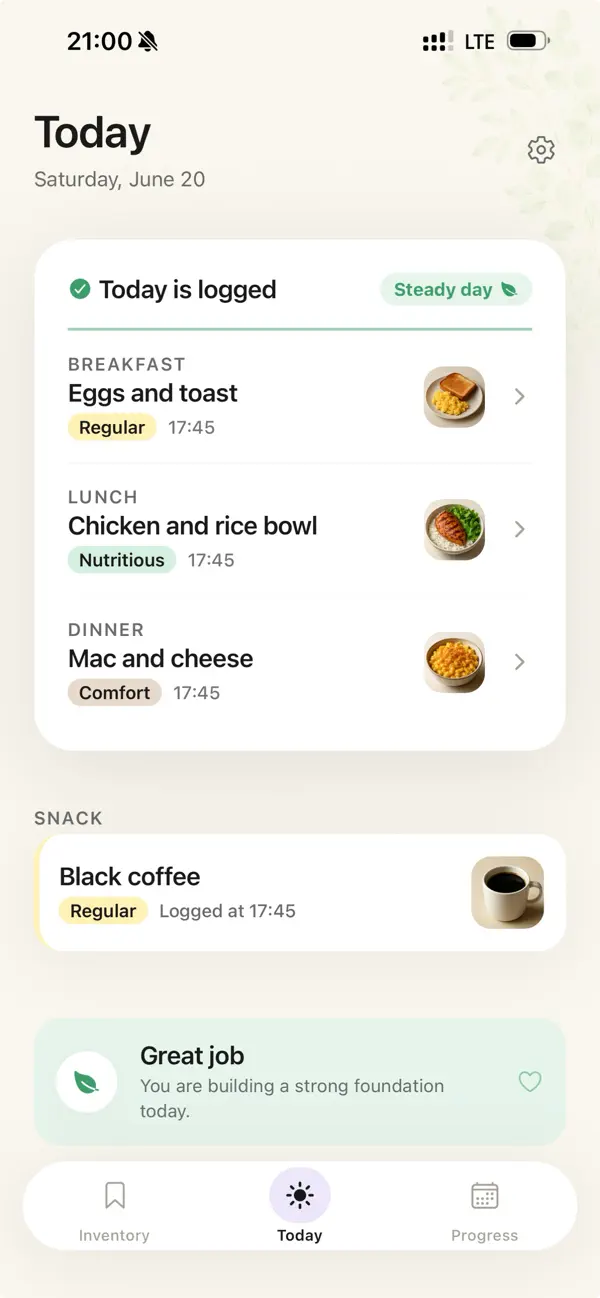
Open Nora on the Today tab. See what is already logged. Fill the next slot from your inventory.
If deciding is the hard part, tap Pick one for me. Nora suggests from the meals you already saved. It does not invent a strict plan for the day.
Breakfast, lunch, and dinner shape the day status. Snack is optional. Skipping a meal is allowed too, because gaps happen.
MONTH
The Month view shows your pattern over time. Tap any day to see what you logged. Use the weekly recap to see which meals carried the week.
The point is not to make every day match. The point is to notice the shape of your real life.
WHO IT'S FOR
Nora is for nights when you do not want to think about dinner again.
It is for people who order delivery because choosing feels harder than eating. It is for anyone who has a few meals that work, but forgets them at the exact moment they need them.
It is also for people who are tired of food apps that feel like homework. Nora keeps the useful part. A quick record. A visible pattern. A small list to come back to.
WHAT NORA IS NOT
Nora is not a recipe app. It does not hand you a new menu every week.
Nora is not a coach. It does not tell you what you should have eaten.
Nora is not a food score app. It does not turn dinner into a number.
No ads. No in-app purchases. No paid tier. Nora is free.
PRIVACY AND ACCOUNTS
You can use Nora without an account. Your library and logs stay on your device.
Sign in only if you want cloud sync or Create with AI. If you start as a guest, Nora can bring your local meals and logs into your account later.
Reminders are local and optional. Turn on breakfast, lunch, or dinner reminders only if they help.
ABOUT AI
Create with AI uses generative AI only when you ask it to make a meal card. Type a short description and Nora turns it into an editable card. You can add a generated photo, retry it, or skip the photo. AI is not used for logging, calendar dots, weekly recap, or Pick one for me. You review and edit the result before saving. See our privacy policy for which services process your data.
Quoi de neuf dans la dernière version ?
Your logged meals now show their photo, so the day looks like your day.
Finish a day and you'll get a calm green check and a little encouragement.
The inventory has clearer sections, and there's small polish throughout.
We're now Nora Meals. Same app, easier to find.