Air Sketch Wireless Whiteboard
iPad / Economie et entreprise
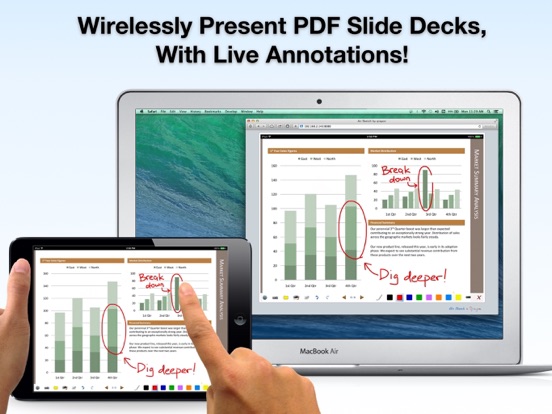
Turn your iPad into a wireless whiteboard! Annotate PDF slides and images live in 3 easy steps:
STEP 1: Launch Air Sketch.
STEP 2: Enter the indicated URL in the web browser.
STEP 3: Everything your present and write is projected to the browser, in real-time.
LIVE ANNOTATIONS
Project PDF documents (such as exported PowerPoint or Keynote decks) and photos to a computer on the same local network, then annotate them in real time, all from your iPad.
NO SUBSCRIPTIONS, PLUG-INS, OR DONGLES NEEDED
Just fire up Air Sketch on the iPad and open the specified URL from any HTML-5 compatible browser on the local network. Your images and drawings show up natively in the browser. There's no additional client software to install, or services to subscribe to.
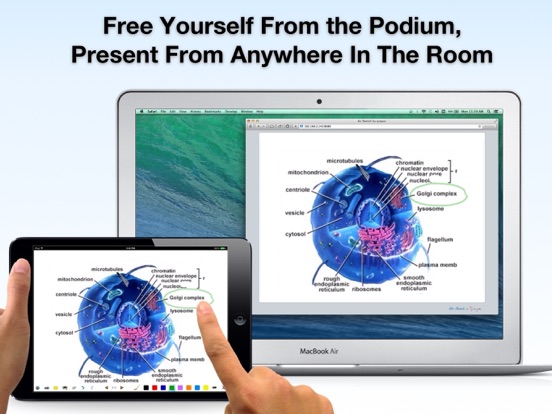
FREE YOURSELF FROM THE PODIUM
Connect your laptop to a projector to present and draw from your iPad as you walk around the room. Pass your iPad around to allow others to contribute.
Incorporate the iPad into your desktop-based workflow: Record videos of your live Air Sketch drawings, or share them live with remote colleagues via any online meeting or desktop sharing software running on the computer (such as iChat or WebEx).
Air Sketch is great for presentations in the boardroom, classroom, or on the go.
FEATURES:
+ Fast and fluid sketching on the iPad using your finger or 3rd party stylus.
+ Real-time sketching to your browser: Strokes show up as you draw, network speeds permitting.
+ Open PDF documents from Mail or other Apps in Air Sketch to wirelessly annotate and project them (note: The iOS "open in..." menu is scrollable). Email the full annotated versions afterwards.
+ Set the background image from any picture in your photo library.
+ 5 drawing tools: Pencil, pen, marker, brush, and highligher.
+ A fully customizable color palette (tap on the selected color to edit it).
+ Fluidly zoom and pan using 2 fingers to edit your sketches in minute detail.
+ Instantly save and restore snapshots of your sketches using the camera tool.
+ Email your sketches and annotated slides as PDF or images.
+ Multi-level undo and redo.
WORKS ON STANDARD WEB BROWSERS
Air Sketch supports any HTML5-capable browser, including the newest versions of Safari, Firefox, Chrome, and even another iPad, iPhone, or iPod Touch!
Note: Air Sketch is designed to work optimally with landscape documents and with a single computer connected to the same local network as your iPad.
No public WiFi? No problem. You can even use Air Sketch peer-to-peer with a computer via an ad-hoc network when a WiFi hotspot is unavailable (see our blog for the quick how-to).
IPHONE and IPOD TOUCH USERS
Want to present PDFs and pictures from your iPhone? Check out our sister Apps, Air Projector and Air Scanner, now available in the App Store!
WE BUILD APPS FOR PEOPLE WHO CHANGE THE WORLD
We have designed and built a whole suite of Apps that help you create and communicate. Check them out on our website.
If you like Air Sketch, you will also want to grab a copy of Vittle, which turns your iPad into a Recordable Whiteboard. Check out our developer page for the link.
Also, be sure to follow us at twitter.com/qrayon to get the latest news, and updates.
Keep on creating!
-- The Air Sketch team at Qrayon.
Quoi de neuf dans la dernière version ?
+ Updated for the latest OS and devices