All Counter
iOS Universel / Economie et entreprise
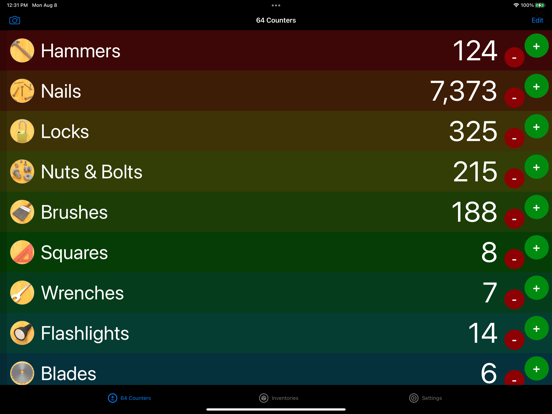
All Counter is a utility for counting items. Counters are organized in inventories and can be imported and exported as CSV files.
Counters can be added to and subtracted from in a list of activate counters, or from a full-screen view of a single counter.
Remotely count using other iOS devices, AirTurn remotes or a web server.
Counters can be customized with images, colors, sounds and haptics. Use the speech system to speak the count when it changes. Optionally allow counters to subtract values or reach negative values.
Create any number of inventories. Each inventory can be assigned an image, or a color. Automatically assign colors to all counters in an inventory. Choose which colors to use and whether to alternate colors or fade colors.
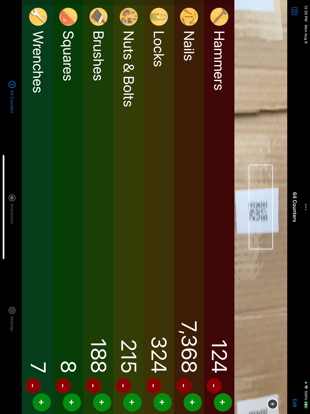
Use the camera to scan a variety of barcode types to add to counter values. Supported barcode types include UPC-E, Code 39, Code 39 mod 43, EAN-13, EAN-8, Code 93, Code 128, PDF417, QR, Aztec, Interleaved 2 of 5, ITF14, and DataMatrix codes.
Create barcodes to use for counting with custom content. Supported barcode creation types include Code 128, PDF417, Aztec and QR.
AirTurn remote support: Use AirTurn remotes to add and subtract from counters. Assign counter controls to AirTurn remote ports to navigate and count. Create any number of AirTurn presets for easy recall of different layouts.
iOS Remote: Use the iOS Remote feature to synchronize all data across multiple devices. Any counting on one device will happen on all devices.
Web Server: Host a webpage on a local network to count remotely. Any device that can present a webpage can count items. The counter list is allows all activate counters to be used, or the single counter mode allows one counters to be used at a time.
Accelerometer Counting: Use the motion sensors to detect a shake in the device to trigger a count. While counting items, simply shake the device toward the subject for an intuitive method of counting.
Apple Watch Support: Add and subtract for the counters using the Apple Watch.
Built-in Help: View step-by-step instructions from within the app to see how to accomplish various tasks.
Quoi de neuf dans la dernière version ?
All Counter is a utility for counting items. Counters are organized in inventories and can be imported and exported as CSV files.
Counters can be added to and subtract from in the list of activate counters, or from a full-screen view of a single counter.
Remotely count using other devices, AirTurn remotes or a web server.
Counters can be customized with images, colors, sounds and haptics. Use the speech system to speak the count when it changes. Optionally allow counters to subtract values or reach negative values.
Create any number of inventories. Each inventory can be assigned an image, or a color. Automatically assign colors to all counters in an inventory. Choose which colors to use and whether to alternate colors or fade colors.
Use the camera to scan a variety of barcode types to add to counter values. Supported barcode types include UPC-E, Code 39, Code 39 mod 43, EAN-13, EAN-8, Code 93, Code 128, PDF417, QR, Aztec, Interleaved 2 of 5, ITF14, and DataMatrix codes.
Create barcodes to use for counting with custom content. Supported barcode creation types include Code 128, PDF417, Aztec and QR.
AirTurn remote support: Use AirTurn remotes to add and subtract from counters. Assign counter controls to AirTurn remote ports to navigate and count. Create any number of AirTurn presets for easy recall of different layouts.
iOS Remote: Use the iOS Remote feature to synchronize all data across multiple devices. Any counting on one device will happen on all devices.
Web Server: Host a webpage on a local network to count remotely. Any device that can present a webpage can count items. The counter list is allows all activate counters to be used, or the single counter mode allows one counters to be used at a time.
Accelerometer Counting: Use the motion sensors to detect a shake in the device to trigger a count. While counting items, simply shake the device toward the subject for an intuitive method of counting.
Built-in Help: View step-by-step instructions from within the app to see how to accomplish various tasks.