• KultureGeek
  • Comparateur de prix
       
iPhoneAddict
 iAddictv5Notre Application iPhone/iPad
  • Accueil Apps
  • Actualité Apple
  • Keynote Apple
  • Firmwares & iTunes
  • Contactez-nous
Accueil » Liste des Apps » Apps Universelles » Economie et entreprise » CTC CQC
L'application n'est plus disponible sur l'App Store français
2.2 iOS €6,99€ Crowhurst Technical Consulting 0 0 This App gives you : - A Full Screen Browser on an iPhone or iPad, so that you CQC screen displays full screen. - Split Screen on iPad - SSL Support - A Today Widget that enable the sending of text triggers to CQC. - The ability to change the...
CTC CQC

CTC CQC

iOS Universel / Economie et entreprise

6,99€
Acheter sur l'App Store

This App gives you :

- A Full Screen Browser on an iPhone or iPad, so that you CQC screen displays full screen.
- Split Screen on iPad
- SSL Support
- A Today Widget that enable the sending of text triggers to CQC.
- The ability to change the Application Icon.
- Sync Settings between devices.

There are options to :
- Select the Application Icon
- Select the Widget Button Icons
- Enter the Widget Button Labels
- Enter the Widget Button send text
- Turn on iCloud Sync
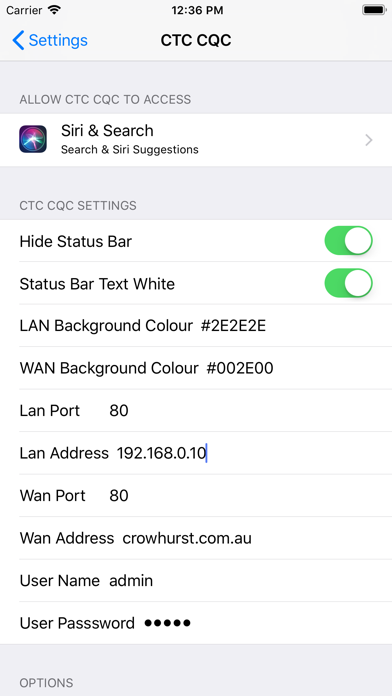
- Enter a LAN IP address and Port Number of CQC Controller
- Enter a WAN IP address and Port Number
- Enter a User Name and Password
- Hide the Status Bar
- Change the bar text colour to light/dark
- Change the background colour
- Enable orientation page change
- when enabled a different screen for landscape and portrait is displayed (via using different user logins)
- Use Portrait as Default
- when on (and Enable orientation is off) the portrait user is used instead of landscape
- disabled screen bounce

There are also CQC specific options:

- Enable No Cache - Disables template caching
- Set the Target Port - It controls what port the Javascript uses to make the Websocket connection to the CQC web server.
- Set Session Name. - If you add this, any WebRIVA specific logging done by the web server will include this session name
- Enable No Pixel Scale - This will set the view scaling so that it undoes any default scaling done by the device.

En voir plus...

Quoi de neuf dans la dernière version ?

Added "Use Portrait as Default" - if enable orientation is off, then when on Portrait user is used to log in, when off Landscape user is used

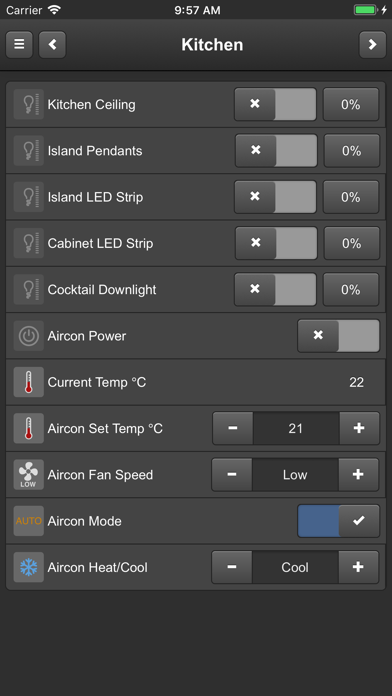
  • Screenshot #1 pour CTC CQC
  • Screenshot #2 pour CTC CQC
  • Screenshot #3 pour CTC CQC
  • Screenshot #4 pour CTC CQC
  • Screenshot #5 pour CTC CQC
  • Screenshot #6 pour CTC CQC

D'autres applications du développeur

CTC Wiser
CTC Wiser
/ iOS Universel
Portal
Portal
/ iOS Universel
Getter
Getter
/ iOS Universel
CTC SpaceLogic
CTC SpaceLogic
/ iOS Universel

Note

(0 note)

Détails sur l'application

Version
2.2
Taille
15.7 Mo
Version minimum d'iOS
12.0
Dernière mise à jour
05/02/2021
Publié par
Crowhurst Technical Consulting

Newsletter App Store

Recevez chaque jour les meilleures promos

Actualité Apple

Image Lisa Jackson, responsable de l’environnement chez Apple, prend sa retraite
Lisa Jackson, responsable de l’environnement chez Apple, prend sa retraite
Image App Store : Apple teste un format où publicités et résultats de recherche se confondent
App Store : Apple teste un format où publicités et résultats de recherche se confondent
Image Apple dévoile les photos de son nouvel Apple Store à Montréal
Apple dévoile les photos de son nouvel Apple Store à Montréal
Image Super Bowl 2026 : Apple Music dévoile la bande-annonce avec Bad Bunny
Super Bowl 2026 : Apple Music dévoile la bande-annonce avec Bad Bunny
Partenaires : Actualité iPhone - Culture Geek
©2009-2026 i2CMedia | A propos |