Relativity ETT
iOS Universel / Economie et entreprise
Relativity: Executive Time Tracking
Relativity is an executive time tracking app built around a simple, powerful framework: every hour you work falls into one of three categories, Strategic, Administrative, or Tactical. By tracking where your time goes, you gain clarity on whether you're leading with vision or drowning in execution.
Core Concept
All work is classified into three categories:
• Strategic (green) — Long-term planning and vision work
• Administrative (blue) — Operations and management work
• Tactical (red) — Day-to-day execution tasks
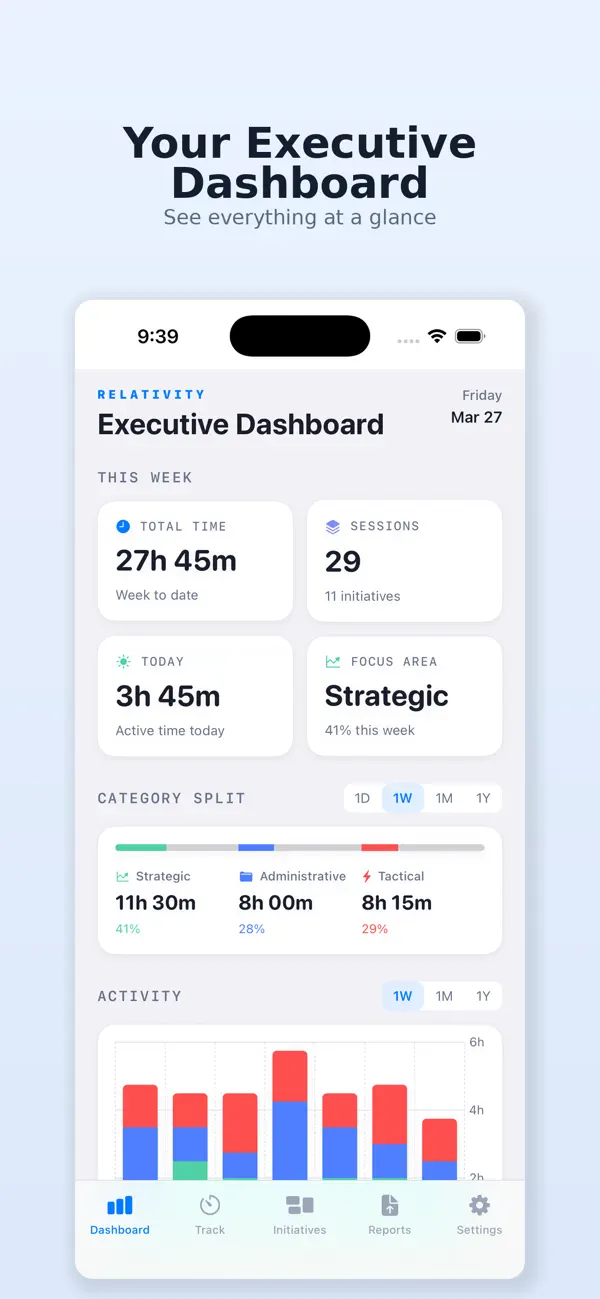
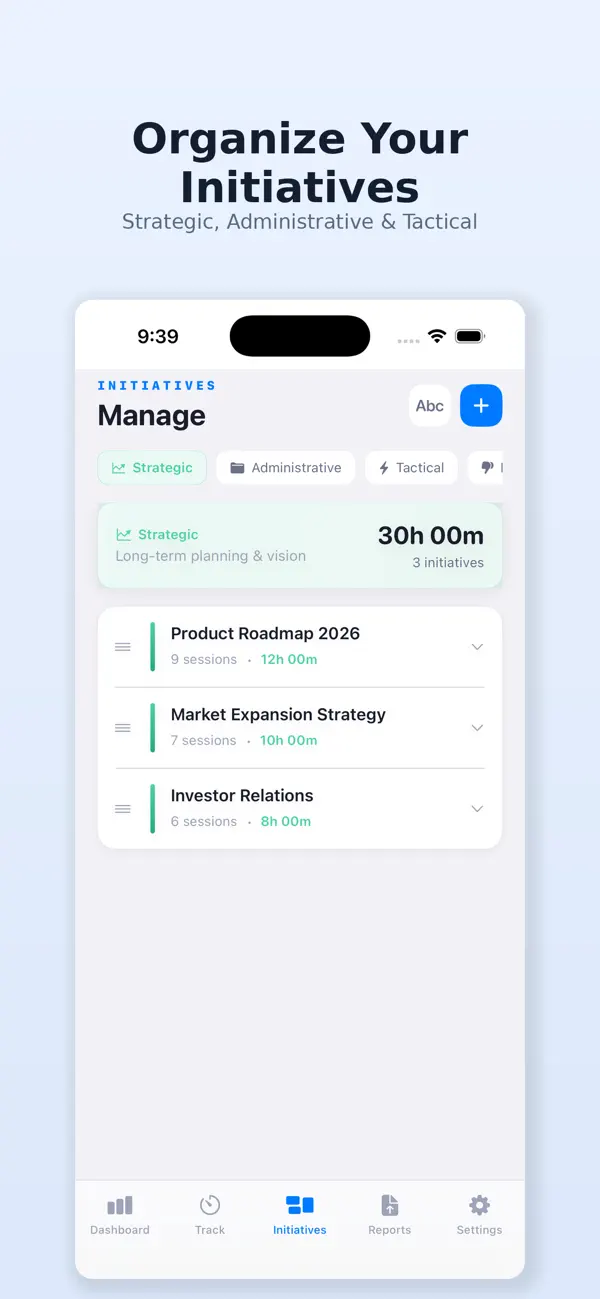
Users create Initiatives (projects/workstreams) under each category, then track time against them. The app provides dashboards, charts, and reports showing how time splits across these categories — helping executives evaluate whether their time allocation aligns with their role.
Features:
Time Tracking
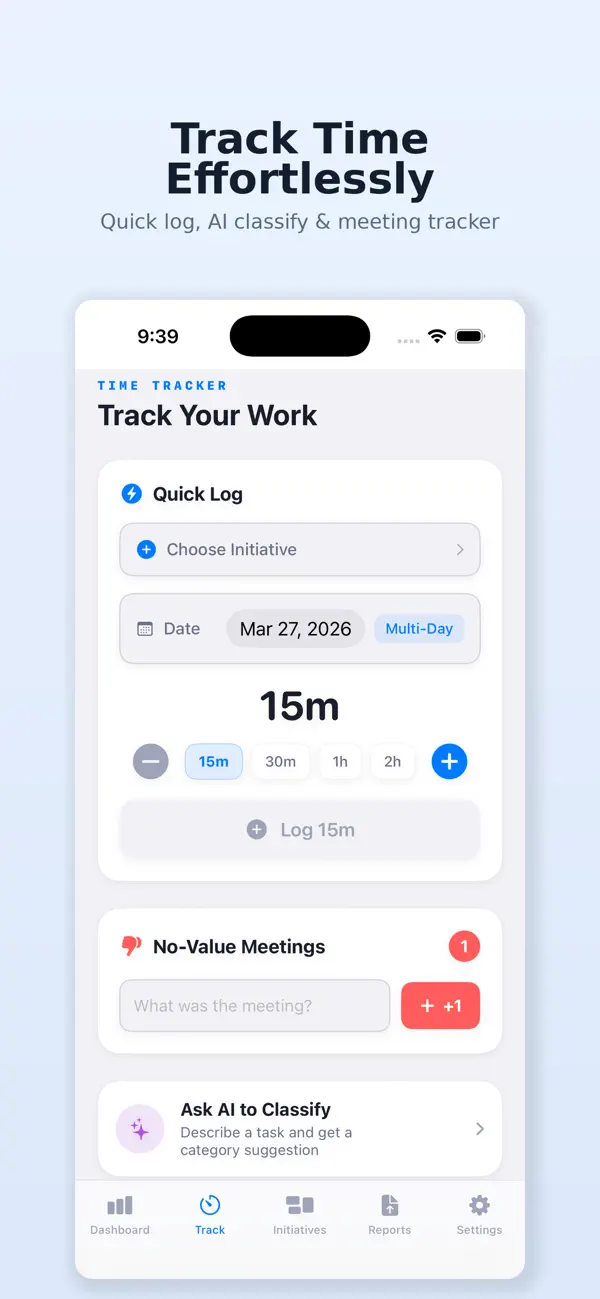
• Quick Log — One-tap time logging with preset duration chips (15m, 30m, 1h, 2h), date picker, and optional multi-day bulk entry
• Live Timer — Start/stop stopwatch-style timer against any initiative (can be toggled off in settings)
• Manual Entry — Custom start/end time entry for past sessions
• Micro Tracking — Optional setting that switches to 5-minute granularity (5m, 15m, 30m, 1h chips)
Initiatives Management
• Create, edit, archive, and reorder initiatives within each category
• Drag-to-reorder and alphabetical sort
• Per-initiative time totals and session history
No-Value Meeting Tally
• A dedicated tally counter for tracking unproductive meetings
• Add notes per tally entry
• Separate tab in Initiatives view with stats and daily/weekly/monthly charts
Executive Dashboard
• Week-to-date KPI cards (total time, sessions, today's time, dominant focus area)
• Category split bar with percentage breakdown
• Stacked bar charts with 1D/1W/1M/1Y time range pickers
• No-value meeting trend chart
• Top initiatives ranking with progress bars
Reports
• Date-range-filtered reporting (Today, This Week, This Month, This Quarter, This Year, All Time, Custom)
• Category breakdown with percentages
• Per-initiative detail with session counts and time totals
• PDF Export — Multi-page PDF report with metrics and tables
• CSV Export — Full session data with summary section for spreadsheet analysis
AI Work Classification (Apple Intelligence, on-device)
• Uses Apple's FoundationModels framework for on-device AI
• "Ask AI to Classify" tool — describe a task and get a Strategic/Administrative/Tactical classification with reasoning
• Inline AI suggestions when creating new initiatives (auto-suggests category after typing)
• Completely hidden on unsupported devices; no API keys or cloud calls required
• Toggleable on/off in Settings
iCloud Sync
• Document-based iCloud sync across devices.
Widget
• Home screen widget (small and medium sizes) showing weekly time breakdown by category
• Shared App Group data for live updates
Appearance & Personalization
• System / Light / Dark mode selection
• Configurable week start day (Sunday or Monday)
• User name for personalized PDF reports
Settings
• Profile name
• Category definitions reference sheet
• Feature toggles (Live Timer, Week Start, Micro Tracking, AI Classification)
• iCloud Sync toggle
• Data export (CSV/PDF)
• Delete all data with confirmation
Whether you're a CEO auditing your weekly schedule, a VP/Director shifting from tactical firefighting to strategic planning, or a founder trying to work on the business instead of in it — Relativity gives you the data to make that shift intentional.
Your time is your most valuable asset. Start treating it that way.
Quoi de neuf dans la dernière version ?
Bug fixes.
Updated icon.