SitePro®
iOS Universel / Economie et entreprise
The all-new SitePro® Mobile App (V2) redefines what operators, engineers, and managers can do from their mobile devices.
Built from the ground up, it delivers faster performance, global navigation, richer insights, and a modern adaptive experience that lets users view and act on data across all sites, not just one at a time.
Global Navigation
The new app eliminates constant back-stepping between pages. Users can now view data across all sites, multiple selected sites, or a single site by switching seamlessly between views without losing context.
Navigation dynamically adapts depending on where you start:
•From the Sites tab, view alerts or cameras for all locations at once, then filter down as needed.
•From a single site’s detail page, jump to cameras or alerts for that site, or expand your selection to compare other locations.
Sites Tab (Home Screen)
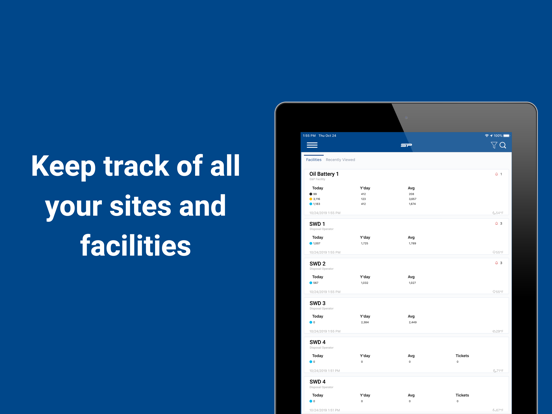
The Sites tab serves as your command center for high-level visibility and quick insights.
•Dynamic Summary Cards: Each site displays unique real-time data tailored to its site type, updating automatically every 60 seconds.
•Watch List: Instantly review summary stats across all sites you manage.
•Multi-Select Search: Search across multiple companies and sites using the search bar.
•Unified Access: View sites across all organizations tied to your account. No more switching logins!
•Filter & Sort Tools: Sort sites alphabetically, by alert count, or by activity. Quickly switch all sites to a specific card type for fast vertical scanning.
•Pinning: Keep key sites at the top of your list.
•At-a-Glance Data: Alarm counts, communication status, and live weather appear right on each card.
Detail View
The Detail View is cleaner, faster, and far more informative.
•Infinite Scroll & Frozen Headers: Seamlessly navigate large equipment lists while always seeing context.
•Dynamic Mini Cards: Get quick data summaries per equipment type without extra clicks.
•Visual Cues: Active alarms highlight red and show alarm messages directly in each equipment section.
•Quick Navigation: Tap the equipment list at the top to jump instantly to that section.
•Pulldown Refresh: Sync a single site for new equipment or settings - no more full-system syncs necessary.
•Navigation Tools: Tap the coordinates icon in the top right to open directions, copy coordinates, or share the site location.
•RC Mode: Start live data streaming, view or modify settings, and issue control commands.
•Expanded Settings: Adjust sensor scaling, actuator triggers, and more.
•Transaction History: Review ticket data, compare entered vs metered values, and open camera activity for that ticket timeframe with one tap.
Cameras Tab
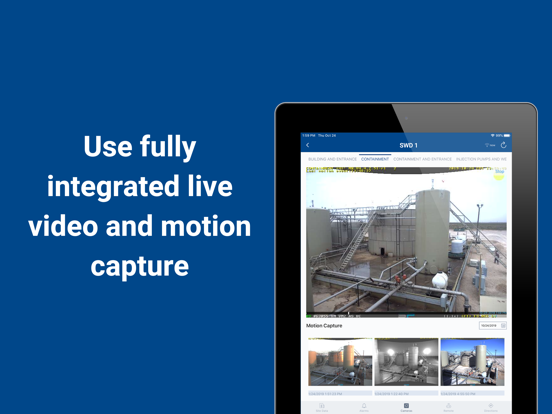
Cameras are now integrated into every workflow for complete visual context.
•Adaptive UX: View all cameras, a single site’s cameras, or any filtered subset across multiple sites.
•Live & Motion Capture Views: Switch instantly between real-time and recorded footage.
•Grid or Full-Screen Modes: Choose how you want to view, plus landscape or portrait orientation for live and motion capture playback.
•Freeze/Unfreeze Playback: Lock or scroll the motion capture playback as you browse.
Alerts Tab
Alerts are clearer, faster, and more flexible than ever.
•Dynamic View: Just like Sites and Cameras, see all alerts, one site’s alerts, or a filtered subset.
•Smart Filters: Narrow by site, equipment, or alarm type.
•Searchable Alerts: Find events by keyword or message text.
•Camera Integration: View linked footage around an alert window.
•Summaries by Type: Get quick insight into alarm frequency and severity.
•Resolve & Silence: Take action right from your device without jumping screens.
Tools & Customization
Personalize the app to match your work style.
•Equipment & Card Ordering: Reorder the summary carousel and equipment list by preference.
•Display Settings: Adjust decimal precision for more accurate readings.
Quoi de neuf dans la dernière version ?
Enhanced the pump Live Data section to show all attached sensor values
Users can now remotely resolve sensor alarms that require manual resolution
The equipment log graphs properly scale their Y-axis to show negative values
Fixed an incorrect calculation on the storage summary card and the abbreviated summary card in the site’s storage detail section
Adjusted the pump-tank connection settings menu experience to clarify how feeding tanks and receiving tanks appear in the app and how they impact different pump settings
Fixed the sensor alarm form validation to enable the editing of sensor alarm values when a sensor does not have a defined min/max span
Replaced the site connectivity and alarm count symbols for sites in an inactive running status
Sites with blank summary cards can now be properly accessed
Fixed an issue causing the flowmeter total volume values to display different numbers while in Remote Control mode vs when outside of Remote Control mode