iPhoneAddict Apps
  • Actualités
  • Accueil Apps
  • iPhone
  • iPad
  • Universelles
  • Mac
  • Apple TV
KG KultureGeek
App
iPhone / iPad Télécharger iAddict v5 Mac Télécharger iAddict Mac
  • Actualités
  • Accueil Apps
  • iPhone
  • iPad
  • Universelles
  • Mac
  • Apple TV
  • Archives keynotes
  • Firmwares & iTunes
  • Contactez-nous
  • Comparateur de prix
  • KultureGeek
Accueil » Liste des Apps » Apps Universelles » Education » Pattern Blocks+ by mathies
1.0.3 iOS €Gratuit OAME 0 0 The Pattern Blocks+ Tool is a virtual manipulative similar to the physical ones commonly available in classrooms. Fifteen different shapes can be dragged into the workspace from the scrollable selection panel at the left. Once in the workspace they...
Pattern Blocks+ by mathies

Pattern Blocks+ by mathies

iOS Universel / Education

Gratuit
Obtenir sur l'App Store
Facebook X E-mail

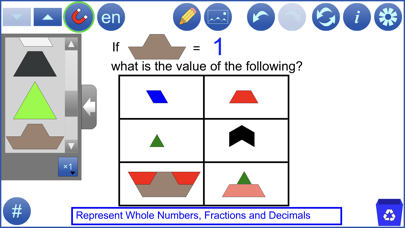
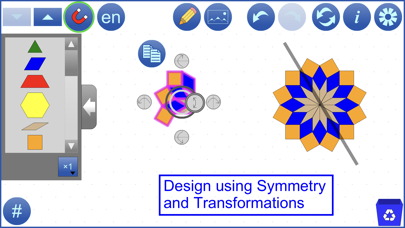
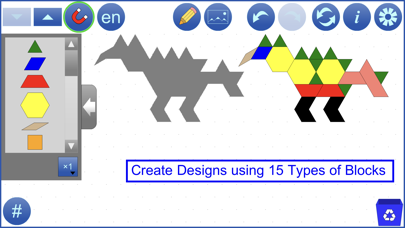
The Pattern Blocks+ Tool is a virtual manipulative similar to the physical ones commonly available in classrooms. Fifteen different shapes can be dragged into the workspace from the scrollable selection panel at the left. Once in the workspace they can be moved, copied, reflected, or rotated, individually or in groups. Blocks to represent tenths are included. The colour of each type of block can be changed. Blocks can be used to create designs and develop numerous mathematical concepts.
See support.mathies.ca for more information and examples.

Mathematical Concepts:

Develop and apply an understanding of mathematical concepts by:
●Creating a set of blocks with various attributes
●Counting the number of elements in a set of blocks
●Skip counting by 2s, 5s and 10s
●Creating, identifying and extending patterns
●Representing fractions based on a) the area relationship between blocks or b) the number of elements in a set of blocks
●Representing decimals
●Comparing angles
●Identifying symmetry
●Calculating area and perimeter of composite shapes
●Translating and tessellating blocks

Features:

●Use the multiplier button to set the number of blocks (1, 2, 5, 10) to drag to the workspace
●Change the size of blocks
●Change the colour of each type of block
●Blocks snap to each other unless snapping is turned off using the magnet button
●Select a block or set of blocks by drawing a marquee around them
●Copy, rotate or reflect individual blocks or sets of selected blocks
●Use the Count button (#) to check to see how many of each type of block is in the workspace
●Adjust the transparency of blocks and background isometric grid
●Use the template settings to create outline puzzles
●Step through a history of your work with the undo/redo buttons
●Communicate your thinking or highlight various features of your representation using the built-in annotation tool
●Insert background images
●Save your work to files on your device
●Open files stored on your device or from the web, including several example files
●Opened files contain all the tool and image steps performed; use Undo and Redo to review these steps
●Opened files contain the final annotation step which is not affected by Undo and Redo
●Use the iOS Files app to access mathies files

En voir plus...

Quoi de neuf dans la dernière version ?

- added three new rhombus shapes
- improved undo/redo of image steps
- bug fixes
  • Screenshot #1 pour Pattern Blocks+ by mathies
  • Screenshot #2 pour Pattern Blocks+ by mathies
  • Screenshot #3 pour Pattern Blocks+ by mathies
  • Screenshot #4 pour Pattern Blocks+ by mathies
  • Screenshot #5 pour Pattern Blocks+ by mathies
  • Screenshot #6 pour Pattern Blocks+ by mathies

D'autres applications du développeur

Rekenrek by mathiesRekenrek by mathiesiOS UniverselRelational Rods+ by mathiesRelational Rods+ by mathiesiOS UniverselNotepad by mathiesNotepad by mathiesiOS UniverselMoney by mathiesMoney by mathiesiOS UniverselColour Tiles by mathiesColour Tiles by mathiesiOS UniverselSet Tool by mathiesSet Tool by mathiesiOS UniverselVoir toutes les apps

Note

(0 note)

Détails sur l'application

Version
1.0.3
Taille
45.8 Mo
Version minimum d'iOS
8.0
Dernière mise à jour
05/04/2019
Publié par
OAME

Newsletter App Store

Recevez chaque jour les meilleures promos

Actualité Apple

Image Apple limite les signalements de failles face au déluge de l’IA
Apple limite les signalements de failles face au déluge de l’IA
Image iPad Air 2027 : écran OLED, puce M5 et possible nouveau design
iPad Air 2027 : écran OLED, puce M5 et possible nouveau design
Image iPhone : Apple a capté 49 % des revenus de smartphones au 2e trimestre, un record
iPhone : Apple a capté 49 % des revenus de smartphones au 2e trimestre, un record
Image L’iPhone Air 2 aurait une Dynamic Island plus petite et d’autres nouveautés
L’iPhone Air 2 aurait une Dynamic Island plus petite et d’autres nouveautés
iPhoneAddict Apps

Le catalogue iPhoneAddict pour suivre les nouveautés, mises à jour et baisses de prix de l’App Store.

Apps

Toutes les apps iOS iPhone iPad Universelles Mac Apple TV

iPhoneAddict

Actualité Apple Archives keynotes Contact À propos KultureGeek

Suivez-nous

©2009-2026 i2CMedia. Tous droits réservés.