iPhoneAddict Apps
  • Actualités
  • Accueil Apps
  • iPhone
  • iPad
  • Universelles
  • Mac
  • Apple TV
KG KultureGeek
App
iPhone / iPad Télécharger iAddict v5 Mac Télécharger iAddict Mac
  • Actualités
  • Accueil Apps
  • iPhone
  • iPad
  • Universelles
  • Mac
  • Apple TV
  • Archives keynotes
  • Firmwares & iTunes
  • Contactez-nous
  • Comparateur de prix
  • KultureGeek
Accueil » Liste des Apps » Apps Universelles » Education » Brainstem and SEZ anatomy
1.1 iOS €Gratuit Satoshi Kiyofuji 0 0 Usability is pretty intuitive: you can drag or pinch your iPhone/iPad screen to mobilize or magnify the model. Traditional textbooks or anatomy books only described two-dimensional sections of the brainstem, and realistic three-dimensional...
Brainstem and SEZ anatomy

Brainstem and SEZ anatomy

iOS Universel / Education

Gratuit
Obtenir sur l'App Store
Facebook X E-mail

Usability is pretty intuitive: you can drag or pinch your iPhone/iPad screen to mobilize or magnify the model.

Traditional textbooks or anatomy books only described two-dimensional sections of the brainstem, and realistic three-dimensional understanding relied on your imagination. By using 3DCG originally invented by Dr. Yukinari Kakzawa, MD, PhD (department of Neurosurgery, Suwa red cross hospital), this App makes understanding complex 3D relationships of neurostructures easier.

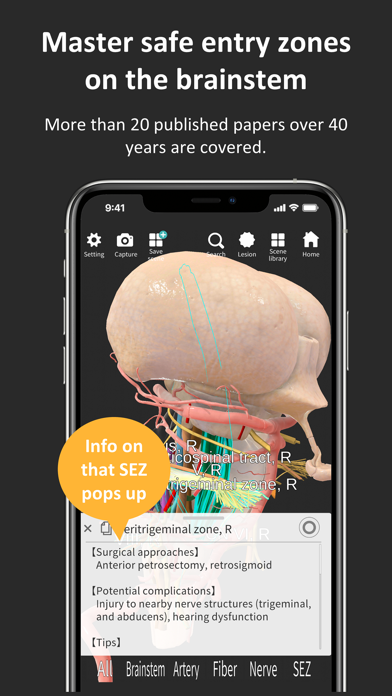
You can study inner structures of the brainstem by tapping the screen: The outline becomes transparent, and you can observe inner nerve fibers or nuclei.

When you tap a safe entry zone (demonstrated in red cylinders), related structures are highlighted, and major surgical approaches, potential complications, and small notes are provided. More than twenty papers or textbooks were consulted to obtain information regarding the safe entry zones to the brainstem, and 26 safe entry zones (16 species) are demonstrated on this App.

For presurgical imaginary simulation, you can put imaginary lesion demonstrated in a purple sphere or ellipse on the brainstem on lesion mode. The size can be adjusted as you refer to the scale on the screen.

The scenes you created can be saved into the App’s library, which can be instantly replayed by tapping Scenes button. Those scenes can also be saved to your local device by tapping Capture button.

En voir plus...

Quoi de neuf dans la dernière version ?

Maximized language function and corrected misprints.

  • Screenshot #1 pour Brainstem and SEZ anatomy
  • Screenshot #2 pour Brainstem and SEZ anatomy
  • Screenshot #3 pour Brainstem and SEZ anatomy
  • Screenshot #4 pour Brainstem and SEZ anatomy
  • Screenshot #5 pour Brainstem and SEZ anatomy
  • Screenshot #6 pour Brainstem and SEZ anatomy

Note

(0 note)

Détails sur l'application

Version
1.1
Taille
320.3 Mo
Version minimum d'iOS
10.0
Dernière mise à jour
11/10/2020
Publié par
Satoshi Kiyofuji

Newsletter App Store

Recevez chaque jour les meilleures promos

Actualité Apple

Image Seul l’iPhone 18 Pro Max aurait l’ouverture variable
Seul l’iPhone 18 Pro Max aurait l’ouverture variable
Image Apple contre-attaque sèchement contre le DoJ dans la procédure antitrust sur l’iPhone
Apple contre-attaque sèchement contre le DoJ dans la procédure antitrust sur l’iPhone
Image Castlevania: Grimoire of Souls va (encore) disparaître d’Apple Arcade le 3 septembre
Castlevania: Grimoire of Souls va (encore) disparaître d’Apple Arcade le 3 septembre
Image Apple vs Epic Games : l’éditeur de Fortnite refuse toute médiation
Apple vs Epic Games : l’éditeur de Fortnite refuse toute médiation
iPhoneAddict Apps

Le catalogue iPhoneAddict pour suivre les nouveautés, mises à jour et baisses de prix de l’App Store.

Apps

Toutes les apps iOS iPhone iPad Universelles Mac Apple TV

iPhoneAddict

Actualité Apple Archives keynotes Contact À propos KultureGeek

Suivez-nous

©2009-2026 i2CMedia. Tous droits réservés.