Fibonacci Clock+
iOS Universel / Education
Fibonacci Clock+ — Feature Highlights
Core Clock
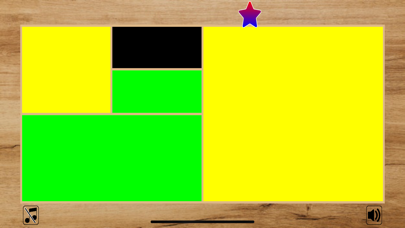
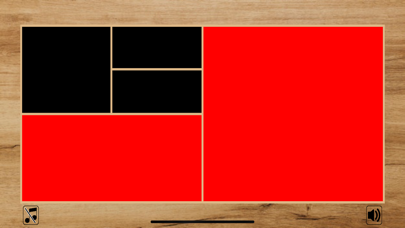
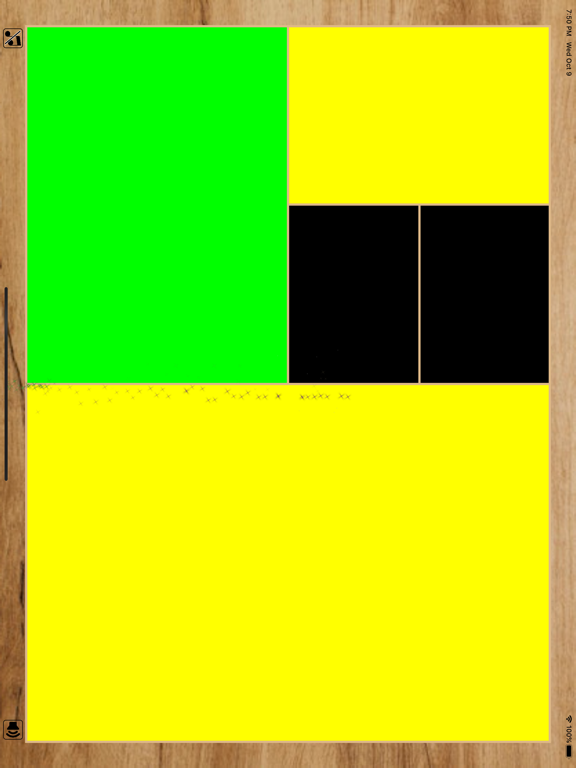
• Full-screen Fibonacci clock: 5 tiles (1, 1, 2, 3, 5) that light up in different colors to show the current time
• Reads hours from red + yellow tiles, minutes (in 5-min steps) from green + yellow tiles
• Auto-updating live, second-by-second
Digital Time Companion
• Toggleable digital time pill in the top nav
• Tap to switch between 12-hour (AM/PM) and 24-hour (military) formats
• Preference remembered across launches
5 Watch Themes (persisted)
• Classic — walnut wooden frame, painted tiles
• Military — tactical olive
• Doctor — clean clinical white
• Navy — deep maritime blue
• Digital — glowing neon retro
Calculation Panel
• Slide-out left panel shows the math: e.g. "12h = 2 red + 8 yellow", "25 min = (3 green + 2 yellow) × 5"
• Learn how Fibonacci addition builds every time
Interactive Physics Playground
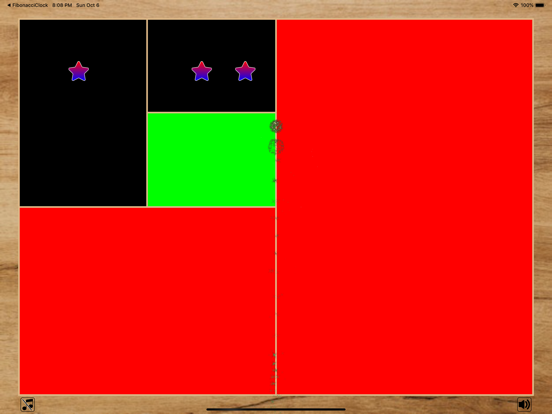
• Extra minutes (0–4 leftover) appear as floating icons
• Star mode: zero-gravity — drift freely
• Football mode: real gravity + bounce
• Drag and fling icons with momentum
• Icon-to-icon collisions with visual ring + haptic feedback
Music & Sound
• Built-in ambient "Quiet Morning" loop
• Pick songs from your iPhone Music Library via MusicKit
• Compact transport pill: shuffle · previous · play/pause · next · loop
• All persists — loop and shuffle preferences remembered
• Optional hourly chime
Interactive Info Sheet
• Mini-clock demo with sliders — set any hour & minute to see how the tiles decompose
• "Now" button snaps the demo back to real time
Polish
• Landscape-locked, immersive full-viewport layout
• Idle timer disabled so the clock never dims
• Smooth theme transitions and spring animations
• Reserved safe zones so controls, digital time and banner never overlap the clock
Version 3.0.0
Fibonacci Clock+: To get the time you need some math.
The view of the clock is made up of five squares whose side lengths match the first five Fibonacci numbers: 1, 1, 2, 3 and 5. The hours are displayed using red and the minutes using green. When a square is used to display both the hours and minutes it turns Yellow(Red + Green). Black squares are ignored.
Minute Box(Green Or Yellow): represents 5 mins
Hour Box(Red Or Yellow): represents 1 hrs.
The remaining minutes are represented by stars or Football, which are shown or hidden according to the current time.
App also provides background music "The quiet morning" by David Fesliyan.
https://www.fesliyanstudios.com/about
Quoi de neuf dans la dernière version ?
ibonacci Clock+ — Feature Highlights
Core Clock
• Full-screen Fibonacci clock: 5 tiles (1, 1, 2, 3, 5) that light up in different colors to show the current time
• Reads hours from red + yellow tiles, minutes (in 5-min steps) from green + yellow tiles
• Auto-updating live, second-by-second
Digital Time Companion
• Toggleable digital time pill in the top nav
• Tap to switch between 12-hour (AM/PM) and 24-hour (military) formats
• Preference remembered across launches
5 Watch Themes (persisted)
• Classic — walnut wooden frame, painted tiles
• Military — tactical olive
• Doctor — clean clinical white
• Navy — deep maritime blue
• Digital — glowing neon retro
Calculation Panel
• Slide-out left panel shows the math: e.g. "12h = 2 red + 8 yellow", "25 min = (3 green + 2 yellow) × 5"
• Learn how Fibonacci addition builds every time
Interactive Physics Playground
• Extra minutes (0–4 leftover) appear as floating icons
• Star mode: zero-gravity — drift freely
• Football mode: real gravity + bounce
• Drag and fling icons with momentum
• Icon-to-icon collisions with visual ring + haptic feedback
Music & Sound
• Built-in ambient "Quiet Morning" loop
• Pick songs from your iPhone Music Library via MusicKit
• Compact transport pill: shuffle · previous · play/pause · next · loop
• All persists — loop and shuffle preferences remembered
• Optional hourly chime
Interactive Info Sheet
• Mini-clock demo with sliders — set any hour & minute to see how the tiles decompose
• "Now" button snaps the demo back to real time
Polish
• Landscape-locked, immersive full-viewport layout
• Idle timer disabled so the clock never dims
• Smooth theme transitions and spring animations
• Reserved safe zones so controls, digital time and banner never overlap the clock