LYNX Whiteboard
iOS Universel / Education
Introducing LYNX Whiteboard, the ultimate tool for idea sharing and collaboration with your team or classmates. LYNX Whiteboard is designed to enhance your productivity and creativity by providing you with a virtual whiteboard that you can access from anywhere.
With LYNX Whiteboard, you can easily sketch, draw, write, and erase just like you would on a physical whiteboard. Whether you’re working on a project, presenting an idea, or teaching a class, LYNX Whiteboard has everything you need to make your collaboration sessions more effective.
-- LYNX for Business --
Brainstorming sessions: Collaborate with colleagues to generate new ideas and strategies, and capture them all on your virtual whiteboard.
Presentations: Use LYNX Whiteboard to create engaging presentations that showcase your ideas and data, and share them with your team or clients.
Project planning: Organize your thoughts, tasks, and timelines on a virtual whiteboard, and collaborate with your team to stay on track.
-- LYNX for Education --
Lesson planning: Use LYNX Whiteboard to create interactive lessons that engage students with multimedia, diagrams, and games, and collaborate with other teachers to share your best practices.
Group projects: Work with classmates to brainstorm, plan, and create projects using a virtual whiteboard, and collaborate in real-time from anywhere.
Virtual tutoring: Use LYNX Whiteboard to provide virtual tutoring sessions, and collaborate with students to help them learn and solve problems.
-- LYNX for Families --
Creative projects: Use LYNX Whiteboard to sketch out ideas for art, design, or writing projects, and collaborate with friends or family members to refine your vision.
Organization: Keep track of schedules, grocery lists, and other important information by creating a shared whiteboard for your family to access from anywhere.
Virtual game nights: Use LYNX Whiteboard to play charades and other drawing games with friends and family.
FEATURES
-- Easy to Use Interface --
LYNX Whiteboard has an intuitive interface that makes it easy to start using right away. You can create a new board with just a few taps, and start sketching, drawing, or writing immediately.
-- Variety of Pen Styles and Sizes --
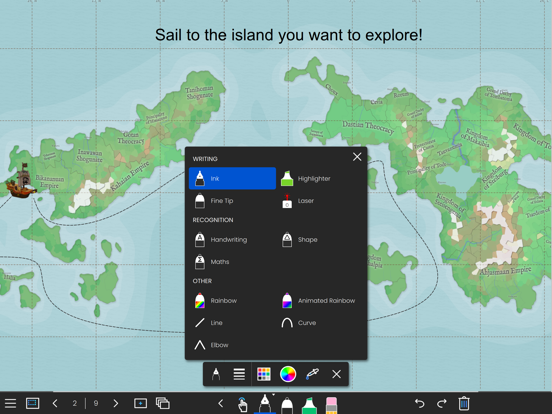
From ink pens, handwriting recognition and highlighters to rainbow pens and erasers, LYNX Whiteboard has everything you need to create a stylish and engaging presentation.
-- Multi-touch --
LYNX Whiteboard supports up to 10 people all collaborating simultaneously on the board.
-- Customizable Backgrounds --
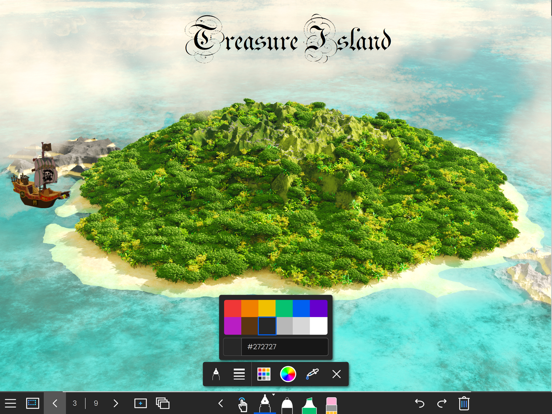
You can choose from a range of backgrounds for your whiteboard, including plain white, gridlines, music score or an image from the media search. This makes it easy to tailor your whiteboard to your specific needs.
-- Sharing and Collaboration --
LYNX Whiteboard makes it easy to share your whiteboard with others, whether you’re working on a project with colleagues, teaching a class, or presenting an idea. You can invite others to view your board, or share it as a PDF.
-- LYNX Cloud Storage --
Whiteboards can be saved to LYNX Cloud, so you can access them from anywhere, anytime. This means you can pick up right where you left off, even if you switch devices or locations.
-- Multi-Device Support --
LYNX Whiteboard works across multiple devices, including smartphones, tablets, and computers. This means you can start working on one device, and pick up where you left off on another.
-- Extensive File Support --
Use all your existing presentation files and documents. LYNX Whiteboard supports PowerPoint, MS Word, Google Docs, SMART Notebook, PDF and more.
-- No Ads --
LYNX Whiteboard is completely ad-free.
LYNX Whiteboard is perfect for teams, students, teachers, and anyone who needs to collaborate and share ideas. With its intuitive interface, and comprehensive features, it’s the ultimate tool for boosting productivity and creativity. Try LYNX Whiteboard today, and take your collaboration sessions to the next level.
Quoi de neuf dans la dernière version ?
• Click, access and drag action settings panel
• Open file and Play audio click actions
• Click actions on calendars, clocks, media, sticky notes and tables
• Item animations
• Snap-to-grid and random order for grouped items
• Import Mimio Notebook .ink files
• Better Apple Pencil and stylus input