iPhoneAddict Apps
  • Actualités
  • Accueil Apps
  • iPhone
  • iPad
  • Universelles
  • Mac
  • Apple TV
KG KultureGeek
App
iPhone / iPad Télécharger iAddict v5 Mac Télécharger iAddict Mac
  • Actualités
  • Accueil Apps
  • iPhone
  • iPad
  • Universelles
  • Mac
  • Apple TV
  • Archives keynotes
  • Firmwares & iTunes
  • Contactez-nous
  • Comparateur de prix
  • KultureGeek
Accueil » Liste des Apps » Apps iPad » Education » Simduino
L'application n'est plus disponible sur l'App Store français
2.1 iOS €3,99€ Derek Knight 3 2 An Arduino Simulator A great way to learn programming and to learn about electronics at the same time. Program a simulated Arduino board, connect it to a simulated circuit and watch the program run. Supports most of the Arduino C programming...
Simduino

Simduino

iPad / Education

3,99€ au lieu de 4,99€
Acheter sur l'App Store
Facebook X E-mail

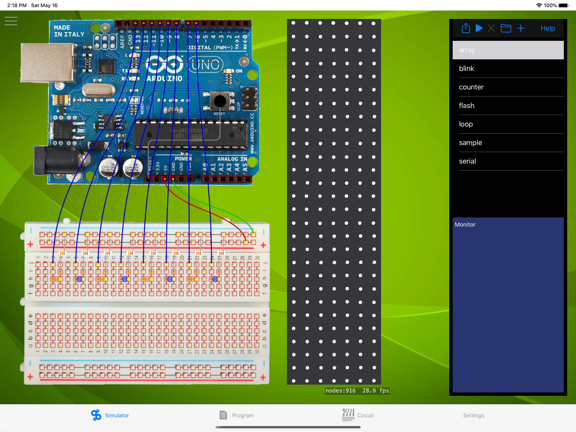
An Arduino Simulator

A great way to learn programming and to learn about electronics at the same time.

Program a simulated Arduino board, connect it to a simulated circuit and watch the program run.

Supports most of the Arduino C programming language (currently no switch statements or multi-dimensional arrays, but I am working on that)

Circuits can include wires, resistors and LEDs, but more components will be available soon

En voir plus...

Quoi de neuf dans la dernière version ?

This is only a minor release, but there are some huge changes.
• I've added a few new components: a battery and a motor. Now you can build circuits that really demonstrate how transistors work
• There is a new workboard area in the middle of the screen, where you can place motors and batteries. I've got ideas for other components like this in the future
• I've added a sample circuit (named motor) that demonstrates using a transistor to control a motor
• I've also improved the transistors sample (delete that sample then reload all samples to get the new version)
• A big change is that you can move components just by dragging their connectors. And as if that wasn't enough, you can now pick new components from a sidebar list and drop them on the breadboard. You can still edit the circuit definition directly if that's what you're into
• I've improved the graphics for components (especially transistors and diodes), also I've improved the colours so wires and things show their on/off states better
• I've added reset buttons to the microcontrollers - like a real Arduino. A long tap on these will stop a running program
• I've aded a digitalRead function. It reports the state of a digital pin - including the Arduino's feature that an unconnected pin has an indeterminate state (could be 1, could be 0)
  • Screenshot #4 pour Simduino
  • Screenshot #5 pour Simduino
  • Screenshot #6 pour Simduino

Note

(2 notes)

Détails sur l'application

Version
2.1
Taille
125.1 Mo
Version minimum d'iOS
11.0
Dernière mise à jour
17/05/2020
Publié par
Derek Knight

Newsletter App Store

Recevez chaque jour les meilleures promos

Actualité Apple

Image John Ternus, futur patron d’Apple, recrute une ex-vice-présidente… d’Apple
John Ternus, futur patron d’Apple, recrute une ex-vice-présidente… d’Apple
Image D’ex-employés Apple peuvent récupérer des documents confidentiels via iCloud
D’ex-employés Apple peuvent récupérer des documents confidentiels via iCloud
Image Apple s’attaque encore au Royaume-Uni pour empêcher une backdoor
Apple s’attaque encore au Royaume-Uni pour empêcher une backdoor
Image iPhone Ultra pliable : pas de délai, les problèmes de production sont résolus
iPhone Ultra pliable : pas de délai, les problèmes de production sont résolus
iPhoneAddict Apps

Le catalogue iPhoneAddict pour suivre les nouveautés, mises à jour et baisses de prix de l’App Store.

Apps

Toutes les apps iOS iPhone iPad Universelles Mac Apple TV

iPhoneAddict

Actualité Apple Archives keynotes Contact À propos KultureGeek

Suivez-nous

©2009-2026 i2CMedia. Tous droits réservés.