iPhoneAddict Apps
  • Actualités
  • Accueil Apps
  • iPhone
  • iPad
  • Universelles
  • Mac
  • Apple TV
KG KultureGeek
App
iPhone / iPad Télécharger iAddict v5 Mac Télécharger iAddict Mac
  • Actualités
  • Accueil Apps
  • iPhone
  • iPad
  • Universelles
  • Mac
  • Apple TV
  • Archives keynotes
  • Firmwares & iTunes
  • Contactez-nous
  • Comparateur de prix
  • KultureGeek
Accueil » Liste des Apps » Apps iPhone » Education » TabletAED remote
1.2.1 iOS €Gratuit Doczero 0 0 Discover the new way of training BLS&AED with digital AED trainers on your iPad. With your iPhone as remote control you can simply operate every TabletAED trainer. A professional low cost solution for every instructor. In combination with the...
TabletAED remote

TabletAED remote

iPhone / Education

Gratuit
Obtenir sur l'App Store
Facebook X E-mail

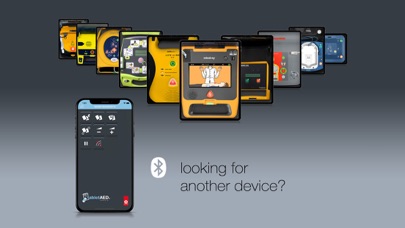
Discover the new way of training BLS&AED with digital AED trainers on your iPad. With your iPhone as remote control you can simply operate every TabletAED trainer. A professional low cost solution for every instructor.

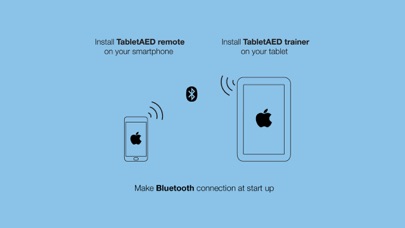
In combination with the e-learning you have the ultimate instructor package. Install the TabletAED trainer app on your iPad. This includes 1 free AED trainer. Do you prefer remote control, also install the free TabletAED remote app on your iPhone.

Quick start WITHOUT remote control:
1. Install the TabletAED trainer app on your iPad.
2. Start the TabletAED trainer app and slide the door open.
3. Select an AED and select a language.
4. Select the option ‘Without remote control’ and press Start.
5. Operate your TabletAED trainer like you are used to. With the operation bar on top you simply give commands to the AED trainer and simulate a training scenario.

Quick start WITH remote control:
1. Install the TabletAED trainer app on your iPad.
2. Install the TabletAED remote app on your iPhone.
3. Start the TabletAED trainer app and slide the door open.
4. Select an AED and select a language.
5. Select the option ‘With remote control’ (default) and press Start.
6. Start the TabletAED remote app.
7. Press the ‘Connection’ button and select your located iPad (with TabletAED trainer app installed). Press ‘Allow’ on the iPad to accept connection. After a few seconds connection will be established.
8. Operate your TabletAED trainer like you are used to. With the TabletAED remote app you simply give commands to the TabletAED trainer app and simulate a training scenario.

En voir plus...

Quoi de neuf dans la dernière version ?

Improved layout for larger screens.
Show correct name of tablet the remote is connected to.

  • Screenshot #1 pour TabletAED remote
  • Screenshot #2 pour TabletAED remote
  • Screenshot #3 pour TabletAED remote

D'autres applications du développeur

TabletAED trainerTabletAED traineriPad

Note

(0 note)

Détails sur l'application

Version
1.2.1
Taille
1.4 Mo
Version minimum d'iOS
9.0
Dernière mise à jour
10/01/2020
Publié par
Doczero

Newsletter App Store

Recevez chaque jour les meilleures promos

Actualité Apple

Image iPad Air 2027 : écran OLED, puce M5 et possible nouveau design
iPad Air 2027 : écran OLED, puce M5 et possible nouveau design
Image iPhone : Apple a capté 49 % des revenus de smartphones au 2e trimestre, un record
iPhone : Apple a capté 49 % des revenus de smartphones au 2e trimestre, un record
Image L’iPhone Air 2 aurait une Dynamic Island plus petite et d’autres nouveautés
L’iPhone Air 2 aurait une Dynamic Island plus petite et d’autres nouveautés
Image iPhone 18e : les 9 Go de RAM se confirment un peu plus
iPhone 18e : les 9 Go de RAM se confirment un peu plus
iPhoneAddict Apps

Le catalogue iPhoneAddict pour suivre les nouveautés, mises à jour et baisses de prix de l’App Store.

Apps

Toutes les apps iOS iPhone iPad Universelles Mac Apple TV

iPhoneAddict

Actualité Apple Archives keynotes Contact À propos KultureGeek

Suivez-nous

©2009-2026 i2CMedia. Tous droits réservés.