Text Reader - Language Pronunciation TTS (Text-to-Speech)
iOS Universel / Education
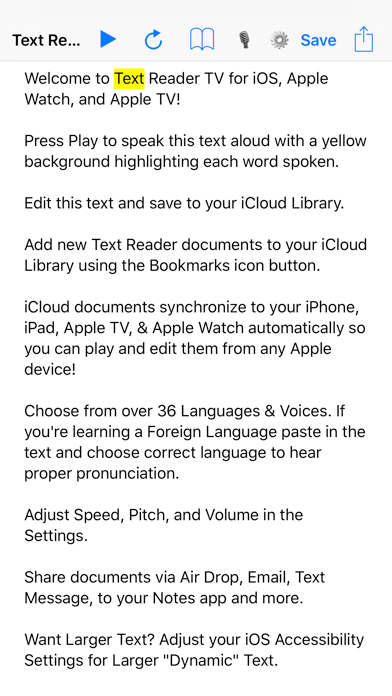
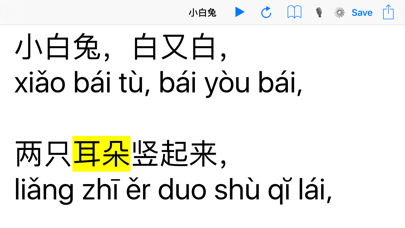
36 Languages Spoken Out Loud by Your iPhone & iPad! New for iOS 9! Visual highlighting of current word spoken! Speech keeps talking in the background while using other apps! Hear foreign language translations spoken with the correct pronunciation. Text scrolls to follow yellow highlight of current word spoken. Adjust Speed, Pitch, and Volume in the Settings.
This app will help you learn how to speak in a foreign language!
Paste translated text into the app then choose the correct language and hit play.
Paste, Type, or Dictate Text to be spoken out loud in the many different Text to Speech Voices.
Apple TV Remote Play/Pause button works to speak text on screen!
Share documents via Air Drop, Email, Text Message, to your Notes app and more.
Text Size controlled by Dynamic Type under Settings > General > Text Size & Accessibility > Larger Type.
Text Reader can read your Emails, RSS Feeds, News Articles… anything you can copy and paste into the app!
Text Reader is useful to check for spelling and grammatical errors in important documents like your resume, bio, emails to your boss, etc.
By listening to documents spoken out loud you catch errors that a normal spell checker will miss and that you don't normally notice when reading with your eyes alone.
Add new Text Reader documents to your iCloud Library using the Bookmarks icon button.
iCloud documents synchronize to your iPhone, iPad, Apple TV, & Apple Watch automatically so you can play and edit them from any Apple device!
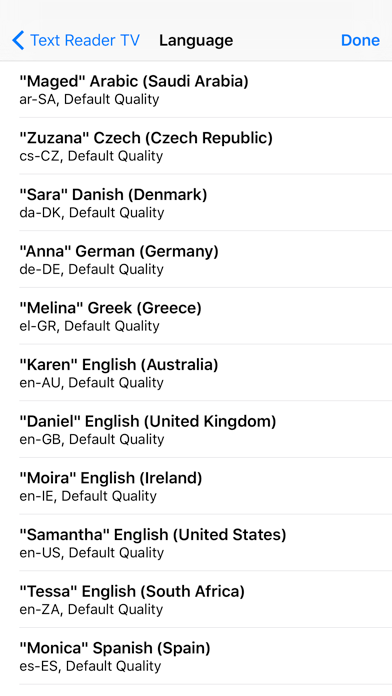
Choose from over 36 Languages & Voices. If you're learning a Foreign Language paste in the text and choose correct language to hear proper pronunciation.
Want Larger Text? Adjust your iOS Accessibility Settings for Larger "Dynamic" Text.
Text Reader Supports Accessibility and VoiceOver!
Use VoiceOver's Magic Tap Gesture to Pause/Play
Please send your App Reviews and Feature Requests from the Settings screen so we can create a better app. Thanks! :)
Languages Included: (plus more!)
Arabic - Saudi Arabia, Czech - Czech Republic, Danish - Denmark, German - Germany, Greek - Greece, English - Australia, English - United Kingdom, English - Ireland, English - United States, English - South Africa, Spanish - Spain, Spanish - Mexico, Finnish - Finland, French - Canada, French - France, Hindi - India, Hungarian - Hungary, Indonesian - Indonesia, Italian - Italy, Japanese - Japan, Korean - Korea, Dutch - Belgium, Dutch - The Netherlands, Norwegian - Norway, Polish - Poland, Portuguese - Brazil, Portuguese - Portugal, Romanian - Romania, Russian - Russia, Slovak - Slovakia, Swedish - Sweden, Thai - Thailand, Turkish - Turkey, Chinese - China, Chinese - Hong Kong, Chinese - Taiwan
Bluetooth Keyboard Commands:
Play/Pause Command P
Reset Command R
Library Command L
Voice/Language Command V
Settings Command S
Quoi de neuf dans la dernière version ?
This app has been updated by Apple to display the Apple Watch app icon.
New for Apple TV & Watch! Speak text aloud on the Apple TV and Apple Watch!
Add new Text Reader documents to your iCloud Library using the Bookmarks icon button.
iCloud documents synchronize to your iPhone, iPad, Apple TV, & Apple Watch automatically so you can play and edit them from any Apple device!
Choose from over 36 Languages & Voices.
Apple TV Remote Play/Pause button works to speak text on screen!
Bluetooth Keyboard Commands:
Play/Pause Command P
Reset Command R
Library Command L
Voice/Language Command V
Settings Command S