iPhoneAddict Apps
  • Actualités
  • Accueil Apps
  • iPhone
  • iPad
  • Universelles
  • Mac
  • Apple TV
KG KultureGeek
App
iPhone / iPad Télécharger iAddict v5 Mac Télécharger iAddict Mac
  • Actualités
  • Accueil Apps
  • iPhone
  • iPad
  • Universelles
  • Mac
  • Apple TV
  • Archives keynotes
  • Firmwares & iTunes
  • Contactez-nous
  • Comparateur de prix
  • KultureGeek
Accueil » Liste des Apps » Apps Universelles » Education » Window On The World Augmented Reality (AR) app
L'application n'est plus disponible sur l'App Store français
3.0 iOS €Gratuit Canal & River Trust 0 0 Use our augmented reality (AR) app when you visit the National Waterways Museum at Ellesmere Port to bring characters from the past to life and see a recreation of Mossdale, the last surviving wooden Mersey Flat as she’s winched up the historic...
Window On The World Augmented Reality (AR) app

Window On The World Augmented Reality (AR) app

iOS Universel / Education

Gratuit
Obtenir sur l'App Store
Facebook X E-mail

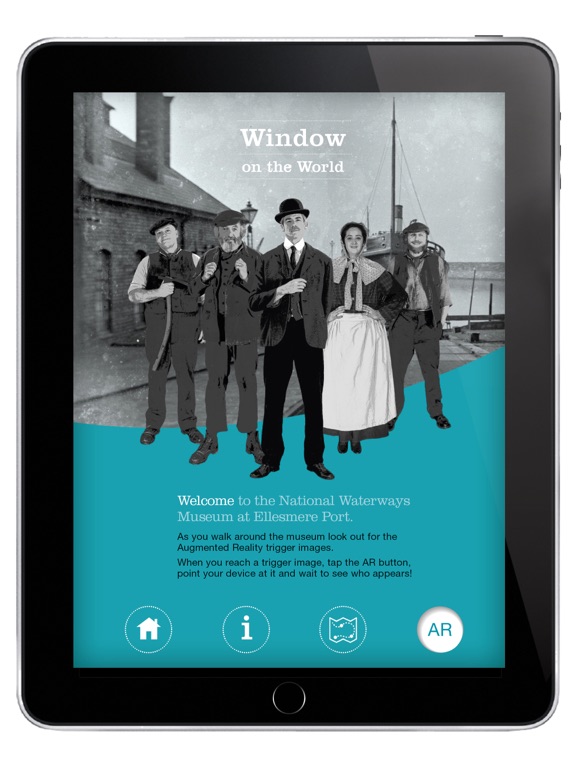
Use our augmented reality (AR) app when you visit the National Waterways Museum at Ellesmere Port to bring characters from the past to life and see a recreation of Mossdale, the last surviving wooden Mersey Flat as she’s winched up the historic slipway for repairs.

Meet Charlie Broster the night watchman, Crane-driver William Nicholas, Levi Williams Lindop the machinery foreman, shipwright Henry Leadbetter and boatwoman Hattie Price to find out what life was like at Ellesmere Port in its heyday.

Ellesmere Port offered a Window on the World, acting as a conduit between the canals and waterways of England and shipping routes from all over the world.

Offering a viewpoint across the river Mersey and the Manchester Ship Canal, the Window on the World exhibition has breathed new life into the historic slipway and its buildings to give visitors a glimpse of the Port’s former glory as it helped to drive the industrial revolution in the North of England.

How to use the App
The app has a map to guide you around the museum.
When you find a trigger image, tap the AR button and hold your mobile device up to the image as though taking a photo of it.
Wait for it to scan and see who appears to tell their story.

Your mobile device will need a camera and a gyroscope for best results, however there is an alternative tracking option if your device has no gyroscope or if it isn’t calibrating properly.

En voir plus...

Quoi de neuf dans la dernière version ?

This app has been updated by Apple to display the Apple Watch app icon.

Bug fixes.
  • Screenshot #1 pour Window On The World Augmented Reality (AR) app
  • Screenshot #2 pour Window On The World Augmented Reality (AR) app
  • Screenshot #3 pour Window On The World Augmented Reality (AR) app
  • Screenshot #4 pour Window On The World Augmented Reality (AR) app
  • Screenshot #5 pour Window On The World Augmented Reality (AR) app
  • Screenshot #6 pour Window On The World Augmented Reality (AR) app

Note

(0 note)

Détails sur l'application

Version
3.0
Taille
222.4 Mo
Version minimum d'iOS
6.0
Dernière mise à jour
09/07/2016
Publié par
Canal & River Trust

Newsletter App Store

Recevez chaque jour les meilleures promos

Actualité Apple

Image Les coques pour iPhone 17 Pro sont compatibles avec l’iPhone 18 Pro selon deux accessoiristes
Les coques pour iPhone 17 Pro sont compatibles avec l’iPhone 18 Pro selon deux accessoiristes
Image Epic Games attaque le nouveau barème européen de l’App Store
Epic Games attaque le nouveau barème européen de l’App Store
Image Apple Vision Pro : une fuite dans macOS relance la piste d’un nouveau modèle
Apple Vision Pro : une fuite dans macOS relance la piste d’un nouveau modèle
Image L’app Apple Invitations se met à jour avec 1 nouveauté
L’app Apple Invitations se met à jour avec 1 nouveauté
iPhoneAddict Apps

Le catalogue iPhoneAddict pour suivre les nouveautés, mises à jour et baisses de prix de l’App Store.

Apps

Toutes les apps iOS iPhone iPad Universelles Mac Apple TV

iPhoneAddict

Actualité Apple Archives keynotes Contact À propos KultureGeek

Suivez-nous

©2009-2026 i2CMedia. Tous droits réservés.