Adding Machine 10Key Lite
iPhone / Finance
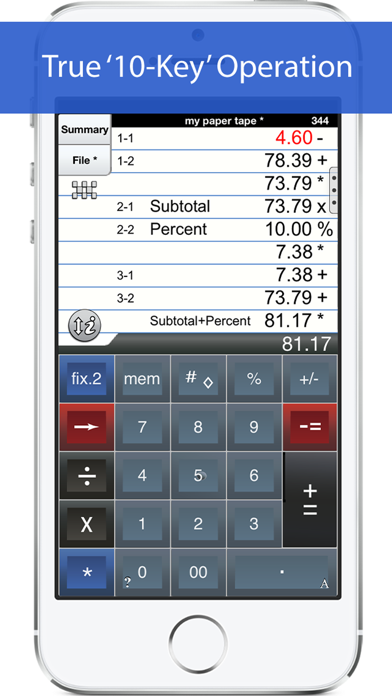
'Adding Machine 10Key Lite' behaves like a true '10 Key' or 'printing calculator' such as those made by Monroe, Casio, Sharp and others. A total is obtained by pressing the asterisk (*), operator entry is reversed, and percentages are obtained by multiplying and adding to a stream of numbers. PLEASE SEE THE 1ST FAQ BELOW.
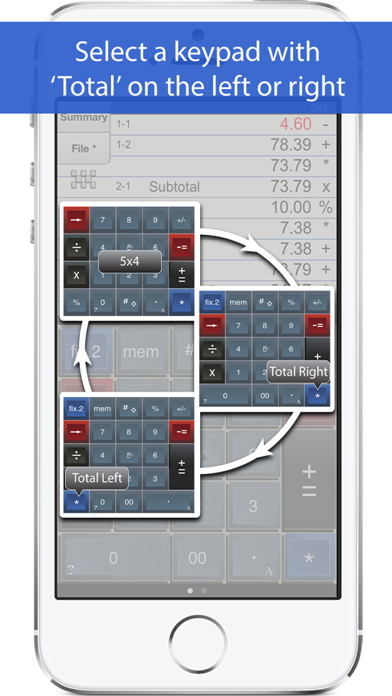
Adding Machine offers multiple keypads with a total (*) key on either the left or right side (Sharp or Canon style).
Also. Review & edit numbers, add or delete lines. Save & retrieve paper tape files. Export paper tape files to iBooks©, Dropbox©, Email or your favorite printing utility (see the FAQs).
Free Version Description
==================
This is the full version of Adding Machine 10Key iPhone, but with a reduced number of paper tape lines & some other limitations. You can find the full version by searching for 'Adding Machine 10Key iPhone' by Richard Silverman in the App Store.
==== Recent Press =====
Currently featured in iTunes "What's Hot" in the Finance Category for iPad.
Strategic Finance (Tools of the Trade): "If you're looking for a professional desk calculator that can give you full 10-key accounting functions with a tape you can name and save, edit, e-mail, or print, check out Interlocken's 10 Key Adding Machine app."
=================
Specifications:
=================
● Behaves the same as a '10 Key' adding machine.
● Export a PDF file to iBooks©, DropBox©, Email, or your favorite printing utility.
● Select from a menu of keypad sounds.
● 400 lines of paper tape history (full version)
● 3 display formats: fixed, fix+, float
● Save paper tapes to disk for later use.
● Correct numbers, add comments, add/delete lines
● Use your voice to dictate comments (iOS 7 and greater)
● Two keypads offer the 'total' key on the left or right (Sharp or Canon style)
● Comprehensive set of help screens.
● International number formatting (Settings -> General -> International -> Region Format -> select region).
================
FAQs
Q1. What is the difference between 'Adding Machine 10Key Lite' and 'Accountant Calculator' in the App. Store.?
A1. Both are single-column adding devices and both have iPad versions with full size 1:1 keyboards. '10 Key' behaves the same as a 10 Key Adding Machine with reversed operator entry while ‘Accountant Calculator’ supports the free chaining of +, -, x, /, %, √, 1/x and is easier to use if you are not familiar with how a '10-key' works.
You can also reference the following link:
http://www.tenkeycalculators.com/addandsubtract.html
Q2. Can I touch-type?
A2. Checkout the iPad version with large (1:1) keyboards and several aids for touch-typing.
Q3. How can I quickly clear the paper tape?
A3. The quickest way is to double-tap the calculator's large "i" action icon to the left of the calculator's LCD display.
Q4. How can I edit an incorrect number or add & delete lines from the paper tape?
A4. Touch any line of the paper tape to go into edit mode. Touch the side controls: Add Line, Delete Line. You can also edit numbers. Press Done to return to Calculator mode.
Q5. How can I have my 'total' key be on the right side?
A5. Press the checkerboard icon on the left side of the paper tape until the keypad you want is displayed. There are three to choose from.
Q6. Tell me about Email, Printing, and Exporting a Paper Tape.
A6. From the Export dialog, select from: Email, Print, Copy or Open-In. Email includes a pdf attachment. Print requires an AirPrint capable printer. Open-In will cause a menu of 3rd party Apps to appear that can receive a hardcopy of your paper tape; for example, iBooks, DropBox, and 3rd party printer Apps for Brother, HP, Epson, Canon and more. With these print directly to a network reachable printer (even if it is NOT AirPrint capable).
Quoi de neuf dans la dernière version ?
1. Errata was repaired that repeatedly asked user to 'review this App'.