Securitas Membership
iOS Universel / Finance
1. Who can become a Securitas Membership member?
Anyone can sign up for a Securitas Membership to enjoy benefits such as SecuriDocs and the drafting and storage of your will. Securitas Clients can sign up and enjoy added benefits such as 24/7 Assist and view their Securitas Portfolio.
2. How the Membership works
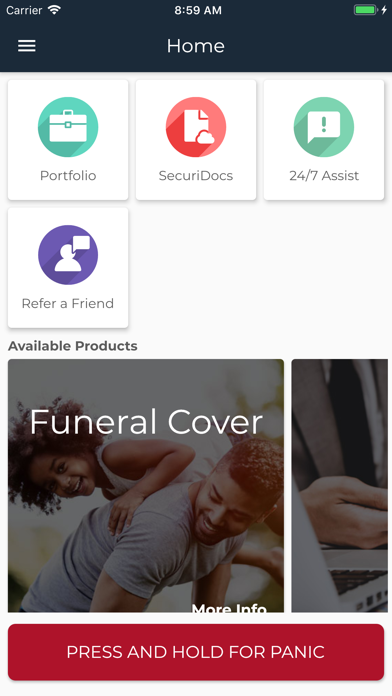
Securitas Membership gives our clients access to extra features and tools to manage their Securitas portfolios via the Securitas Membership App.
3. Medical Aid, Car and Home insurance package:
As a Securitas Health Consultants client, you have free access to our 24/7 Medical Assistance product. By appointing Securitas as your Car and Home insurance broker, automatically qualify for our free Roadside and Household Assistance valued at R99.00.
4. How to sign up via our application:
- Go to the App Store on your Apple mobile device
- In the Search bar - search for Securitas Membership.
- Select the Securitas Membership app.
- Open the app and click on “Don’t have an account?” You will be redirected to our web-based sign up facility.
- Complete your details to create an account
- Go to the email account you signed up with. You will receive an email to set your password - please click on the link and choose a password according to the password policy below Please note that the link is only valid for 24 hours.
- Fill in your own unique Password - Your password must have at least 8 characters, 1 upper case letter, 1 lower case letter, 1 number and 1 special character (@,#,$, etc.). Retype your password to confirm the password.
5. How to sign up via the website
- Navigate to https://www.securitas.co.za/web/login.
- Click on “Don’t have an account?” You will be redirected to our web-based sign up facility.
- Complete your details to create an account
- Go to the email account you signed up with. You will receive an email to set your password
- Click on the link and choose a password according to the password policy below Please note that the link is only valid for 24 hours.
- Fill in your own unique Password. Your password must have at least 8 characters, 1 upper case letter, 1 lower case letter, 1 number and 1 special character (@,#,$, etc.). Retype your password to confirm the password.
6. Membership Products:
Portfolio:
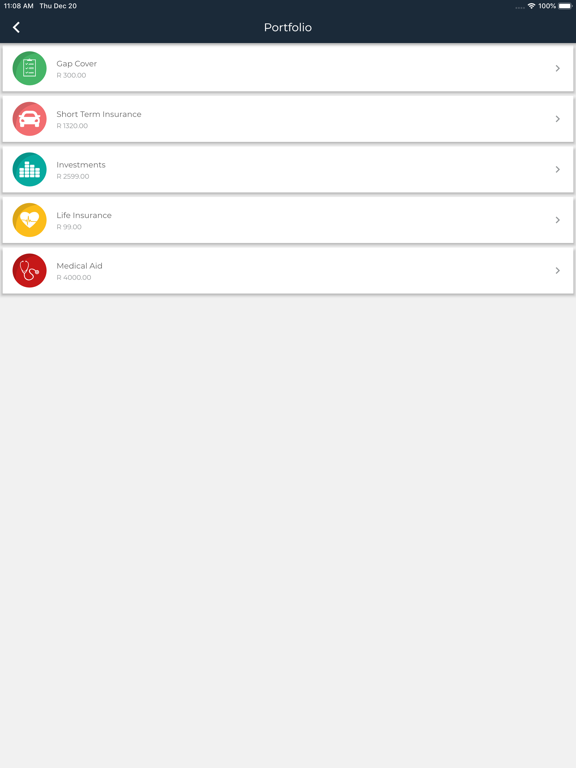
Your Securitas Portfolio displays your active Securitas products, investment values and monthly premiums.
SecuriDocs:
SecuriDocs is a secure online document storing facility where all your important personal and financial documents are stored for easy access at any time.
24/7 Assistance:
24/7 Assistance gives you medical, household and roadside assistance with the click of a button. Update details, have guidance in a medical emergency or request a plumber or electrician when something goes wrong at home.
Panic Button:
We provide a 24/7 Panic button that provides guidance and emergency services in any panic-stricken situation.
Admin Assist:
Admin Assist will allow you to log any changes to your personal details, updates on policy information or requests for new products. After submitting your request, your financial advisor will be in contact with you. All customers with products at Securitas will have access to our Admin Assist functionality.
7. Cancellation of Securitas Membership
Please send an email to our Securitas team at info@securitas.co.za to cancel your Securitas Membership.
8. Support
Having any problems? Please send us an email at apps@securitas.co.za
9. Privacy Policy:
https://www.securitas.co.za/disclaimers/portal
10. Terms of Service:
https://www.securitas.co.za/disclaimers/portal
11. App Permissions Information
In order to provide the 24/7 Assist services, we require location based permissions.
Quoi de neuf dans la dernière version ?
Performance and stability enhancements.
1. Refer a Friend:
- You can now refer your friends to one of your advisors.