Surplus: Expense Tracker
iOS Universel / Finance
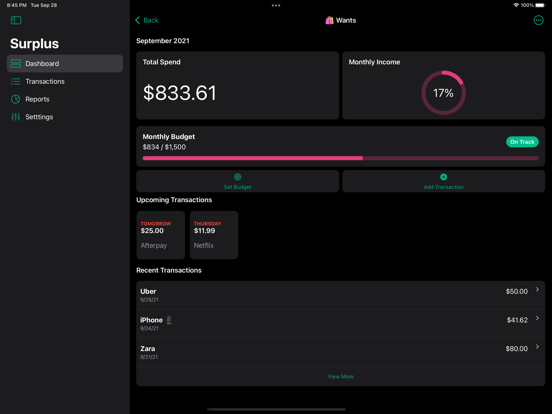
Surplus is a monthly expense tracker that takes into account your monthly income, expenses and upcoming payments to provide you with a clear overview of your leftover spend.
-- Spend Wisely --
Know how much you have left to spend, including your subscriptions and installments.
-- Profile Your Spend --
Categorize your expenses into meaningful groups that drive insights into your spend profile. This can include popular budgeting methods such as the “50/30/20 budget rule” or the “80/20 budget rule”.
-- Adaptable Workflows --
Manual or automatic, easily sync and categorize transactions from all your accounts.
-- Transaction Collections --
Group related transactions across buckets and time. They can be themed around trips, shared expenses or anything you'd like!
-- Widgets --
Customize your home and lock screens with widgets that showcase your leftover spend, upcoming transactions and buckets.
-- Interactive Reports --
Customizable reports for your historic and upcoming spend with support for CSV Export.
-- Shortcuts --
Automate your expense tracking with actions configurable via the Shortcuts app. Examples include triggering an expense entry when leaving your favorite coffee shop or scheduling spend summaries on a daily, weekly or monthly basis. Actions can be run via Siri, Apple Watch and the Shortcuts app.
-- Privately Synced with iCloud --
All financial data is stored on your device(s) and synced privately via your iCloud Account. We do not store any personal information or transaction data on our servers.
Surplus is free to use with pro features that can be activated via in-app purchases. Surplus Pro can be purchased as a one time payment or as a recurring subscription. Current pricing and purchase offers are available in the app.
By downloading and using Surplus you agree to our terms and conditions:
Terms of Use https://surplus.app/terms
Privacy Policy https://surplus.app/privacy
Surplus is an indie app developed and maintained by Omar Inam. If you have any questions or feedback please feel free to contact me through Twitter @_oinam
Quoi de neuf dans la dernière version ?
- Bug fixes