Swim Note
iPhone / Forme et santé
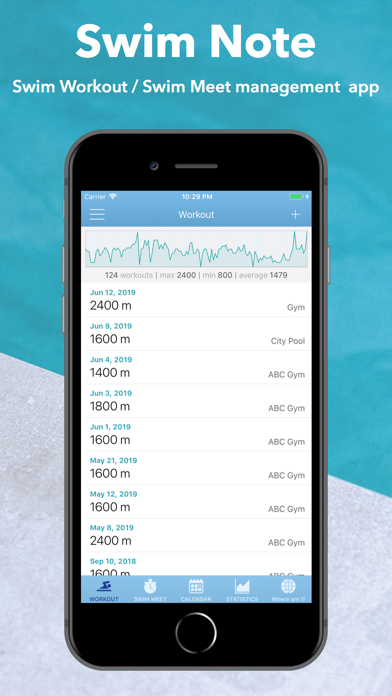
Swim Note is a swim training log designed for swimmers.
Track your workouts, swimming distance, and race results.
Over time, you can clearly see your progress and achievements.
Swim Note is used by a wide range of swimmers including masters swimmers, fitness swimmers, and parents managing their children's swim meet results.
** Training Log
Easily record your swim workouts with a swim-focused input system.
• Log swim sets with stroke, distance, repetitions, and interval
• Simple mode for recording total distance only
• Save frequently used workouts as templates
• Duplicate previous workouts to save time
• Entries are automatically saved while editing
** Training Goals & Dashboard
Set weekly, monthly, or yearly training goals and track your progress.
The dashboard shows:
• Workout count
• Total swimming distance
• Progress toward your goals
** Where am I? – Distance Map
Visualize your cumulative swimming distance on real-world routes.
For example:
• Baltic Sea
• New York Bay
Watch your progress as you swim further along the route.
** Race Results
Track swim meet results and personal bests.
• Record race results for each meet
• Lap time recording
• Personal best charts by event
• Separate records for short course, long course, and open water
You can also set target times for each event.
** Statistics
Analyze your training history with graphs.
• Monthly and yearly distance charts
• Total swimming distance
• Training frequency
Your progress becomes clearer the more you train.
** Other Features
• Manage up to 5 swimmers (great for families or teams)
• Attach photos to records
• Share workouts
• CSV export (add-on)
=== Swim Note Add-On Subscription ===
** Add following functionalities.
- Remove Ads
- Export CSV file of Workouts and Swim Meet records
** Payment
Payment will be charged to your Apple ID account at confirmation of purchase.
** Price and Period
Please check the in-app purchase screen.
** About Auto-Renewing Subscription
The upgrade contract will be automatically renewed. You can stop the auto-renewal at least 24 hours before the end of the term. Your Apple ID account will be charged within 24 hours before the end of the current period.
** Manage and Cancel Subscription
You can check the timing of the next renewal or cancel the auto-renewal by going to your AppStore account settings.
** Notes
If you turn off auto-renewing you will have access to your subscribed content until the end of the current period.
You will be charged to your Apple ID account once the purchase is confirmed.
** Privacy Policy
https://works.sabitori.com/swim-note-privacy-policy-en/
** Terms of Use
https://www.apple.com/legal/internet-services/itunes/dev/stdeula/
Quoi de neuf dans la dernière version ?
We have fixed an issue with sharing to X.