Drawing - Draw, Sketch & Trace
iPhone / Graphisme et design
Trace an image on paper with the help of camera tracing on your mobile to sketch.
The Draw Sketch Tracing app is used to transfer an image into line work from a photo or artwork. Using this app, you can learn drawing or tracing.
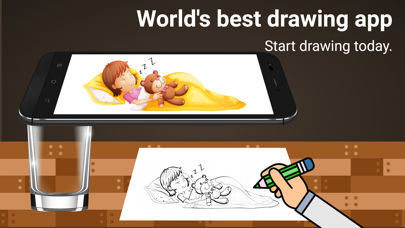
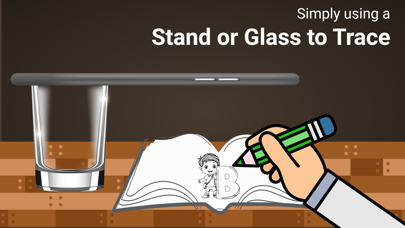
It also makes tracing an image easy. Just select an image from the app or gallery and apply a filter to create a traceable image. The image will appear on the screen with the camera open. Place the phone about 1 foot above and look into the phone to draw on paper.
This app lets users trace images from their phone's camera to paper, aiding drawing and sketching. Here's how it works:
1. Image Selection: Choose an image from the gallery or take a new one with the camera.
2. Applying Filters: Apply filters to simplify the image for tracing.
3. Camera Display: The camera displays the image transparently on the screen.
4. Tracing onto Paper: Hold the phone above paper, tracing what you see.
5. Drawing Process: Trace lines from the screen onto paper, creating a copy.
6. Converting Images: You can also practice with sample images or choose your own.
In short, this app combines your camera and paper to help you trace and sketch with ease.
Main Features:
Trace any image with the help of the camera output on your phone's screen; the image will not actually appear on the paper, but you can trace and draw it exactly.
Draw on paper by looking at the phone with a transparent image and the camera open.
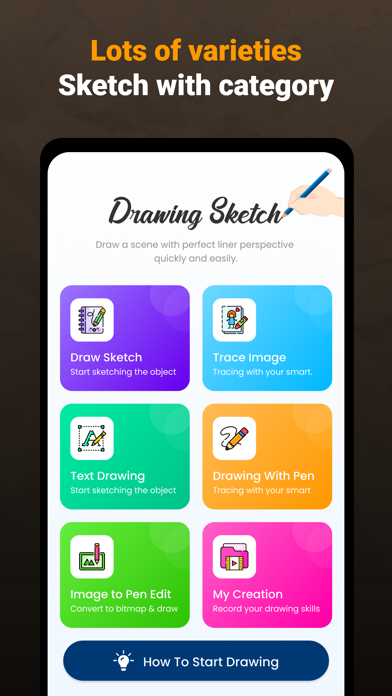
Select any provided sample image and draw on your sketchbook.
Pick any image from the gallery and convert it into a tracing image to sketch on blank paper.
Make the image transparent or create a line drawing to create your art.
Image Tracing:
The app enables users to trace images from their phone's camera output onto paper.
Transparent Image:
The camera output shows the image with transparency, allowing users to overlay it onto their real-world environment.
Real-time Tracing:
Users can draw on paper while looking at the phone screen with the transparent image.
Sample Images:
Users can practice by selecting sample images provided by the app.
Gallery Images:
Users can choose images from their gallery and convert them into traceable images for drawing.
Overall, this app seems to be a helpful tool for those who want to learn drawing, practice tracing, or create art by using a real-world reference with the convenience of technology.
Information about the auto-renewable nature of the subscription.
Confirm subscription: Payment will be charged to iTunes Account at confirmation of purchase.
Manage subscriptions: Users can manage or unsubscribe in iTunes & App Store account management in the phone system settings.
Auto-renewal: Apple iTunes account will be charged for renewal within 24-hours prior to the end of the current subscription period. To cancel the renewal, please turn off auto-renew manually at least 24-hours before the end of the period.
No cancellation of the current subscription is allowed during the active subscription period.
Free trial: Free trial (if any) will automatically renew the version at upon expiration.
You can go to the Account Settings to cancel the renewal before the trial ends.
The current free trial will be forfeited when you purchase a subscription to the premium version before the trial period ends.
By using the app, you confirm that you acknowledge and accept our Privacy Policy and Terms of Service:
Privacy Policy: https://privacypolicyiosapp.blogspot.com/2023/10/privacypolicy-drawsletch.html
Terms of Service: https://privacypolicyiosapp.blogspot.com/2023/10/termsandconditiondrawsketch.html
If you would like to use our App but have trouble affording it please email us at fenalimaniya68@gmail.com