GaugeMaster
iPad / Graphisme et design
Simply the best way to design custom Analog Gauge Faces or Dial Indicators.
Design complex custom gauge faces in just minutes!
Designing round dial gauges with generic drawing programs, bitmap or vector based, can be extremely time consuming.
Instead use GaugeMaster to sketch or draw your gauge ideas quickly and effortlessly.
You will not believe how easy it is compared to other solutions.
Once completed export your gauge designs as PDF files to print in high quality at any resolution.
If you need to design simulator indicators, custom car dial panels, engineering analog gauges, or any sort of round dial gauges, get GaugeMaster now!
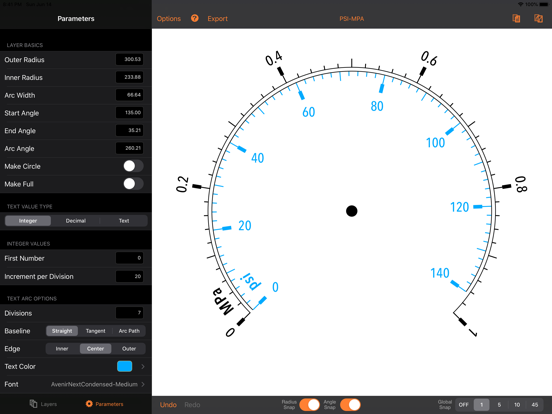
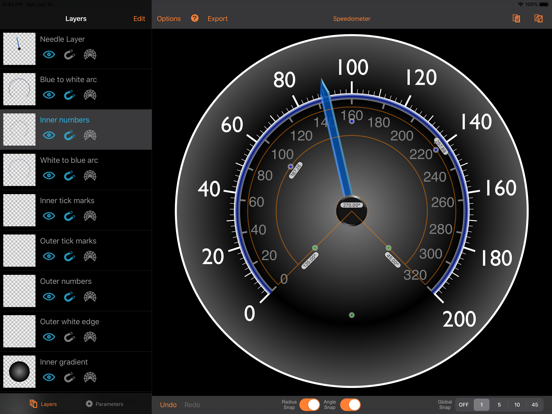
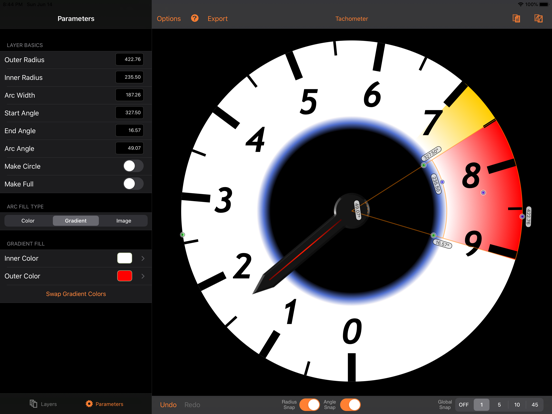
GaugeMaster models are composed of any number of the three base layers (arcs, text, and tick marks) which are the key components of all analog gauge designs.
◆◆◆ NOW WITH NONLINEAR CSV DATA IMPORT OPTION FOR TICK MARKS AND TEXT ARCS ◆◆◆
Main features:
• Specifically designed for dial/round shaped gauge faces.
• Extremely easy and fast to create complex gauges.
• Unlimited layers to give you full design freedom.
• Angle and radius guides and snapping to match layers easily.
• Unlimited undo/redo levels.
• Tick marks designer feature for easy handling of those pesky tick marks.
• Render text that beautifully follows your rounded designs.
• Dial values can be integer or decimal values, as well as arbitrary text.
• Use any font available for your dial text values.
• Custom output gauge diameter selection for precise matching to your designs.
Sharing options:
• Export and import gauge files to share with other GaugeMaster users via the Document Browser.
• Export in PDF for resolution independent renderings, perfect for high quality printing.
• Export into separate PDF files the individual layers of a gauge.
• Export models to the photo album to showcase your designs or share previews.
• Export GaugeMaster files to the new GaugeMaster Pro web app format.
Free Trial
This app can be downloaded for free to try all its features except the Export and Files/Save options.
Old Purchases
Any users that purchased the app prior to version 4 will never require a subscription as a thank you for their early support.
To restore your old purchase simply use the Restore Purchases option on the Subscriptions screen.
Subscriptions Terms of Use
Payment will be charged to iTunes Account at confirmation of purchase. Your subscription automatically renews unless auto-renew is turned off at least 24-hours before the end of the current period. Your account will be charged for renewal within 24-hours prior to the end of the current period at the price listed for the currently subscribed package at that time. You can manage your subscriptions and auto-renewal may be turned off by going to the your Account Settings after purchase. Any unused portion of a free trial period, if offered, will be forfeited when you purchases a paid subscription.
Quoi de neuf dans la dernière version ?
After over a decade on the app store this app will be removed from sale by end of May 2025, please read the details available on the app to transition to the new GaugeMaster Pro.
- Fixed a crash when loading gauge files that contain missing fonts.