iPhoneAddict Apps
  • Actualités
  • Accueil Apps
  • iPhone
  • iPad
  • Universelles
  • Mac
  • Apple TV
KG KultureGeek
App
iPhone / iPad Télécharger iAddict v5 Mac Télécharger iAddict Mac
  • Actualités
  • Accueil Apps
  • iPhone
  • iPad
  • Universelles
  • Mac
  • Apple TV
  • Archives keynotes
  • Firmwares & iTunes
  • Contactez-nous
  • Comparateur de prix
  • KultureGeek
Accueil » Liste des Apps » Apps Universelles » Jeux » Cage It! Puzzle
132 iOS €Gratuit Marcelo Pars 0 0 Tap to turn and forget everything else. Cage It! is a puzzle game with a simple concept: Tap and turn and get rid of all loose ends. Does it have ads? No! How to play Cage It! ? Just tap on the red-brown objects to make them turn. Turn till you...
Cage It! Puzzle

Cage It! Puzzle

iOS Universel / Jeux

Gratuit
Obtenir sur l'App Store
Facebook X E-mail

Tap to turn and forget everything else.
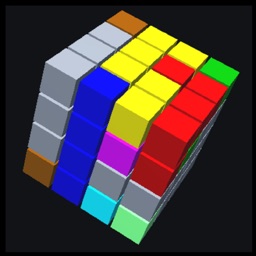
Cage It! is a puzzle game with a simple concept: Tap and turn and get rid of all loose ends.

Does it have ads?
No!

How to play Cage It! ?
Just tap on the red-brown objects to make them turn. Turn till you have removed all loose ends. If you want to mark an object, tap a little longer. The object becomes black.

Is it difficult?
Cage it! starts with quite easy levels. Very relaxing, it makes you forget everything. But the games become more difficult furher on. Which means, there is a level for everyone.
In fact Cage It! contains very hard levels and in order to help you, you can mark the red-brown objects by touching them a little longer than the usual tap. The red-brown object now turns black. It’s an easy way to mark that this object is definitely in the right position.

How many levels are there?
We made 200 levels and you are free to scroll through every one of them. So if one is too easy or too difficult for you, you simply skip it and go to the next one.

What does it cost?
Cage It! is for free. If you think a level is too difficult, you can buy hints. In that way you make a small donation for the developer. Thanks!

Can I see which level I passed?
Yes you can. All the levels have a game number, which you find in a button at the top of the screen. The button turns green the moment you solved that level. You can also use this button if you want restart that level.

Have fun!

En voir plus...

Quoi de neuf dans la dernière version ?

Bug fix.

  • Screenshot #1 pour Cage It! Puzzle
  • Screenshot #2 pour Cage It! Puzzle
  • Screenshot #3 pour Cage It! Puzzle
  • Screenshot #4 pour Cage It! Puzzle
  • Screenshot #5 pour Cage It! Puzzle
  • Screenshot #6 pour Cage It! Puzzle

D'autres applications du développeur

CubicksCubicksiOS UniverselCube Loop PuzzleCube Loop PuzzleiOS UniverselSave Planet CubeSave Planet CubeiOS UniverselLoop Loop PuzzleLoop Loop PuzzleiOS UniverselOne Line Weekly PuzzleOne Line Weekly PuzzleiOS UniverselMaze Ball (Puzzle)Maze Ball (Puzzle)iOS UniverselVoir toutes les apps

Note

(0 note)

Détails sur l'application

Version
132
Taille
71.2 Mo
Version minimum d'iOS
13.0
Dernière mise à jour
14/06/2026
Publié par
Marcelo Pars

Newsletter App Store

Recevez chaque jour les meilleures promos

Actualité Apple

Image Apple met à jour le firmware de son adaptateur multiport AV numérique USB‑C
Apple met à jour le firmware de son adaptateur multiport AV numérique USB‑C
Image Une pub d’Apple avec un enfant et un iPhone crée une polémique en Italie
Une pub d’Apple avec un enfant et un iPhone crée une polémique en Italie
Image Apple prépare un système de reprise pour 90 jours avec l’app Cartes
Apple prépare un système de reprise pour 90 jours avec l’app Cartes
Image Apple recrute son nouveau responsable des affaires gouvernementales
Apple recrute son nouveau responsable des affaires gouvernementales
iPhoneAddict Apps

Le catalogue iPhoneAddict pour suivre les nouveautés, mises à jour et baisses de prix de l’App Store.

Apps

Toutes les apps iOS iPhone iPad Universelles Mac Apple TV

iPhoneAddict

Actualité Apple Archives keynotes Contact À propos KultureGeek

Suivez-nous

©2009-2026 i2CMedia. Tous droits réservés.