FSS MCP/EFIS
iPhone / Jeux
!! NO KEYSTROKE OR ASSIGNMENTS !!
BOEING style MCP & EFIS with NAV Radio Panel w/Indicators & Sound for:
Microsoft Flight Simulator X (except PMDG), XPlane Aircraft
Lockheed Prepar3D v2,v3,v4
!! Important !!
P3D/FSX Users Must Update FSS Server to v4.0 or higher
Xplane Users: Must Use FSS Server v3.1 (No Further Xplane Development)
Minimum iOS 8 required
**FEATURES**
FSX/P3D or XPlane modes:
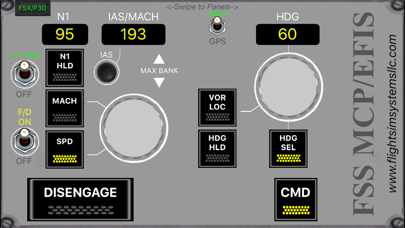
**FULLY Functional MCP(Auto Pilot) Panels** for FSX/P3D and XPlane
-Boeing and Airbus Compatible
-Flight Director Switch
-Auto Throttle ARM
-N1 Hold
-Speed & Mach Hold
-TAP and Hold Knobs to change Speed/Mac or Enter Speed Manually
-NAV / GPS Switch
-VOR/NAV Hold
-Heading Hold
-Heading Select
-TAP and Hold Knobs to change Heading or Enter Heading Manually
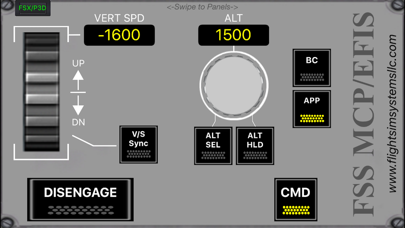
-Vertical Speed Hold
-TAP and Hold Knobs to change Vertical Speed or Enter Vertical Speed Manually
-Altitude Hold
-Altitude Select
-TAP and Hold Knobs to change Altitude or Enter Altitude Manually
-Approach Hold
-Back Course Hold
-Auto Pilot CMD
-Auto Pilot Disengage
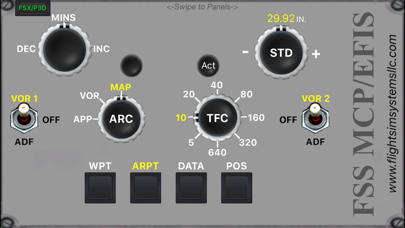
**Fully Functional EFIS Panel** for FSX/P3D mode:
-EFIS Panel is NOT functional in XPlane
-Decision Height Increase / Decrease
-Manually set Altimeter Pressure or Switch between Actual and STD
-MFD Mode (Approach / VOR / MAP) Select Knob
-MFD Scale (5 - 640) Select Knob
-VOR / OFF / ADF Switches for Both NAV's
-MFD MAP Item Select Buttons for WPT, ARPT, DATA, & POS
**Fully Functional NAV Radio Panel** for FSX/P3D & XPlane mode:
-NAV 1 Frequency & NAV 2 Frequency
-TAP and Hold Knobs to change Frequency or Enter Frequency Manually
!!ADDED!! Swap NAV 1 and NAV 2 Frequency (Helps with FSX VOR to VOR Flight)
-NAV 1 Course Select & NAV 2 Course Select
-TAP and Hold Knobs to change Course or Enter Course Manually
-COM 1Radio Sound On/Off Button
-COM 2Radio Sound On/Off Button
-BOTH COM'sRadio On/Off Select Button
-NAV 1Radio Sound On/Off Button
-NAV 2 Radio Sound On/Off Button
-MKR Sound Select On/Off
-DME Sound Select On/Off
-ADF Sound Select On/Off
--NOTE--
Swipe left or right to switch panels
Use Multiple Devices to Create Your own Boeing MCP w/ EFIS or for 757 MCP w/ NAV Radio
PREPAR3D v4 users:
"MUST" have Pete Dawson's FSUIPC5 with or without WIDEFS7 installed on PC (registered FSUIPC is preferred but unregistered"FREE" functions also).
Available at:
http://www.schiratti.com/dowson.html
FSX / PREPAR3D v2 & v3 users:
"MUST" have Pete Dawson's FSUIPC4 with or without WIDEFS7 installed in FSX (registered FSUIPC is preferred but unregistered"FREE" functions also).
Available at:
http://www.schiratti.com/dowson.html
XPlane "MUST" have XPUIPC or WPWideClient installed.
Available at
http://www.tosi-online.de/XPUIPC/XPUIPC.html
User "MUST" also download and Install (a very LIGHT weight server) FSS Server ver2.0 or Higher from www.flightsimsystemsllc.com
README is include in the download. **SIMPLE** 1-5 minutes NO Key Assignment install and you are ready
"FULLY COMPATIBLE with SkeeterBilt FlyPod"
Many Thanks to all that contributed to XPUIPC
Many Thanks to Pete Dawson, Istavan Varadi, and all that contributed to FSUIPC
Quoi de neuf dans la dernière version ?
!! Important !!
P3D/FSX Users Must Update FSS Server to v4.0 or higher
Xplane Users: Must Use FSS Server v3.1 (No Further Xplane Development)
Minimum iOS 8 required
Added Airbus Compatibility