iPhoneAddict Apps
  • Actualités
  • Accueil Apps
  • iPhone
  • iPad
  • Universelles
  • Mac
  • Apple TV
KG KultureGeek
App
iPhone / iPad Télécharger iAddict v5 Mac Télécharger iAddict Mac
  • Actualités
  • Accueil Apps
  • iPhone
  • iPad
  • Universelles
  • Mac
  • Apple TV
  • Archives keynotes
  • Firmwares & iTunes
  • Contactez-nous
  • Comparateur de prix
  • KultureGeek
Accueil » Liste des Apps » Apps Universelles » Livres » eBookRenta
L'application n'est plus disponible sur l'App Store français
1.0.5 iOS €Gratuit Papyless 0 0 Read Your Renta! Rentals Offline!! With this app you can... 1) Store lots of your Renta! rentals on your iPhone/iPad/iPod touch! 2) Download free previews! App Features 1) Bookshelves Allows you to download and organize your rentals easily, so...
eBookRenta

eBookRenta

iOS Universel / Livres

Gratuit
Obtenir sur l'App Store
Facebook X E-mail

Read Your Renta! Rentals Offline!!

With this app you can...

1) Store lots of your Renta! rentals on your iPhone/iPad/iPod touch!

2) Download free previews!


App Features

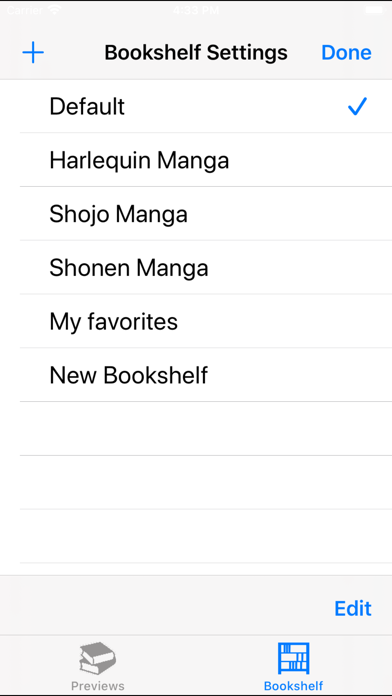
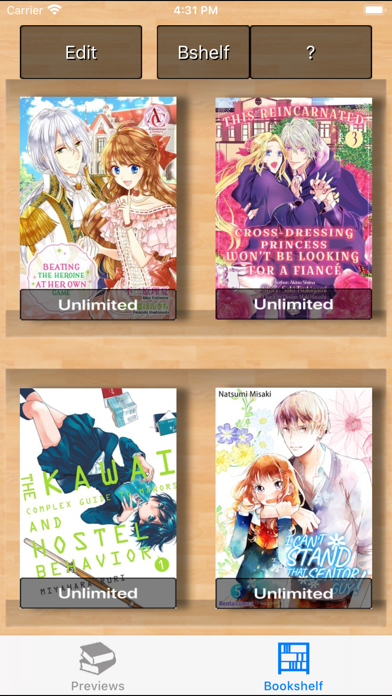
1) Bookshelves
Allows you to download and organize your rentals easily, so you can read your rentals without having to go to the main website.

2) E-reader
Download content quickly and easily. You can even start reading the downloaded pages while you wait for the rest to finish!


How to Use This App

Downloading and Viewing Rented Content
NOTE: You cannot download anything onto the app via a PC. Please use your iPhone/iPad/iPod touch.

a) Sign in to Renta via Safari.
NOTE: If you use a different browser, you may be unable to download content.
b) Go to your Rental List on the website, and then tap the "Download" button next to the content you want to download.
c) The message "Open in 'Renta! Reader'?" will appear on screen. Select "Open" to start the download. Content will be saved to your default Bookshelf.


Reading Previews

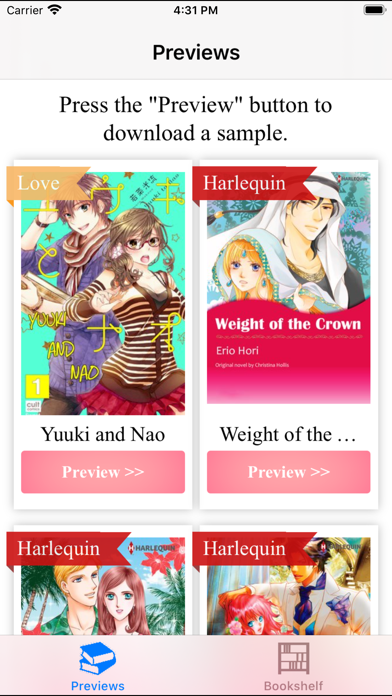
a) Tap the "Previews" icon to open the Previews page.
b) Tap the "Preview" button next to the content you wish to read.
c) The message "Please Confirm" will appear on screen. Select "OK" to start the download. Content will be saved to your default Bookshelf.
d) The message "Download Complete. Read now?" will appear on screen. Select "Yes" to open the downloaded preview.

En voir plus...

Quoi de neuf dans la dernière version ?

- The novel viewer has been changed.
  • Screenshot #1 pour eBookRenta
  • Screenshot #2 pour eBookRenta
  • Screenshot #3 pour eBookRenta
  • Screenshot #4 pour eBookRenta
  • Screenshot #5 pour eBookRenta
  • Screenshot #6 pour eBookRenta

Note

(0 note)

Détails sur l'application

Version
1.0.5
Taille
47.5 Mo
Version minimum d'iOS
9.0
Dernière mise à jour
23/08/2022
Publié par
Papyless

Newsletter App Store

Recevez chaque jour les meilleures promos

Actualité Apple

Image Apple contre-attaque sèchement contre le DoJ dans la procédure antitrust sur l’iPhone
Apple contre-attaque sèchement contre le DoJ dans la procédure antitrust sur l’iPhone
Image Castlevania: Grimoire of Souls va (encore) disparaître d’Apple Arcade le 3 septembre
Castlevania: Grimoire of Souls va (encore) disparaître d’Apple Arcade le 3 septembre
Image Apple vs Epic Games : l’éditeur de Fortnite refuse toute médiation
Apple vs Epic Games : l’éditeur de Fortnite refuse toute médiation
Image Les futurs iPhone et autres produits Apple se dévoilent dans macOS 26.7
Les futurs iPhone et autres produits Apple se dévoilent dans macOS 26.7
iPhoneAddict Apps

Le catalogue iPhoneAddict pour suivre les nouveautés, mises à jour et baisses de prix de l’App Store.

Apps

Toutes les apps iOS iPhone iPad Universelles Mac Apple TV

iPhoneAddict

Actualité Apple Archives keynotes Contact À propos KultureGeek

Suivez-nous

©2009-2026 i2CMedia. Tous droits réservés.