NewsRoll
macOS / Actualités
* Read horizontally-scrolling news feeds from multiple sources *
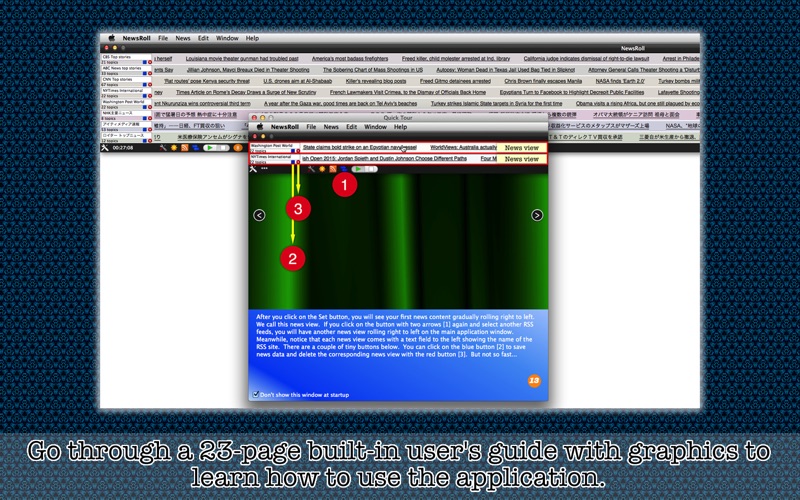
I go to news web sites like Reuters to keep myself updated with international news every one hour or two. Instead of going to this web site and that web site, what if I can read news from all those web sites that I regularly visit altogether? NewsRoll does just that. It's a desktop application which is designed to extract news data (RSS feeds) from remote servers such that you can read horizontally-scrolling (right to left) news from multiple sources at a time.
- Features -
1. Register any number of RSS feeds as news sources.
2. Tell which story is new and which is not after update.
3. Find out how many new stories there are after the application updates news.
4. Change places of news views.
5. Stop news views from scrolling whenever necessary. Resume them any time.
6. Let the application automatically update news every 10 minutes, 30 minutes, 1 hour, 2 hours, 3 hours, 6 hours or never.
7. Click on the title of a story to launch the default web browser and to read the entire story.
8. Adjust scrolling speed.
9. Adjust brightness/darkness of randomly-generated news view colors.
10.Save a list of news titles or links as text. Or save news titles and links as XMLs.
11.The application does NOT support the fullScreen mode.
12.The application supports the retina screen. (tested with 2014 2.6 GHz 13" MacBook Pro)
13.Languages: English and Japanese only.
14.Application file size: 31.1 MB.
15.The application comes with a built-in 23-page user guide. Choose Show Quick Tour under NewsRoll whenever you need to see it.
16.There's no nagging screen. This application is a product people pay to use. The application won't pop up a screen and nag the user to rate the product.
- System requirements -
1. 10.9 (tested with 10.9.5), 10.10 (tested with 10.10.5)
2. 64-bit system
3. Constant Internet access
4. Memory requirement depends on how many news views you run and other factors. For example, running 8 news views can constantly use up 120 to 150 MB of RAM with no or little leak.
- Limitations -
1. The application window is not resizable. Whenever the user launches the application, its window will automatically stretch from the left end to the right end of the desktop area. So this application may be best used with Spaces if you have a dozen news sources to keep your eyes on. (You can switch Spaces screens by pressing Control + arrow key.)
2. The application does not come with news data. What the user reads depends on what RSS feeds they register.
3. The number of news views that the application can display depends on the desktop area height. For a 27-inch display Mac, for example, the maximum number is 50, which means that the user can read horizontally-scrolling news from as many as 50 sources.
- Questions and answers -
Q. Why do you fix the window size?
A. When the application inserts a news view to the window, it has to determine news view's length. News view's length could not be altered once created, or it would be a problem if the user changed window width.
Q. Why don't you allow the application to change the speed of flowing news in real time whenever I adjust the slider?
A. The application creates an object, an instance of a class, when it inserts a news view to the window. Once an object is created, its properties cannot be altered. Properties must be adjusted before the application creates an object.
Q. It says there are X topics. But there are actually fewer stories rolling.
A. If you examine the very source of RSS feeds, you will find out that some titles are left blank. The number of topics appearing right below the name field includes those blank titles.
Quoi de neuf dans la dernière version ?
1. Fix: The application did not fully allow the user to horizontally relocate its window.
2. By default, the application will post a notification when it updates news data.
3. When the application updates news feeds, it'll wait longer for data to arrive.
4. The application automatically removes carriage returns from each title.
5. The user can press the space key to resume news rolling or stop news from rolling. If some control has focus, choose Set Focus On Window under Window before pressing the space key.
6. Other minor changes and fixes are done.