Let It Snow
macOS / Divertissement
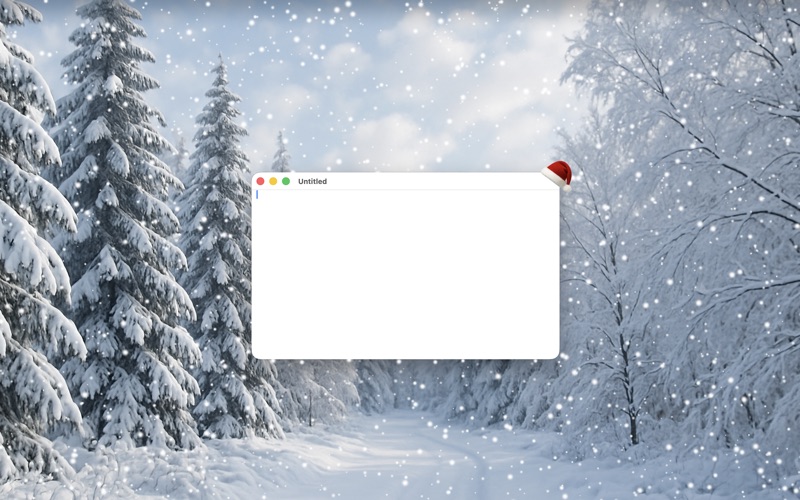
Bring a winter wonderland to your desktop with Let It Snow's realistic snow fall and get into that festive holiday feeling.
FEATURES:
* Realistic snow fall
* Random snow flurries
* Gusts of snow
PRO FEATURES (unlocked via in-app purchase):
* Lots more snow!
* Display a permanent snow drift at the bottom of the screen
* Snow only on the desktop image
* Display snow on up to four displays
* Change the snowflake image
* Change the opacity of the snowflakes
* Festive lights on active window
* Festive hat on active window
A number of settings let you control how the snow falls:
* Amount - Decide how much snow you want
* Size - Pick smaller or bigger snow flakes
* Speed - Select slower or faster snow
* Flurries - Choose if you more or less flurries of snow
* Gusts - Choose if you want more or less gusts of wind
* Snow behind active window
The app lives in the system bar, a star icon near to the volume control in the top-right of the desktop. Clicking on the star gives you access to the settings.
Let it Snow brings a little bit of winter magic to your Mac!
Note: Wallpaper not included with app.
Quoi de neuf dans la dernière version ?
* Gust & Flurry Improvements
* Instant settings response: Changing the Gusts or Flurries slider now takes effect immediately without requiring an app restart
* Enhanced gust frequency: Improved gust timing with better variation at all slider levels
* Increased gust density: Doubled the number of gust snowflakes per wind event for more dramatic visual impact
* More realistic gust angles: Gust snowflakes now follow natural trajectories limited to approximately 30 degrees from vertical, preventing unrealistic horizontal paths
* User Interface Improvements:
* Improved settings layout: Slider min/max labels (Lighter/Heavier, Smaller/Bigger, etc.) are now positioned closer to the sliders for better visual grouping
* Bug Fixes:
* Fixed Gusts slider not responding: Changing the Gusts slider now takes effect immediately instead of requiring an app restart
* Fixed Flurries slider not responding: Changing the Flurries slider now takes effect immediately instead of requiring an app restart