iPhoneAddict Apps
  • Actualités
  • Accueil Apps
  • iPhone
  • iPad
  • Universelles
  • Mac
  • Apple TV
KG KultureGeek
App
iPhone / iPad Télécharger iAddict v5 Mac Télécharger iAddict Mac
  • Actualités
  • Accueil Apps
  • iPhone
  • iPad
  • Universelles
  • Mac
  • Apple TV
  • Archives keynotes
  • Firmwares & iTunes
  • Contactez-nous
  • Comparateur de prix
  • KultureGeek
Accueil » Liste des Apps » Apps Mac » Graphisme et design » Comic Thumbs
L'application n'est plus disponible sur l'App Store français
1.0 macOS €3,99€ David Garsha 0 0 While making my first comic, I drew hundreds of thumbnail sketches to try out different approaches for each page. Then I wanted to see them all together so I could see where a page turn would happen, and how each page would look next to the opposing...
Comic Thumbs

Comic Thumbs

macOS / Graphisme et design

3,99€ au lieu de 4,99€
Acheter sur l'App Store
Facebook X E-mail

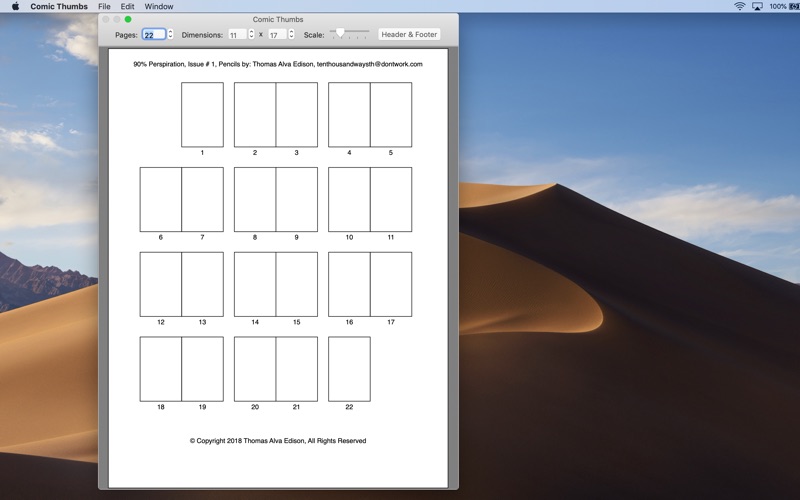
While making my first comic, I drew hundreds of thumbnail sketches to try out different approaches for each page. Then I wanted to see them all together so I could see where a page turn would happen, and how each page would look next to the opposing page. I drew a template with each of the thumbnails paired up with their opposing pages, and numbered each one. For each subsequent revision, I drew it all over again. Finally I realized that part was best done by a computer. It would save me time, be less messy, and the proportions would always be correct. So I made this app.

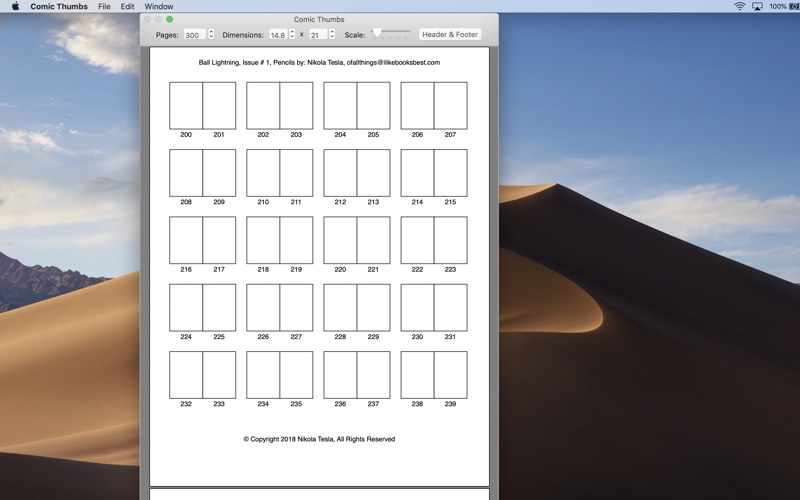
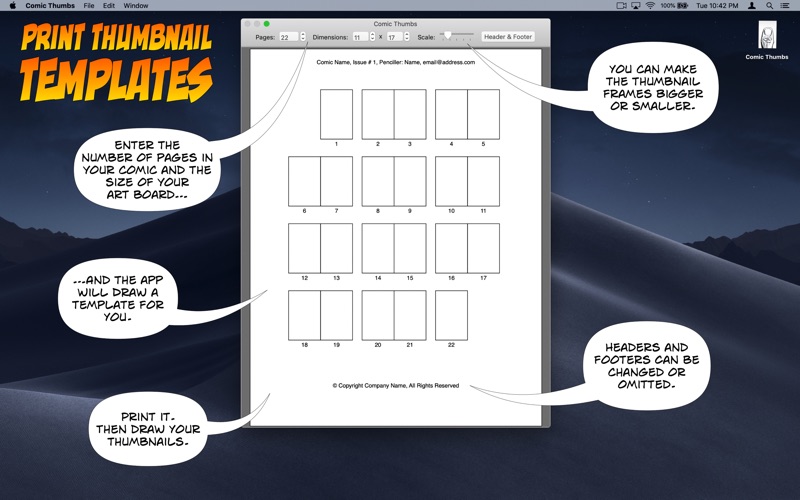
You tell Comic Thumbs how many pages will be in your comic, manga, or graphic novel. Then tell it the dimensions of your art board. The app will draw the template for you, with the pages paired up and numbered. You can customize the size of the thumbnail frames to fit more of them on a sheet of paper, or enlarge them so you can add more detail. You can add text to the header and/or footer, such as the name and issue number of your comic, your contact information, copyright, or whatever you need to communicate when sending these thumbnails to your team. Then print and draw. All of these settings are remembered the next time you launch the app.

I hope you like it and I hope it saves you some time.
En voir plus...

  • Screenshot #1 pour Comic Thumbs
  • Screenshot #2 pour Comic Thumbs
  • Screenshot #3 pour Comic Thumbs

D'autres applications du développeur

Bookbinder's CollatorBookbinder's CollatormacOS

Note

(0 note)

Détails sur l'application

Version
1.0
Taille
6.7 Mo
Version minimum de macOS
10.11
Dernière mise à jour
24/11/2018
Publié par
David Garsha

Newsletter App Store

Recevez chaque jour les meilleures promos

Actualité Apple

Image John Ternus, futur patron d’Apple, recrute une ex-vice-présidente… d’Apple
John Ternus, futur patron d’Apple, recrute une ex-vice-présidente… d’Apple
Image D’ex-employés Apple peuvent récupérer des documents confidentiels via iCloud
D’ex-employés Apple peuvent récupérer des documents confidentiels via iCloud
Image Apple s’attaque encore au Royaume-Uni pour empêcher une backdoor
Apple s’attaque encore au Royaume-Uni pour empêcher une backdoor
Image iPhone Ultra pliable : pas de délai, les problèmes de production sont résolus
iPhone Ultra pliable : pas de délai, les problèmes de production sont résolus
iPhoneAddict Apps

Le catalogue iPhoneAddict pour suivre les nouveautés, mises à jour et baisses de prix de l’App Store.

Apps

Toutes les apps iOS iPhone iPad Universelles Mac Apple TV

iPhoneAddict

Actualité Apple Archives keynotes Contact À propos KultureGeek

Suivez-nous

©2009-2026 i2CMedia. Tous droits réservés.