• KultureGeek
  • Comparateur de prix
       
iPhoneAddict
 iAddictv5Notre Application iPhone/iPad
  • Accueil Apps
  • Actualité Apple
  • Keynote Apple
  • Firmwares & iTunes
  • Contactez-nous
Accueil » Liste des Apps » Apps Mac » Graphisme et design » Diagram Maker
L'application n'est plus disponible sur l'App Store français
1.0.1 macOS €9,99€ 光建 张 0 0 Diagram Maker is a tool for creating flowchart, wireframe, mind map and other diagrams. It's very easy to use, with this app you can quickly build a attractive diagram and use it instantly in your other Mac projects. Features: - Most operations...
Diagram Maker

Diagram Maker

macOS / Graphisme et design

9,99€ au lieu de 11,99€
Acheter sur l'App Store

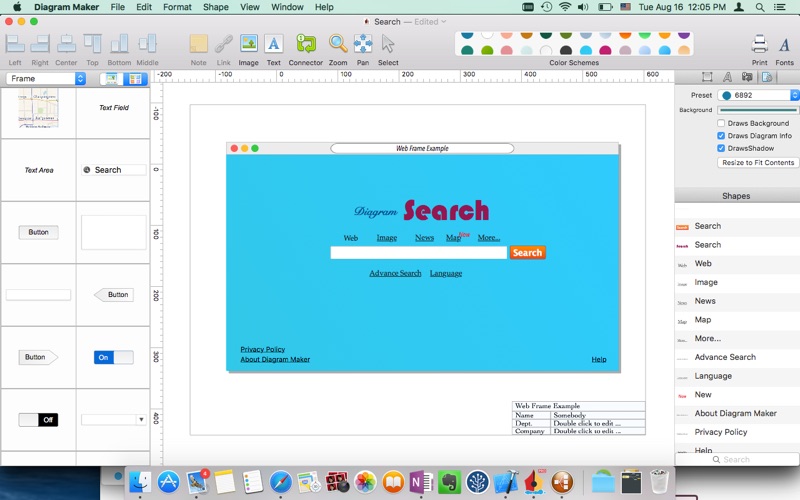
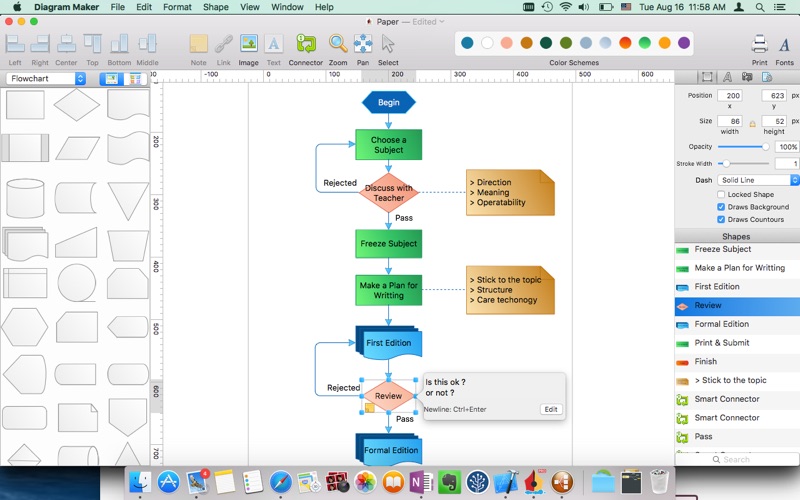
Diagram Maker is a tool for creating flowchart, wireframe, mind map and other diagrams. It's very easy to use, with this app you can quickly build a attractive diagram and use it instantly in your other Mac projects.

Features:

- Most operations accomplished by dragging: Dragging to add new shape, Dragging to change shape, and Dragging to change color scheme.
- Auto resize shape to match text contents.
- Add note and link for shapes.
- Many built-in shapes, includes: basic, flowchart, wireframe, mindmap, and some general containers.
- Support global document color scheme.
- Auto resize page.
- Auto record text attributes.
- Smart connector support 3 corner style.
- Easily export scaled image (2x, 3x, 4x …).
- Group / Ungroup shapes.
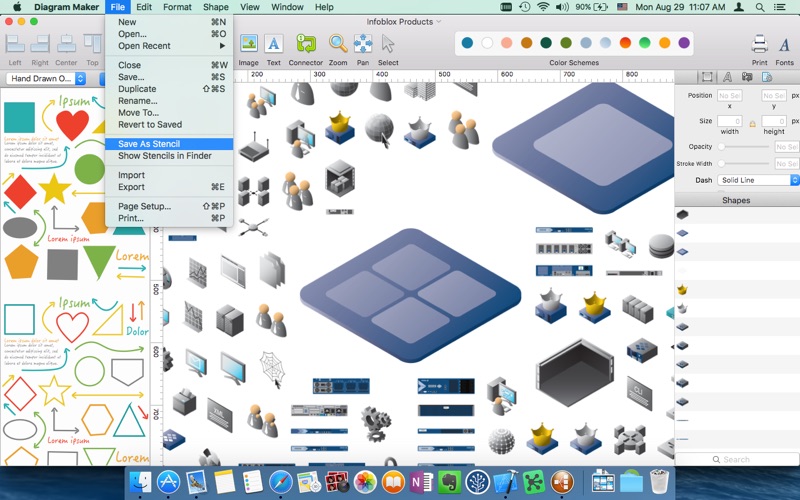
- Import OmniGraffle stencils or documents.
- Export to many image formats : Png, Jpeg, Tiff ...

Note: Some shapes on screenshot but not included in this app are created by user!

How to import Omnigraffle stencils:

1. Download a stencil file from https://www.omnigroup.com/omnigraffle/stencils or any other place (normally, the downloaded file’s extension is “.gstencil")

2. Click “File”->”Import” to import the downloaded file. If import success, after a little while, stencils will displayed in editor. instead, an error window will present, means that this file is not supported by Diagram Maker.

3. Click “File”->”Save as Stencil” to create yourself stencils. The new stencils can be select from the stencils popup button (Which also contains the built-in stencils, such as “Basic”,"Devices”...)

If you have any questions please feel free to contact me at
Email: diagrammaker@outlook.com

Enjoy !

En voir plus...

Quoi de neuf dans la dernière version ?

Added rotation support.
  • Screenshot #1 pour Diagram Maker
  • Screenshot #2 pour Diagram Maker
  • Screenshot #3 pour Diagram Maker

D'autres applications du développeur

Flowchart Designer Premium
/ macOS
Flowchart Designer
Flowchart Designer
/ macOS
Osketch - Logo, Icon & UI Design
/ macOS
Mydea (mindmap)
Mydea (mindmap)
/ macOS
Mydea (mindmap)
Mydea (mindmap)
/ iOS Universel
Mydea Lite (mindmap)
/ macOS
Voir toutes les apps

Note

(0 note)

Détails sur l'application

Version
1.0.1
Taille
3.1 Mo
Version minimum de macOS
10.11
Dernière mise à jour
14/09/2016
Publié par
光建 张

Newsletter App Store

Recevez chaque jour les meilleures promos

Actualité Apple

Image Un très Joyeux Noël à tous nos « i-addicts » !!!
Un très Joyeux Noël à tous nos « i-addicts » !!!
Image Un vol d’iPhone, iPad et Apple Watch chez un revendeur Apple à Bayonne
Un vol d’iPhone, iPad et Apple Watch chez un revendeur Apple à Bayonne
Image Apple Intelligence doit réussir un test de censure avant son arrivée en Chine
Apple Intelligence doit réussir un test de censure avant son arrivée en Chine
Image iPhone Air 2 : la sortie en 2026 plutôt qu’en 2027 refait parler d’elle
iPhone Air 2 : la sortie en 2026 plutôt qu’en 2027 refait parler d’elle
Partenaires : Actualité iPhone - Culture Geek
©2009-2025 i2CMedia | A propos |