SimpleMindMap
macOS / Graphisme et design
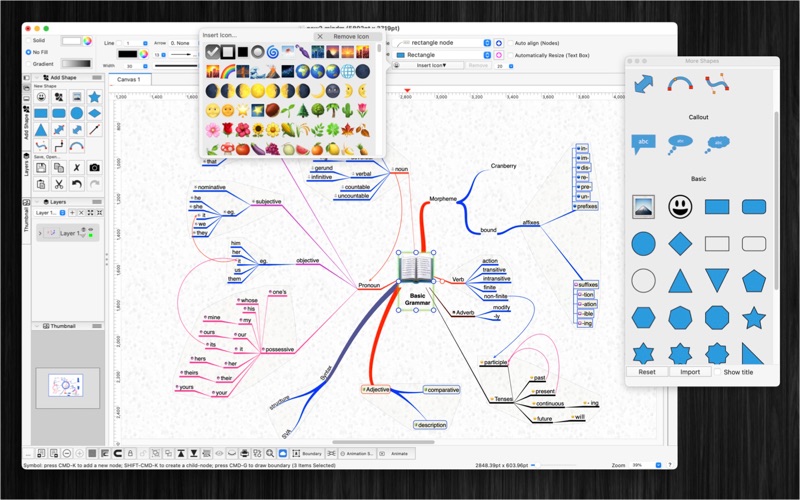
SimpleMindMap is an easy-to-use mind mapping app for writing your ideas down.
Highlights
+ Auto arrange layout or free layout
+ Can be used in many applications: Business, Education, Brainstorming, Project planning, Task lists, Summarizing
+ Support multi-languages: English, Deutsch, Français, 日本語, 한국어, Español, Português, Čeština, Dansk, Suomi, Italiano, Nederlands, Norsk, Polski, Русский, Svenska, ไทย, Türkçe, Tiếng Việt, 中文(中国), 中文(台灣)
+ Easy to use
+ Add image file or colorful emoji symbols
+ Change and customize the appearance of shapes, nodes, topics.
The application could record knowledge, helping you in learning, brainstorming, memory, visual thinking, and problem solving.
- To create main-note: just double-clicking anywhere on the canvas and then typing
- To create child-notes: select a parent node then press key CMD-K
- To draw connection between notes: hold CONTROL key then draw connection or hold right mouse button then drag drop
- To add text to a connection: just press ENTER or SPACE or double-click on the connection line
FEATURES:
- Create new topic, node by press key CMD-K , or new child-node by key CMD-Shift-K
- Connect notes using right mouse with drag and drop
- Write notes anywhere on the virtual paper
- Support multi-canvas (multi-tabs) for each document
- Generate/Import mind map from plain text
- Export mind map to plain text
- Include 2000 beautiful Symbols
- Allow to insert image by drag image to the canvas
- Allow to Animate your drawing
- Move and arrange notes easily
- Support custom background
- OPEN/SAVE to “*.mindm” file so that you could load it later for editing
- Export to png, jpeg, tiff, pdf image file (shortcut key: CMD-E)
- Capture To Clipboard: Press "CMD-4” or click on Capture button
- Print supported (shortcut key: CMD-P)
- Unlimited Undo/Redo (shortcut key: CMD-Z / Shift-CMD-Z)
- Copy / Paste (shortcut key: CMD-C / CMD-V)
- Duplicate select items (shortcut key: CMD-D)
- Group / Ungroup Items (shortcut key: CMD-R / Shift-CMD-R)
- Lock/Unlock items position (shortcut key: CMD-L / Shift-CMD-L)
- Scale size of select items
- Snap to Grid
- Auto Align with another object when resize or move
- Change display order
- Customization color / Font / Size / Line Type
- Allow to Export image in 300dpi
- Allow user to select items then save them to template list to reuse later
SUPPORT
If you have any questions or feedback, you can contact us by email on vu.tienthinh@yahoo.com
Quoi de neuf dans la dernière version ?
- Support macOS 13 Ventura
- Support multi-canvas (multi-tabs) for each document
- Support tree-view of all objects (via "Layers" Inspector-view)
- Generate/Import mind map from plain text
- Export mind map to plain text
- Allow to change order of Inspector-views on left/right sides of document window
- Improve UI
- Fix bugs
Previous updates:
- Support Apple Silicon
- Allow to turn on/off setting: Auto resize shape base in input text
- Press and hold SPACE-BAR to maneuver/scroll around document
- Improve ColorWell UI
- Support multi-languages: English, Deutsch, Français, 日本語, 한국어, Español, Português, Čeština, Dansk, Suomi, Italiano, Nederlands, Norsk, Polski, Русский, Svenska, ไทย, Türkçe, Tiếng Việt, 中文(中国), 中文(台灣)
- Improve print dialog (add Detail controls to print dialog)
- Add Decimal Precision setting
- Add thumbnail view
- Add more arrow types (architectural ticks....)
- Support sync to iCloud