• KultureGeek
  • Comparateur de prix
       
iPhoneAddict
 iAddictv5Notre Application iPhone/iPad
  • Accueil Apps
  • Actualité Apple
  • Keynote Apple
  • Firmwares & iTunes
  • Contactez-nous
Accueil » Liste des Apps » Apps Mac » Graphisme et design » Split Screen Viewer Plus
1.4 macOS €5,99€ Thomas Osthege 0 0 Sometimes you want to display images on the screen to compare them and/or decide which one suits best for a certain purpose. For example: You want to illustrate a flyer for a coffee product. You have 6 images and want to select the one that fits...
Split Screen Viewer Plus

Split Screen Viewer Plus

macOS / Graphisme et design

5,99€
Acheter sur l'App Store

Sometimes you want to display images on the screen to compare them and/or decide which one suits best for a certain purpose.

For example:
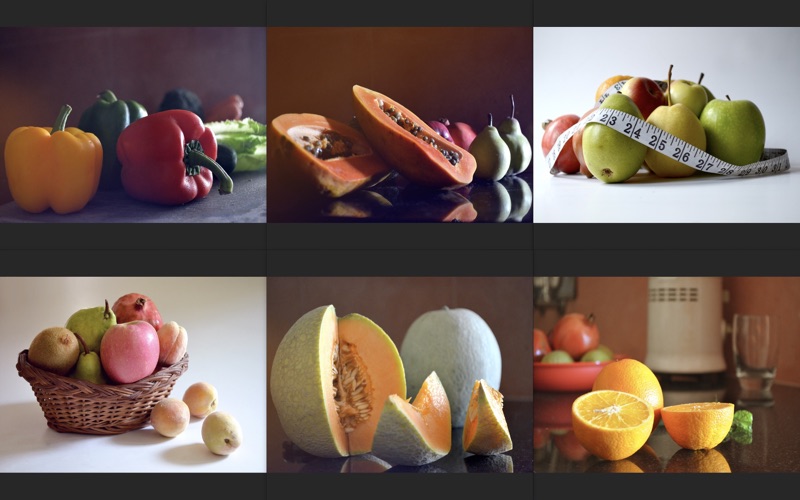
You want to illustrate a flyer for a coffee product. You have 6 images and want to select the one that fits best for your task. This is where this app can be very helpful. You additionally can show display a single image and pull it over the appropriate position of your text for a test. For this purpose Split Screen Viewer is very well suitable.

Any division from 1 row by 1 column up to 3 rows by 5 columns are available with Split Screen Viewer to display images symmetrically on the screen.

Additionally Split Screen Viewer is able to display any amount of images with any size without border at any position on the screen. Number of images is only limited by available memory.

If you have criticism or would like to see additional features, you are always welcome to contact me directly on https://eurocomp.info/en/contact.htm. Apple unfortunately gives us no chance to communicate directly in this environment.

Additional Features of this Plus-Edition of this app:

• Plus-Feature “Position automatically”
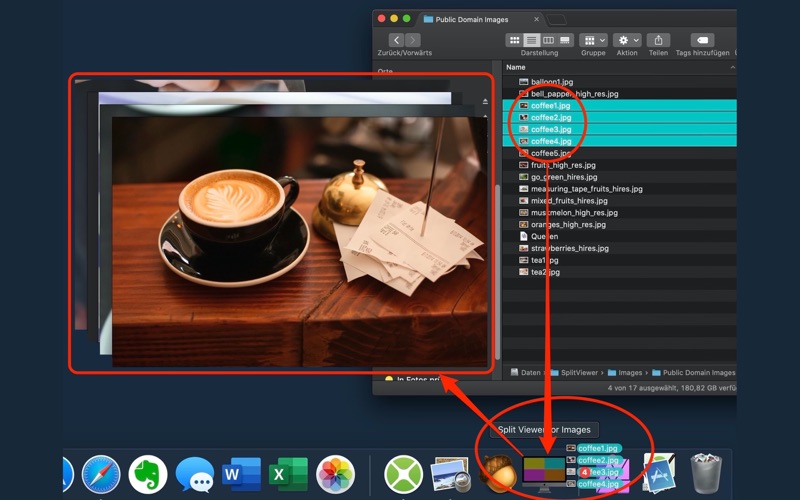
By dragging images onto the borders of the screen symbol they will be positioned on the screen automatically.

• Plus feature “Display Folder”
With the button "Display Folder" all images that a folder contains can be positioned on the screen automatically as well.

• Plus feature “Open”
One or more images can be displayed cascaded on the screen by using the Open menu command.

• Plus feature “Close all windows”
The Close all windows menu command closes all pictures that are shown on the screen at once.

En voir plus...

Quoi de neuf dans la dernière version ?

√ Some user interface improvements.
√ Help extended essentially.
√ Program icon is now more intuitive.

  • Screenshot #1 pour Split Screen Viewer Plus
  • Screenshot #2 pour Split Screen Viewer Plus
  • Screenshot #3 pour Split Screen Viewer Plus

D'autres applications du développeur

ECText Schulschriften und mehr
/ macOS
Split Screen Viewer
Split Screen Viewer
/ macOS
Touch File Date and Time
/ macOS

Note

(0 note)

Détails sur l'application

Version
1.4
Taille
5.4 Mo
Version minimum de macOS
10.10.0
Dernière mise à jour
13/03/2021
Publié par
Thomas Osthege

Newsletter App Store

Recevez chaque jour les meilleures promos

Actualité Apple

Image Protective Custody : Benicio Del Toro et Ben Stiller réunis dans une comédie Apple TV
Protective Custody : Benicio Del Toro et Ben Stiller réunis dans une comédie Apple TV
Image Lil’ Finder Guy : Apple dévoile les premiers croquis de la « mascotte » du MacBook Neo
Lil’ Finder Guy : Apple dévoile les premiers croquis de la « mascotte » du MacBook Neo
Image Le mode vocal de Claude s’améliore sur iPhone avec des modèles IA plus puissants
Le mode vocal de Claude s’améliore sur iPhone avec des modèles IA plus puissants
Image Les Fous du Pickleball : la comédie sportive produite par Ben Stiller est disponible sur Apple TV
Les Fous du Pickleball : la comédie sportive produite par Ben Stiller est disponible sur Apple TV
Partenaires : Actualité iPhone - Culture Geek
©2009-2026 i2CMedia | A propos |