iPhoneAddict Apps
  • Actualités
  • Accueil Apps
  • iPhone
  • iPad
  • Universelles
  • Mac
  • Apple TV
KG KultureGeek
App
iPhone / iPad Télécharger iAddict v5 Mac Télécharger iAddict Mac
  • Actualités
  • Accueil Apps
  • iPhone
  • iPad
  • Universelles
  • Mac
  • Apple TV
  • Archives keynotes
  • Firmwares & iTunes
  • Contactez-nous
  • Comparateur de prix
  • KultureGeek
Accueil » Liste des Apps » Apps Mac » Medecine » My Health Report
1.2.4 macOS €3,99€ Dmitry Kozlov 0 0 The Cristallight’s My Health Report application is your comprehensive health data manager and personal health diary. It allows to store the health information, and review it in a Charts, or Data Table modes, edit the information, save it as a PDF...
My Health Report

My Health Report

macOS / Medecine

3,99€ au lieu de 5,99€
Acheter sur l'App Store
Facebook X E-mail

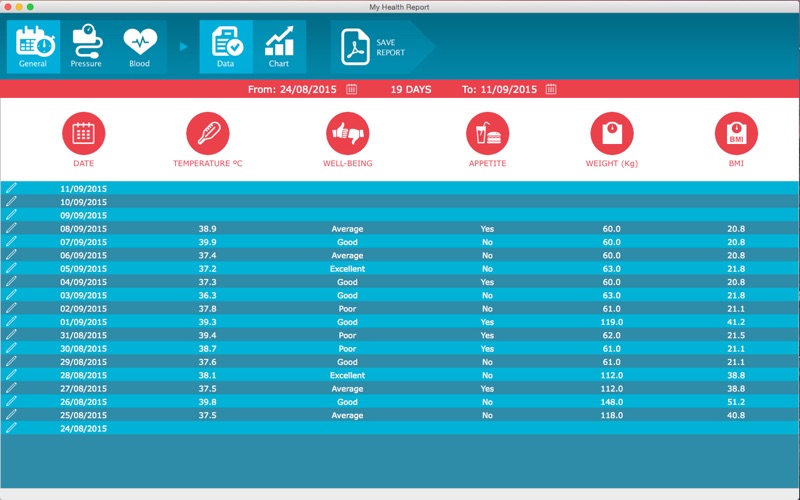
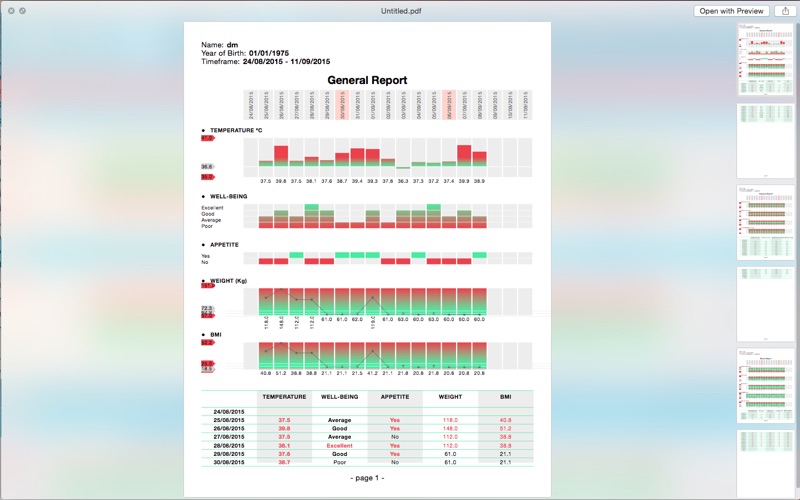
The Cristallight’s My Health Report application is your comprehensive health data manager and personal health diary. It allows to store the health information, and review it in a Charts, or Data Table modes, edit the information, save it as a PDF report, or just print it, making it an analog of medical lab test report software.


Not only the general health parameters, such as Temperature, Well-being, Appetite, Weight, and BMI values are available, but also the Pressure, and Blood groups, thus making the My Health Report to be a blood test monitor, and pressure test monitor software at once. Using the Height Preference value, and BMI normal range, the application calculates optimal weight range.


The Pressure group parameters include Systolic, Diastolic, Pulse, and Pulse Pressure values.

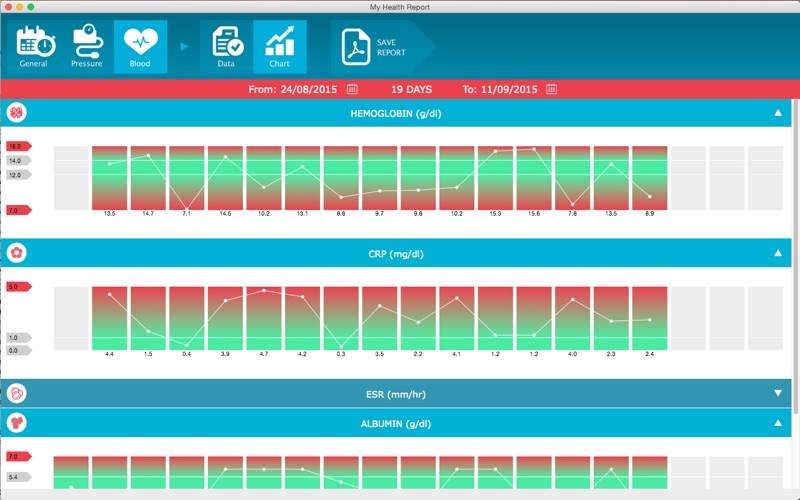
The Blood ones allow you to add your Hemoglobin, CRP(C-reactive protein), ESR (erythrocyte sedimentation rate), Albumin, and WBC (White blood cells) values.

The product has the intuitive interface allowing you to add your health tracking data in just a few clicks.

1. Select the data type you wish to add or edit from General and Pressure and Blood groups,

2. Double click on a row of data, or column on a chart and set the values in the Edit Data screen.

3. To view charts select proper tool button.


Main Features:
• Intuitive interface,
• General, Pressure and Blood groups of parameters,
• Showing your data in Data Table or Charts modes,
• Easily editing your health data,
• Dates range for viewing and saving reports,
• Change the measurement units to represent data, and
• Save Report as PDF file, or print it.

En voir plus...

Quoi de neuf dans la dernière version ?

compatibility changes
  • Screenshot #1 pour My Health Report
  • Screenshot #2 pour My Health Report
  • Screenshot #3 pour My Health Report

D'autres applications du développeur

Home Business CardHome Business CardmacOSWMF Converter ProWMF Converter PromacOSPDF Image Extractor ProPDF Image Extractor PromacOSCD DVD Label MakerCD DVD Label MakermacOSiBarcoderiBarcodermacOSiBarcoder LiteiBarcoder LitemacOS

Note

(0 note)

Détails sur l'application

Version
1.2.4
Taille
4.3 Mo
Version minimum de macOS
10.15
Dernière mise à jour
01/10/2024
Publié par
Dmitry Kozlov

Newsletter App Store

Recevez chaque jour les meilleures promos

Actualité Apple

Image Les États-Unis ne veulent pas qu’Apple achète de la RAM chinoise
Les États-Unis ne veulent pas qu’Apple achète de la RAM chinoise
Image Apple retire sa pub polémique avec un enfant et un iPhone en Italie
Apple retire sa pub polémique avec un enfant et un iPhone en Italie
Image L’iPhone Ultra pliable va-t-il résoudre les défauts du Galaxy Z Fold 8 ?
L’iPhone Ultra pliable va-t-il résoudre les défauts du Galaxy Z Fold 8 ?
Image Mac : des hackers exploitent la faille du partage d’écran avec un mineur de cryptomonnaie
Mac : des hackers exploitent la faille du partage d’écran avec un mineur de cryptomonnaie
iPhoneAddict Apps

Le catalogue iPhoneAddict pour suivre les nouveautés, mises à jour et baisses de prix de l’App Store.

Apps

Toutes les apps iOS iPhone iPad Universelles Mac Apple TV

iPhoneAddict

Actualité Apple Archives keynotes Contact À propos KultureGeek

Suivez-nous

©2009-2026 i2CMedia. Tous droits réservés.