iPhoneAddict Apps
  • Actualités
  • Accueil Apps
  • iPhone
  • iPad
  • Universelles
  • Mac
  • Apple TV
KG KultureGeek
App
iPhone / iPad Télécharger iAddict v5 Mac Télécharger iAddict Mac
  • Actualités
  • Accueil Apps
  • iPhone
  • iPad
  • Universelles
  • Mac
  • Apple TV
  • Archives keynotes
  • Firmwares & iTunes
  • Contactez-nous
  • Comparateur de prix
  • KultureGeek
Accueil » Liste des Apps » Apps Mac » Musique » Magnetola - Vintage Cassette Player with Sound Softener
1.0.8 macOS €Gratuit Hovik Melikyan 0 0 Magnetola is the first sensory-friendly music player that can play tracks either unaltered or, for more sensitive ears, slightly "softened". The player is stylized as a vintage compact cassette player. The softener filter can smoothen the rough...
Magnetola - Vintage Cassette Player with Sound Softener

Magnetola - Vintage Cassette Player with Sound Softener

macOS / Musique

Gratuit
Obtenir sur l'App Store
Facebook X E-mail

Magnetola is the first sensory-friendly music player that can play tracks either unaltered or, for more sensitive ears, slightly "softened". The player is stylized as a vintage compact cassette player.

The softener filter can smoothen the rough edges of individual instruments, such as the drums or electric guitars, as well as it can follow the overall dynamic of the song and suppress sudden "big" attacks (think the beginning of Pink Floyd's The Wall).

The player also features sliders for adjusting highs and lows (that's shelving filters in technical language). You can either boost or cut off high and low frequencies to your liking; we call these parameters "silk" and "wool" respectively.

Of course you can listen to your music in its original, unaltered form. When the app is started for the first time, all sliders are in their neutral positions that don't affect the audio in any way. You can always double click on any slider to snap it to its default position.

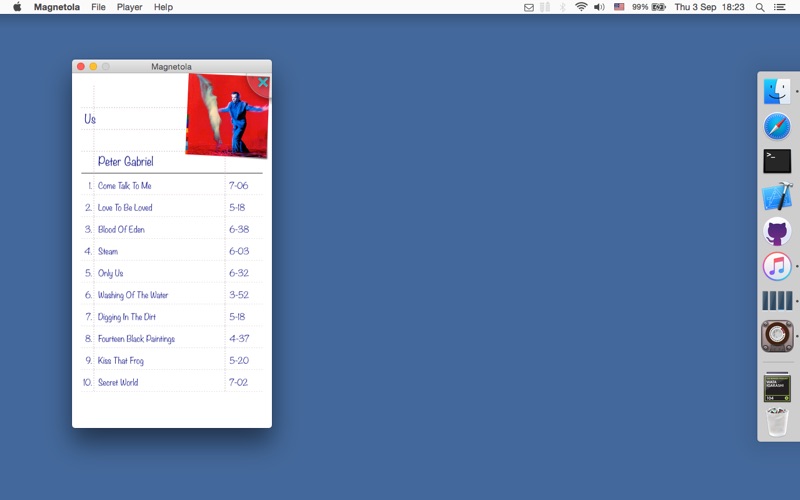
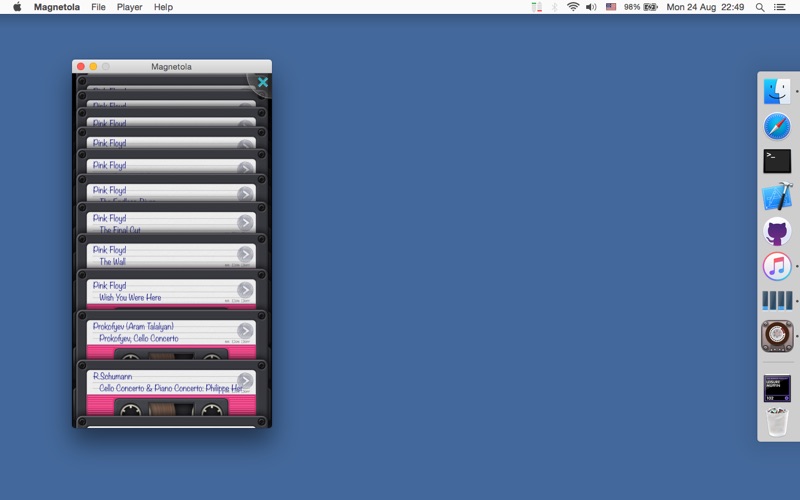
Magnetola plays songs from your iTunes music library. Click on the top part of the cassette to choose an album or a song to play. The playing, rewinding and skipping buttons are at the bottom of the player's window, but you can also press space to play and pause music. Click on the tape window to see the current song position or change it by moving the slider.

Have fun with the Fast Forward/Rewind functions (left and right arrows on the keyboard) that work almost exactly like on the old good cassette players. Pressing both buttons simultaneously does something, too.

Supported audio file formats are: MP3, M4A, AIFF, WAV and ADTS.

Currently available on the Mac running OS X 10.10 or later, as well as on the iPhone and iPad running iOS 8 or later.

The mobile and desktop versions are almost identical with a few additional features available only on the desktop: (1) keyboard shortcuts for playing/pausing, fast-forwarding/rewinding and skipping; (2) the ability to load any local audio file or entire directories, not only from the iTunes music library, though the "cassette collection" shows only the contents of your iTunes library, and (3) currently the desktop version doesn't include podcasts from your iTunes music library due to App Store "sandbox" restrictions, however, you can load podcast files into the player using the Open menu.

Thanks for considering Magnetola, and enjoy the music!

En voir plus...

Quoi de neuf dans la dernière version ?

- Song position tracker with a slider added: click on the tape window to see the tracker
- Library load time improved
- Rewind audio improved (now plays uninterrupted)
- Stability issue fixed for certain Mac computers
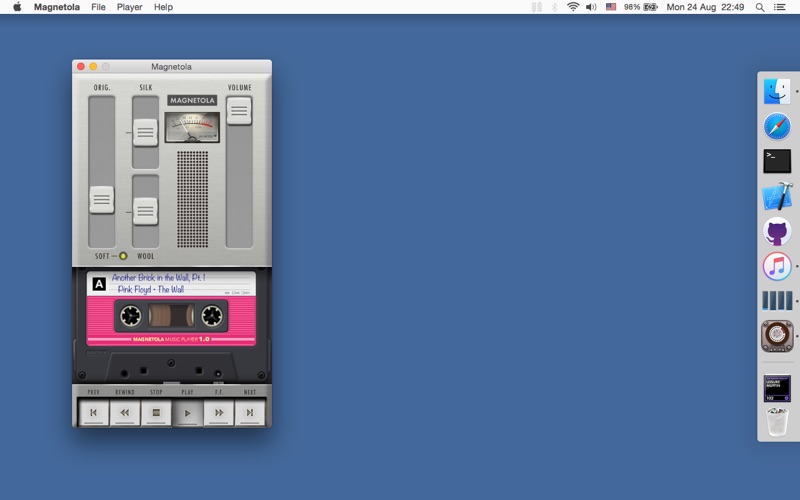
  • Screenshot #1 pour Magnetola - Vintage Cassette Player with Sound Softener
  • Screenshot #2 pour Magnetola - Vintage Cassette Player with Sound Softener
  • Screenshot #3 pour Magnetola - Vintage Cassette Player with Sound Softener

D'autres applications du développeur

Magnetola - Vintage Cassette Player with Sound SoftenerMagnetola - Vintage Cassette Player with Sound SofteneriPhoneFutureCalc: ergonomic calculator for single-handed useFutureCalc: ergonomic calculator for single-handed useiPhoneFutureDialer: ergonomic dialer for single-handed use, with fast T9 contact searchFutureDialer: ergonomic dialer for single-handed use, with fast T9 contact searchiPhoneFuturiana: Pentix-like puzzle with unique, intuitive way of playingFuturiana: Pentix-like puzzle with unique, intuitive way of playingiPhone

Note

(0 note)

Détails sur l'application

Version
1.0.8
Taille
3.9 Mo
Version minimum de macOS
10.10
Dernière mise à jour
24/03/2016
Publié par
Hovik Melikyan

Newsletter App Store

Recevez chaque jour les meilleures promos

Actualité Apple

Image iOS 27 : Apple rend disponible un nouveau firmware bêta pour les AirPods
iOS 27 : Apple rend disponible un nouveau firmware bêta pour les AirPods
Image Telegram explique pourquoi Apple a temporairement retiré son application de l’App Store
Telegram explique pourquoi Apple a temporairement retiré son application de l’App Store
Image Keynote iPhone 18 Pro et Ultra : Apple prépare le terrain avec ses employés
Keynote iPhone 18 Pro et Ultra : Apple prépare le terrain avec ses employés
Image Apple Card et Booking.com accélèrent l’obtention du statut Genius pour les voyageurs
Apple Card et Booking.com accélèrent l’obtention du statut Genius pour les voyageurs
iPhoneAddict Apps

Le catalogue iPhoneAddict pour suivre les nouveautés, mises à jour et baisses de prix de l’App Store.

Apps

Toutes les apps iOS iPhone iPad Universelles Mac Apple TV

iPhoneAddict

Actualité Apple Archives keynotes Contact À propos KultureGeek

Suivez-nous

©2009-2026 i2CMedia. Tous droits réservés.