Learn - Final Cut Pro X 10.1 Edition
macOS / Photo et vidéo
• This is the definitive, fully comprehensive training course for Final Cut Pro X.
• Completely recorded with Final Cut Pro X 10.1.2
• Now includes access to sample video, stills and audio clips to allow you to follow the instruction with a hands-on experience.
• NEW Index feature to allow quick reference to video material.
• 2 PDF indexes are also included as part of the course material, “All lessons” and also “A-Z of all topics”.
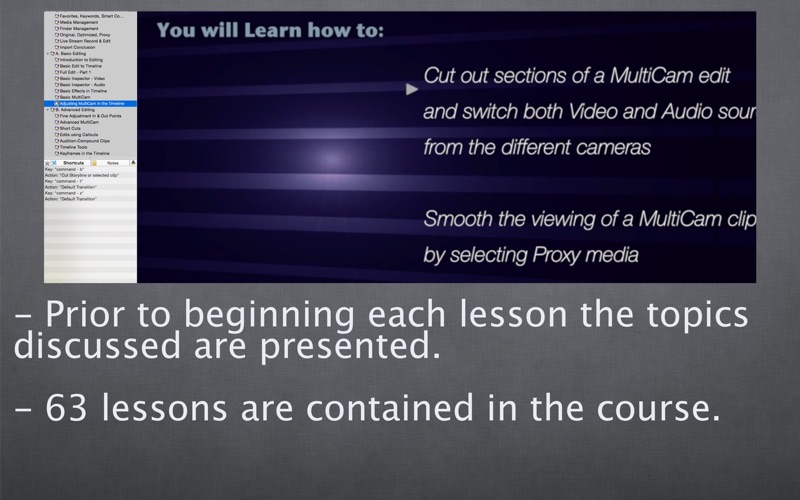
• Over 14 hours of Video tutorials in 63 individual lessons!
• Over 600 topics!
The course covers separate lessons for beginners and for the more advanced. This means that those new to Final Cut Pro are not distracted by unwanted detail and that the seasoned user can learn about advanced information without having to go through the basic details they already know about. These advanced lessons cover topics like: Color correction, Skin tone correction, Video Scopes, Audio correction, Keying, Masks, modifying Effects & Generators and Text search and correction.
A major value with Final Cut Pro is the organization of footage, with this course you will find detailed discussion on the ways to organize and quickly be able to access footage for your main edit. You are assisted through the training with clear explanations and reasons why you are using the features.
When you have completed this course you will be able to edit on a commercial basis and will understand workflows that will allow you to complete edits in a timely manner while maintaining a quality output.
The voice and guide behind this course is Bruce Macbryde. Bruce is CEO of VideoEditOz a Sydney production facility specializing in events and corporate web video. Bruce has been editing with Final Cut Pro since 2002, and was the NSW training manager for Final Cut Pro and other Apple software with Australian Apple reseller NextByte for several years. Currently Bruce provides training for Final Cut Pro X, iMovie and Motion.
Course Outline...
Basic Import and organization: Run Time: About 1 ½ hours
1st Instructions How to use the Tutorial
Import Introduction
Quick Start: Make a 5 minute Movie
Basic Libraries
How to Update Events & Projects to 10.1
Import from a Card Camera
Import from a Tape Camera or file
Basic Preferences
Basic Timeline
Basic Viewer
Middle Menu Bar
The Effects Browse
Advanced Import and organization: Run Time: About 2 ¼ hours
Library & Event Organization
Detailed Preferences
Transcoding prior to Import
Retaining in and out points
Re-Link Missing Media
Import from FCP7 to FCPX
Favorites, Keywords, Smart Collections
Media Management
Finder Management
Original, Optimized, Proxy
Live Stream Record & Edit
Import Conclusion
Basic Editing: Run Time: About 1 ¼ hours
Introduction to Editing
Basic Edit to Timeline
Full edit - Part 1
Basic Inspector - Video
Basic Inspector - Audio
Basic Effects in Timeline
Basic Multicam
Adjusting MultiCam In the Timeline
Advanced Editing:Run Time: About 7 ½ hours
Adjustments in the timeline
Fine Adjustment in & out points
Advanced Multicam
Short Cuts
Edits using Callouts
Audition-Compound Clips
Timeline Tools
Keyframes in the Timeline
Keyframes in the Viewer
Color Correction - Masks
Keying - Green Screen
Video Scopes, 2nd Monitor
Complete the Edit - Part 1
Complete the Edit - Part 2 Effects & Generators
Audio Correction
Editing Text
Edit Conclusion
Basic Export:Run Time: About ¾ hour
Introduction to Export
Export from Share Menu
Audio levels prior to export
Creating a DVD
Burning Blu-Ray to DVD media
Advanced Export: Run Time: About 1 ½ hours
Playback views
Exporting Roles
Export with Compressor
Quicktime Pro
Export with XML
Consolidate and Archive
Overview - Motion
Trouble Shooting Avoid the Spinning Beachball
Export Conclusion