MagicScroll
macOS / Photo et vidéo
MagicScroll 6 features:
Ease of Use
•Intuitive graphic interface.
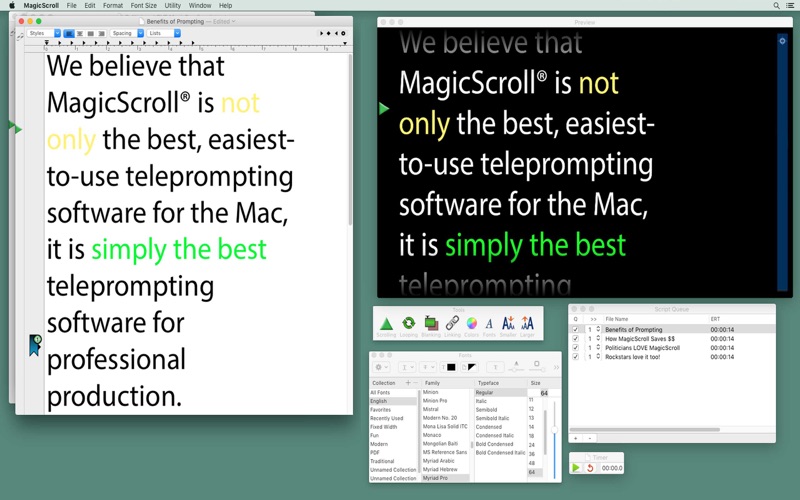
•Full text formatting of font, size, style and color.
•Adjustable margins help ‘center’ videotext over the lens of the camera behind the beamsplitter.
•Voice dictation enabled to help create or edit scripts.
•Find/Replace of text.
•Copy/Paste of STYLE applies color or formatting to script without changing the text.
•Use Emoji’s to cue your speaker to smile, laugh, applaude or other.
•PDF manual download available from our website.
• Dark Mode compatibility.
• Built in Spell Check.
Video Text Scrolling
•Smooth scrolling video text leverages Graphic GPU.
•Scale to fit or actual size for output screen/preview screen.
•Interactive, adjustable scroll speed using your trackpad or attached USB device.
•Full Screen scrolling when scrolling only on main screen of notebook.
•Selectable ‘output’ screen shows only video text (not tools) to talent
•Adjustable size, Preview window mirrors what goes out to attached monitors.
•Adjustable gradient fade at top/bottom of output screen helps draw speakers eyes to the text.
•Inverse video on/off selectable allows white text on black, or black text on white
•Reverse horizontal/vertical scan to flip your video text on your output screen. (For beamsplitters)
Prompting Specialty Features
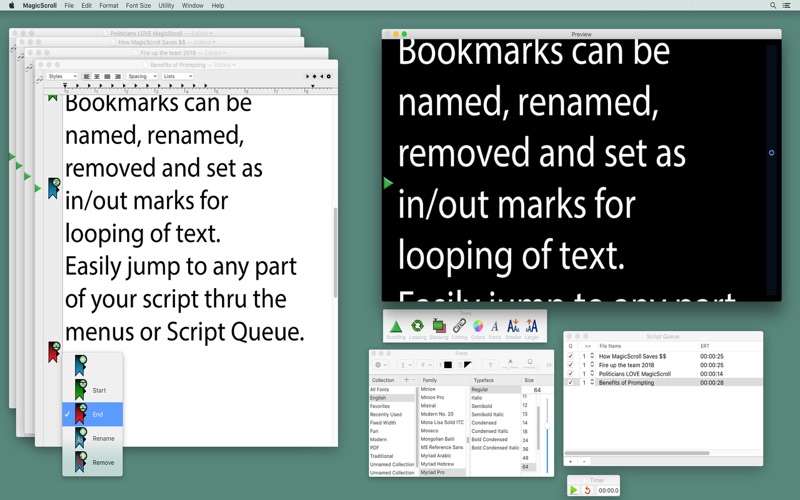
•Unlimited, nameable bookmarks.
•Looping of script - between set-able in and out marks.
•Script Queue window with saveable ‘setlists’ or show runs.
•Linking of files in Script Queue to live-scroll from one linked script to the next.
•Built-in stop watch can be toggled on/off to output screen.
•Paperclips can be instantly set while scrolling to mark a spot in the script.
•Blanking to Black sets the output screens to black with the click of a button.
•Custom blanking screen from your graphic, such as a company or show logo.
•Script Meter in Preview window shows approximate current scrolling location within script.
•Adjustable pointer to set ‘current line’ of text for speaker’s focus.
Quoi de neuf dans la dernière version ?
Added "cmd+opt" to force a re-set of the prefs file.
Other bug fixes.