iPhoneAddict Apps
  • Actualités
  • Accueil Apps
  • iPhone
  • iPad
  • Universelles
  • Mac
  • Apple TV
KG KultureGeek
App
iPhone / iPad Télécharger iAddict v5 Mac Télécharger iAddict Mac
  • Actualités
  • Accueil Apps
  • iPhone
  • iPad
  • Universelles
  • Mac
  • Apple TV
  • Archives keynotes
  • Firmwares & iTunes
  • Contactez-nous
  • Comparateur de prix
  • KultureGeek
Accueil » Liste des Apps » Apps Mac » Photo et vidéo » Stream to LG TV
L'application n'est plus disponible sur l'App Store français
2.1.0 macOS €5,99€ 福池 王 0 0 Regardless of format limits, wirelessly stream any local videos, music, and photos (not web content) to LG TVs! No longer you have to spend hours converting the files to “right” formats before playing them with a USB drive. This app allows you...
Stream to LG TV

Stream to LG TV

macOS / Photo et vidéo

5,99€
Acheter sur l'App Store
Facebook X E-mail

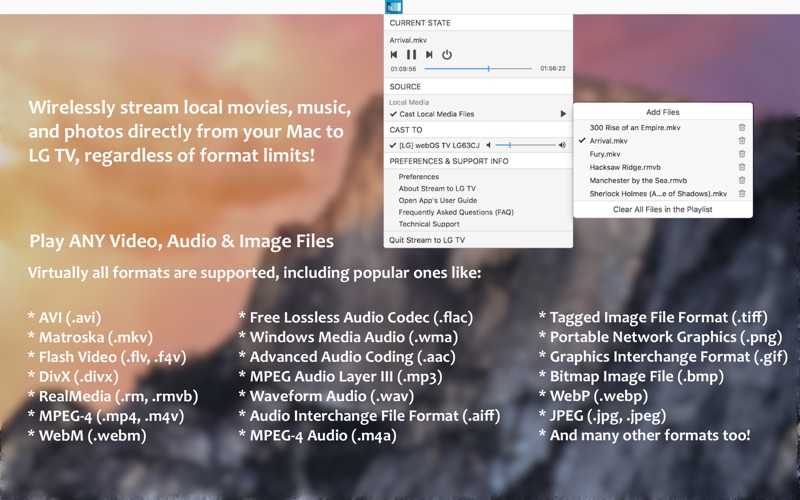
Regardless of format limits, wirelessly stream any local videos, music, and photos (not web content) to LG TVs!

No longer you have to spend hours converting the files to “right” formats before playing them with a USB drive. This app allows you to beam your media content directly from your Mac to the big screen, wirelessly! Simple as that!

To see the app in use, please watch a little demo video: http://bit.ly/2BUkZzt

* Cast Video, Music & Photos without Format Limits
You can easily cast local videos, music, and photos with Stream to LG TV. It will play virtually any file you throw at it to the big screen, including 3GP, AVI, ASF, FLV, M4V, MKV, MOV, MP4, MTS, RMVB, RM, WEBM, WMV, AAC, M4A, FLAC, MP3, OGG, WMA, JPEG, PNG, TIFF, SVG, WEBP, or any other format. Just select the file that you want to stream, and you can enjoy it on the big screen in no time!

* Playlist Customization
Playlist is also supported in the app. You can throw a whole bunch of files into the app and create a playlist, so that you can enjoy your beloved media content non-stop.

* Playback Control
You can use the app to change videos, songs, or pictures; play, pause, seek, and stop the playback. Volume adjustment is also available.

* Auto Device Discovery
Stream to LG TV automatically discovers supported devices connected to the same network as your Mac. No configuration needed, no hassle!

* Supported LG SmartTV models:
This app works on any LG Smart TV manufactured in 2012 and later.

**Please note that it’s not supported to stream DRM protected videos like movies or TV episodes purchased from iTunes. And this app doesn’t beam online videos on websites.**

Trademark Acknowledgement: “LG Life’s Good” is a registered trademark of LG Crop. This app is not endorsed by and has no association with the company listed herein.

En voir plus...

Quoi de neuf dans la dernière version ?

Added the ability to stream photos in variety of formats to LG Smart TV.

  • Screenshot #1 pour Stream to LG TV
  • Screenshot #2 pour Stream to LG TV
  • Screenshot #3 pour Stream to LG TV

Note

(0 note)

Détails sur l'application

Version
2.1.0
Taille
49.1 Mo
Version minimum de macOS
10.10
Dernière mise à jour
09/03/2018
Publié par
福池 王

Newsletter App Store

Recevez chaque jour les meilleures promos

Actualité Apple

Image iPhone « des vingt ans » : Apple testerait des écrans de 6,4 et 7 pouces sans bordures
iPhone « des vingt ans » : Apple testerait des écrans de 6,4 et 7 pouces sans bordures
Image Google Health synchronise maintenant ses données avec Apple Santé
Google Health synchronise maintenant ses données avec Apple Santé
Image Apple organise un concours de sosies de Ted Lasso dans son Apple Store de New York
Apple organise un concours de sosies de Ted Lasso dans son Apple Store de New York
Image La Russie s’attaque à Apple et la pré-installation d’applications
La Russie s’attaque à Apple et la pré-installation d’applications
iPhoneAddict Apps

Le catalogue iPhoneAddict pour suivre les nouveautés, mises à jour et baisses de prix de l’App Store.

Apps

Toutes les apps iOS iPhone iPad Universelles Mac Apple TV

iPhoneAddict

Actualité Apple Archives keynotes Contact À propos KultureGeek

Suivez-nous

©2009-2026 i2CMedia. Tous droits réservés.