• KultureGeek
  • Comparateur de prix
       
iPhoneAddict
 iAddictv5Notre Application iPhone/iPad
  • Accueil Apps
  • Actualité Apple
  • Keynote Apple
  • Firmwares & iTunes
  • Contactez-nous
Accueil » Liste des Apps » Apps Mac » Productivité » CopyClip 2 - Clipboard Manager
3.986 macOS €8,99€ FIPLAB Ltd 0 0 CopyClip 2 is the slickest and most efficient premium clipboard manager for your Mac. Running discreetly from your menu bar, the app stores all text that you have copied or cut in the past, allowing you to quickly find that snippet of text you've...
CopyClip 2 - Clipboard Manager

CopyClip 2 - Clipboard Manager

macOS / Productivité

8,99€ au lieu de 9,99€
Acheter sur l'App Store

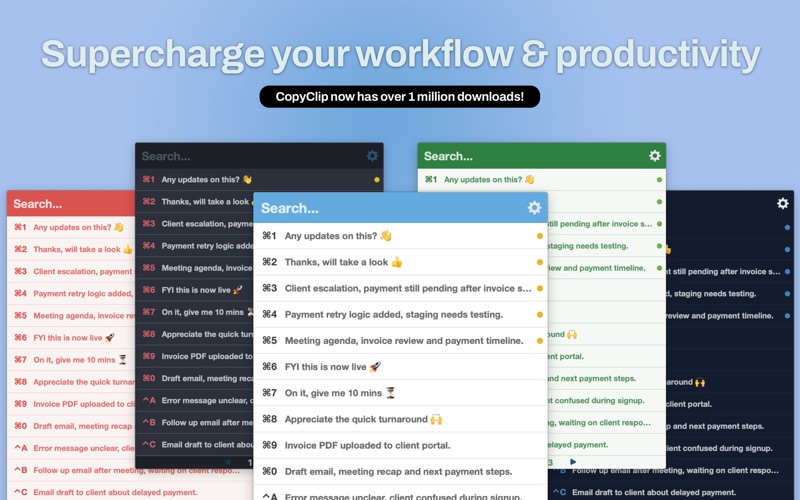
CopyClip 2 is the slickest and most efficient premium clipboard manager for your Mac. Running discreetly from your menu bar, the app stores all text that you have copied or cut in the past, allowing you to quickly find that snippet of text you've been looking for.

KEY FEATURES:
- Ability to store up to 9999 clippings
- Option to paste clippings with the original formatting if desired
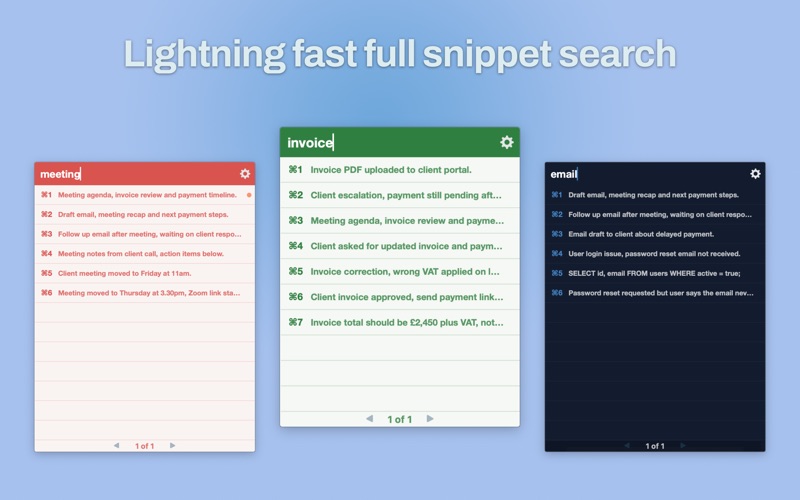
- Ability to search through clippings using the embedded search bar
- Keyboard shortcuts to paste clippings
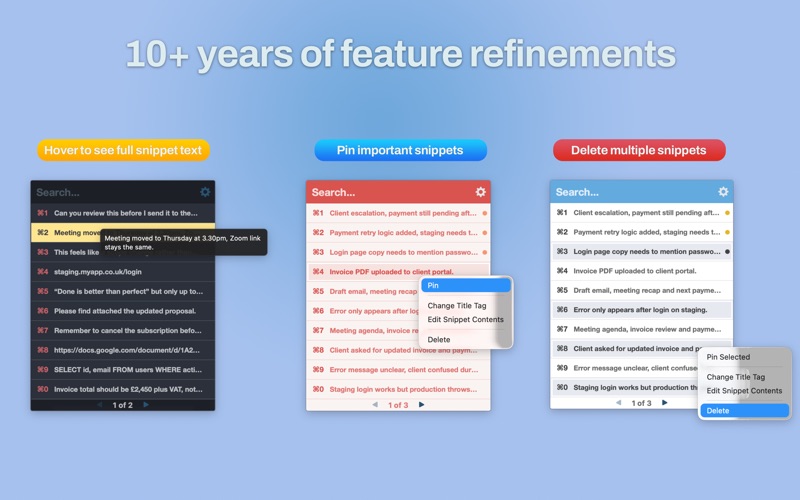
- Right-click option to ‘pin’ chosen clippings to the top of the list
- You can exclude apps you wish not to copy clippings from
- Option to edit and delete individual clippings, as well as delete all clippings at once
- Toggle between Dark/Light and various coloured user interface themes
- Works on both the menubar and the Dock

BENEFITS OF COPYCLIP 2:
- Improves your overall productivity, speed and efficiency
- Saves you time on the mundane task of cutting/copying/pasting
- All your recent copied items are stored on the app’s clipboard = less worries!
- Pinning items to the top of the list keeps those important clippings within easy reach
- The search bar helps to ensure anything you may have previously copied, is easy to find again

We've worked hard to make CopyClip 2 as simple and efficient as possible for you to use. We would love to hear your thoughts via email and make any improvements to future versions of this app. We intend to have an active development cycle powered by your feedback, love and support!

En voir plus...

Quoi de neuf dans la dernière version ?

- Fixed an issue where the clipboard window could appear on the wrong monitor in multi display setups.
- Resolved a bug that caused the tooltip to remain visible after the clipboard window was dismissed.
- You can now use Cmd + click to select multiple clips for deletion (hold Cmd down), even when one click paste is enabled.
- General stability and performance improvements.

  • Screenshot #1 pour CopyClip 2 - Clipboard Manager
  • Screenshot #2 pour CopyClip 2 - Clipboard Manager
  • Screenshot #3 pour CopyClip 2 - Clipboard Manager

D'autres applications du développeur

Disk Doctor: System Cleaner
/ macOS
Battery Health - Monitor Stats
/ macOS
CopyClip - Clipboard History
/ macOS
RSS Bot - News Notifier
/ macOS
Duplicate Detective: Cleaner
/ macOS
Disk Map: Visualize Disk Usage
/ macOS
Voir toutes les apps

Note

(0 note)

Détails sur l'application

Version
3.986
Taille
4.8 Mo
Version minimum de macOS
10.13
Dernière mise à jour
14/03/2026
Publié par
FIPLAB Ltd

Newsletter App Store

Recevez chaque jour les meilleures promos

Actualité Apple

Image Apple annonce AirPods Max 2, son nouveau casque avec plusieurs nouveautés
Apple annonce AirPods Max 2, son nouveau casque avec plusieurs nouveautés
Image Twisted Yoga : la docu-série sur les dérives sectaires d’une école de Yoga est disponible sur Apple TV
Twisted Yoga : la docu-série sur les dérives sectaires d’une école de Yoga est disponible sur Apple TV
Image iPad : un prix de vente moyen en hausse… qui compense le ralentissement du marché
iPad : un prix de vente moyen en hausse… qui compense le ralentissement du marché
Image MacBook Neo : passer à 1 To de stockage, c’est possible… mais pas facile
MacBook Neo : passer à 1 To de stockage, c’est possible… mais pas facile
Partenaires : Actualité iPhone - Culture Geek
©2009-2026 i2CMedia | A propos |