CRAX Commander
macOS / Productivité
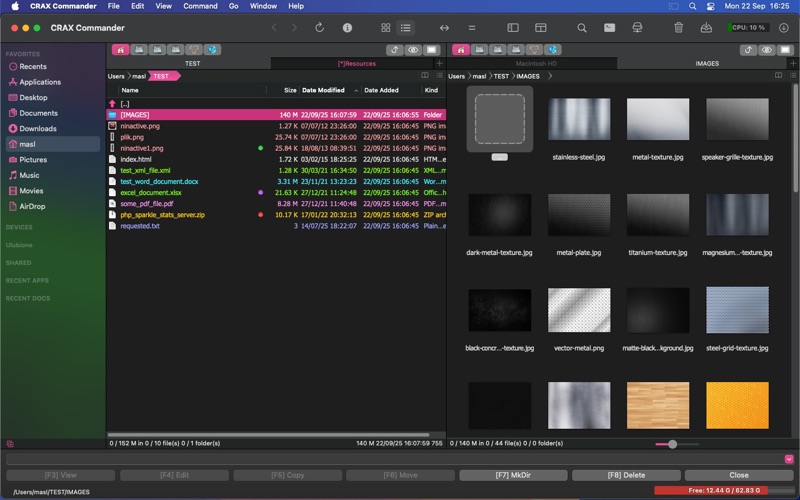
Looking for a fast and powerful Finder alternative? CRAX Commander is a dual-pane file manager for macOS designed to help you organize, copy, move, and manage files efficiently, both locally and on remote servers. Ideal for developers, IT professionals, and power users, CRAX combines advanced file operations, cloud integration, and version control in one sleek interface.
Key Features:
- Dual-pane interface with multiple tabs – manage files faster than Finder
- Customizable UI – fonts, colors, toolbar, behavior, and actions
- Keyboard shortcut and custom tool support – optimize your workflow
- Sidebar with favorites and color-coded files – quickly access what matters
- Background file operations – copy, move, and merge folders without freezing
- Connect to remote servers via FTP, FTPS, SFTP, SSH, WebDAV, SMB, AFP
- Cloud storage support – Dropbox, Google Drive, OneDrive
- Built-in text editor with syntax highlighting for developers
- Binary file split and merge
- Checksum calculation and verification for secure transfers
- Archive support – ZIP, RAR, 7-ZIP, GZIP, BZIP2, AR/IPK, ISO9660, RPM, including selective extraction and nested browsing
- Advanced search & duplicate file detection
- Multi-file renaming tool (Multi-Rename)
- Version control integration – Git and Subversion support
- Secure password storage using macOS Keychain
- Quick Look preview support for files and folders
CRAX Commander is your all-in-one file manager, combining speed, flexibility, and reliability. Whether you need to transfer files, sync folders, organize archives, or connect to remote servers, CRAX Commander makes file management on Mac easy, efficient, and powerful.
Download now and experience the most versatile dual-pane file manager for macOS.
Quoi de neuf dans la dernière version ?
- Added dynamic width, middle truncation, and hover tooltips for history popovers
- Improved Tahoe tab style by shifting the close button left and implementing adaptive text centering
- Fixed a crash that could occur during file copy progress updates
- Fixed potential permission errors (EPERM) during chmod operations on local file systems
- Fixed search window "Feed to listbox" and "Go to file" actions