iPhoneAddict Apps
  • Accueil Apps
  • iPhone
  • iPad
  • Universelles
  • Mac
  • Apple TV
KG KultureGeek
App
iPhone / iPad Télécharger iAddict v5 Mac Télécharger iAddict Mac
  • Accueil Apps
  • iPhone
  • iPad
  • Universelles
  • Mac
  • Apple TV
  • Actualité Apple
  • Archives keynotes
  • Firmwares & iTunes
  • Contactez-nous
  • Comparateur de prix
  • KultureGeek
Accueil » Liste des Apps » Apps Mac » Productivité » Factura
L'application n'est plus disponible sur l'App Store français
1.2 macOS €1,99€ Jelle Vandebeeck 0 0 Factura is a fast and easy way to organize that pile of files you keep trying to ignore. Select the files you want to put where they belong and copy or move them to any existing or new folder. You'll only need your keyboard to create your personal,...
Factura

Factura

macOS / Productivité

1,99€ au lieu de 2,49€
Acheter sur l'App Store

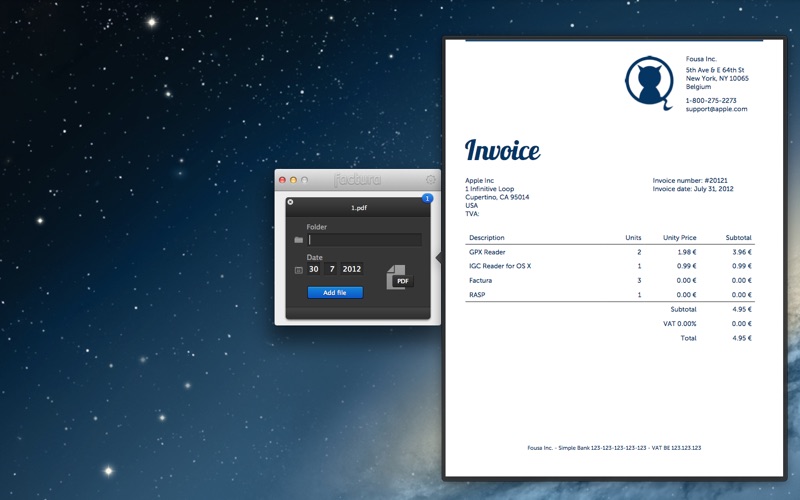
Factura is a fast and easy way to organize that pile of files you keep trying to ignore. Select the files you want to put where they belong and copy or move them to any existing or new folder. You'll only need your keyboard to create your personal, clear folder hierarchy.
Stop searching for stuff and start finding it.

We all have at least one giant folder stuffed with files we're going to organize later, when we have some spare time. Lots of photos, downloaded attachments. Years of paperwork, invoices and receipts you have digitalized with your brand new Doxie perhaps, waiting to be archived.

Factura lets you flip through those files in no time. Preview each file, give it a destination and move on to the next one. Quick and simple. And free.

Start with a pile.
- drop files to the app window or dock icon
- or reorganize a file via the context menu
- works with any file
- preview the picture, PDF,... without opening it
- zoom in and out on the preview

Let your fingers glide through.
- just type a name for the destination folder
- if the folder doesn't exist, Factura will create it
- add a slash to pick a subfolder
- autocompletion of existing folders
- pick a date for the new filename (default today)
- press Enter to move or copy

Customize.
- choose to move or copy files
- choose to add a date to the new filename
- set a default destination folder
- rename the file or keep the name

En voir plus...

Quoi de neuf dans la dernière version ?

Factura now is compatible with OS X Mavericks.

Got some nice idea's? Let me know, and maybe I'll add them to the application.
  • Screenshot #1 pour Factura
  • Screenshot #2 pour Factura
  • Screenshot #3 pour Factura

D'autres applications du développeur

GPX Reader
GPX Reader
/ iOS Universel
GPX Reader
GPX Reader
/ macOS
Track - Lire vos journaux
/ macOS
Pace Up
Pace Up
/ iPhone
Vulture
Vulture
/ iOS Universel

Note

(0 note)

Détails sur l'application

Version
1.2
Taille
3 Mo
Version minimum de macOS
10.7.3
Dernière mise à jour
24/10/2013
Publié par
Jelle Vandebeeck

Newsletter App Store

Recevez chaque jour les meilleures promos

Actualité Apple

Image Tim Cook partage un message pour ses derniers résultats financiers d’Apple
Tim Cook partage un message pour ses derniers résultats financiers d’Apple
Image Davantage de fournisseurs de RAM = baisse de prix chez Apple ? Pas forcément, dit Tim Cook
Davantage de fournisseurs de RAM = baisse de prix chez Apple ? Pas forcément, dit Tim Cook
Image Siri AI en Europe : Apple travaille avec la Commision, dit Tim Cook
Siri AI en Europe : Apple travaille avec la Commision, dit Tim Cook
Image Apple justifie sa hausse de prix pour les Mac, iPad et le reste
Apple justifie sa hausse de prix pour les Mac, iPad et le reste
iPhoneAddict Apps

Le catalogue iPhoneAddict pour suivre les nouveautés, mises à jour et baisses de prix de l’App Store.

Apps

Toutes les apps iOS iPhone iPad Universelles Mac Apple TV

iPhoneAddict

Actualité Apple Archives keynotes Contact À propos KultureGeek

Suivez-nous

©2009-2026 i2CMedia. Tous droits réservés.