FileFly Network File Transfer
macOS / Productivité
FileFly is the fastest way to transfer files between your devices over a local network — no cloud, no accounts, no size limits.
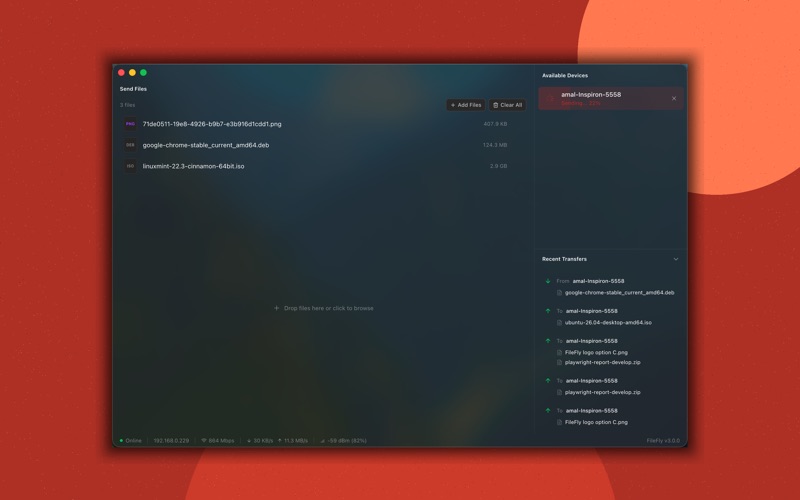
FileFly 3 arrives with a completely redesigned interface, rebuilt from the ground up for clarity and ease of use. It supports both Light and Dark mode, adapting automatically to your system appearance, and is available in multiple languages to serve users around the world.
Setting up FileFly takes seconds. It instantly discovers every device running FileFly on your local network — no IP addresses, no QR codes, and no configuration required. Just install, open, and start transferring.
FileFly works seamlessly across Mac, Windows, and Linux, making cross-platform file sharing effortless regardless of what devices you use. You can send and receive files from multiple devices at the same time, whether it's a small document or a multi-gigabyte archive.
Every incoming transfer shows you exactly who is sending and what — giving you the option to accept or deny before anything is received. You can also cancel any active transfer at any time, in either direction.
All transfers happen directly between your devices on your local network. Your files never touch a server, never pass through the cloud, and never leave your network.
Quoi de neuf dans la dernière version ?
This update fixes transfer cancellation and refines file selection.
1. Cancelled transfers are now recorded correctly - cancelling an upload no longer shows up as a completed transfer in your history.
2. Cancelling mid-transfer is handled cleanly, without errorssurfacing on either device.
3. "Click to browse" now opens the standard macOS file dialog, so choosing several files at once feels properly native.
4. Drag-and-drop works exactly as before.
As always, FileFly sends files directly between your devices over your local network - no cloud, no accounts, no size limits.