Launchy: App Launcher
macOS / Productivité
Replace Dock hunting and Command-Tab cycling with a fast radial launcher for Mac.
Launch apps, files, and folders from your keyboard or mouse, centered on screen or right at the cursor.
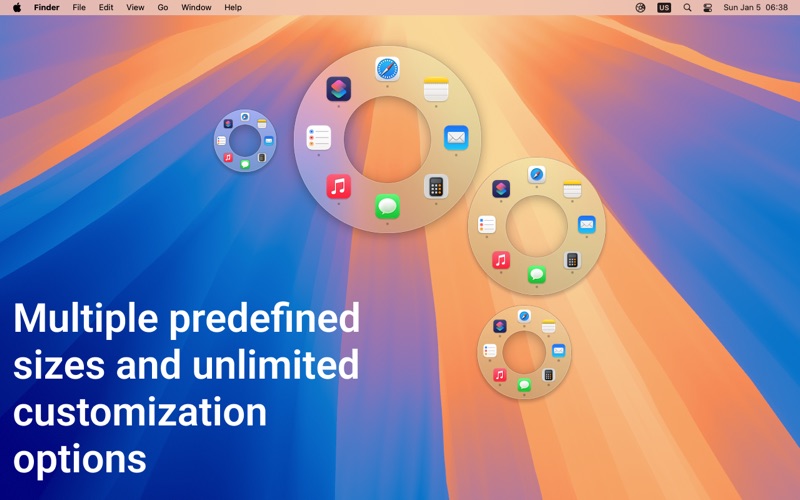
Launchy is a lightweight app launcher and switcher for macOS. It gives you a customizable radial menu for opening the things you use most, without digging through the Dock, Spotlight, or long app-switcher lists.
Features You’ll Love:
— Switch, activate, and launch apps effortlessly.
— Open files and folders directly from Launchy.
— Custom App Palette: Add apps via drag-and-drop, arrange them as you like, and configure unique behaviors.
— Launch Behavior Control: Set rules such as hiding Launchy or other apps when launching.
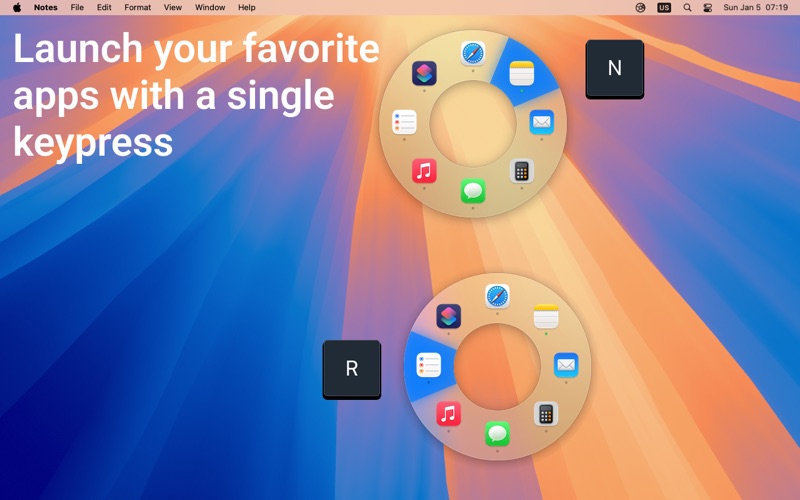
— Quick Navigation: Use arrow keys or press A–Z to instantly select and activate apps.
— Flexible Presentation: Show the wheel in the screen center or right at the mouse cursor.
— Seamless Mode Switching: Toggle between user-defined and running app modes with ease.
— Easy Configuration Management: Export and import app settings effortlessly.
— Full Customization: Adjust menu size, icon size, selection tolerance, and more.
— iCloud Sync: Keep your preferences in sync across devices.
— Lightweight & Native: Designed for speed and efficiency on macOS.
Make your Mac workflow faster and more direct. With Launchy, the right app, file, or folder is always just a shortcut away.
Quoi de neuf dans la dernière version ?
Fixes a crash that could happen for users on macOS 13 with Intel Macs.
In the previous version, Launchy 1.3.1 made the app smoother and more reliable, especially around preferences, reopening, and the radial menu.
- Added Liquid Glass styling for the radial menu on supported macOS versions.
- You can now open Launchy preferences by launching the app again when Launchy is already running and the menu bar icon is hidden.
- Added a setting to disable radial menu selection animations.
- Fixed preferences toolbar and header buttons that could become unclickable.
- Fixed app settings so selecting an app now opens its settings window, making Advanced settings accessible again.
- Improved preferences layout and tab switching stability.
As always, feel free to reach out at https://tinyurl.com/launchy-app for live support!