• KultureGeek
  • Comparateur de prix
       
iPhoneAddict
 iAddictv5Notre Application iPhone/iPad
  • Accueil Apps
  • Actualité Apple
  • Keynote Apple
  • Firmwares & iTunes
  • Contactez-nous
Accueil » Liste des Apps » Apps Mac » Productivité » Link to Text Fragment
L'application n'est plus disponible sur l'App Store français
2.1.0 macOS €Gratuit Thomas Steiner Apps 0 0 This extension allows for easily creating a special link to the currently selected text on a page via the context menu. When opening such a special link, a compatible browser will scroll the selected text into view and highlight it. Usage...
Link to Text Fragment

Link to Text Fragment

macOS / Productivité

Gratuit
Obtenir sur l'App Store

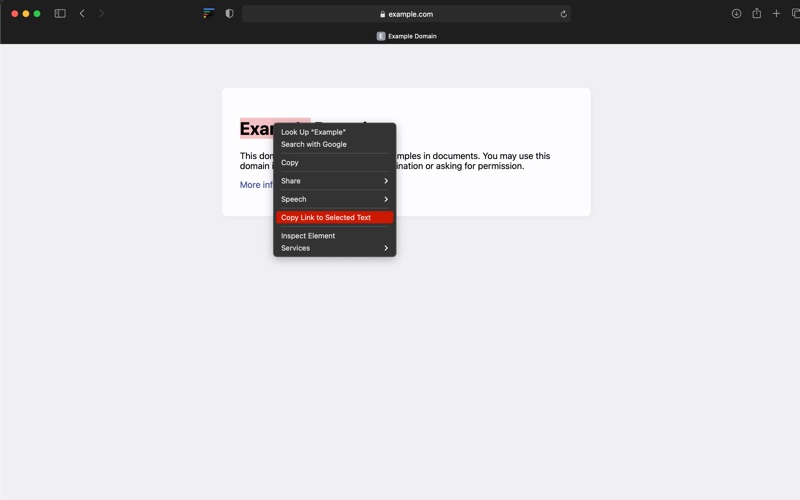
This extension allows for easily creating a special link to the currently selected text on a page via the context menu. When opening such a special link, a compatible browser will scroll the selected text into view and highlight it.

Usage instructions:

1) Select the text that you want to link to.
2) Right-click and choose "Copy Link to Selected Text" from the context menu.
3) If the link creation succeeded, the selected text will be briefly highlighted in yellow.
4) Paste your link wherever you want to share it.
Pro-tip: use a keyboard shortcut (by default: Command+Shift+L or Ctrl+Shift+L).

Background article: https://web.dev/text-fragments/
Demo video: https://www.youtube.com/watch?v=Y5DmGqnzvBI

For more information, see the Text Fragments specification (https://wicg.github.io/scroll-to-text-fragment/) where this feature is described.

This extension is open-source (https://github.com/GoogleChromeLabs/link-to-text-fragment) and licensed under the terms of the Apache 2.0 license.

En voir plus...

Quoi de neuf dans la dernière version ?

Updated the text fragment generation library.
  • Screenshot #1 pour Link to Text Fragment
  • Screenshot #2 pour Link to Text Fragment
  • Screenshot #3 pour Link to Text Fragment

Note

(0 note)

Détails sur l'application

Version
2.1.0
Taille
12.1 Mo
Version minimum de macOS
10.14
Dernière mise à jour
21/07/2021
Publié par
Thomas Steiner Apps

Newsletter App Store

Recevez chaque jour les meilleures promos

Actualité Apple

Image iPhone 18, 18 Pro et Fold : 12 Go de RAM pour toute la gamme
iPhone 18, 18 Pro et Fold : 12 Go de RAM pour toute la gamme
Image iPhone 18 Pro : écran LTPO+ et Face ID sous l’écran au programme
iPhone 18 Pro : écran LTPO+ et Face ID sous l’écran au programme
Image Xenia, un émulateur de Xbox 360, débute sur Mac
Xenia, un émulateur de Xbox 360, débute sur Mac
Image Lisa : retour sur l’ordinateur qui a révolutionné l’informatique… avant d’être oublié
Lisa : retour sur l’ordinateur qui a révolutionné l’informatique… avant d’être oublié
Partenaires : Actualité iPhone - Culture Geek
©2009-2026 i2CMedia | A propos |