PublishPlot
macOS / Productivité
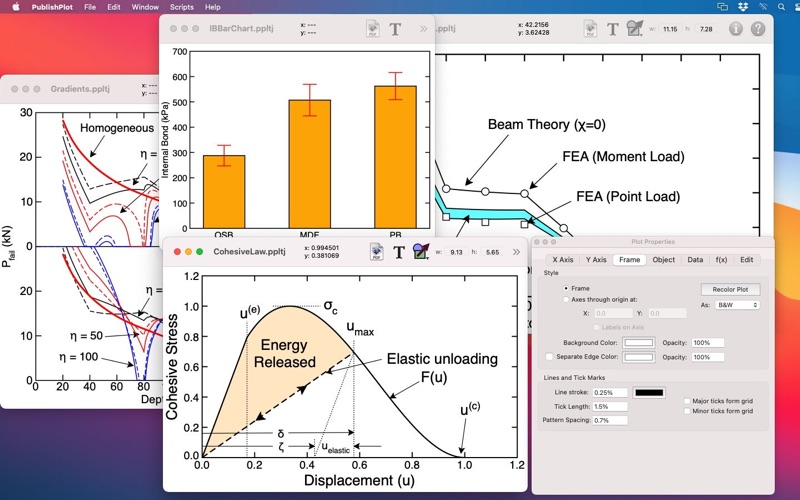
The goal of PublishPlot is to quickly create publication quality plots from any table of data. It is developed by a professor and editor for an international journal who wanted to create good plots and was tired of rejecting papers submitted with ugly plots. PublishPlot is ideal for students, teachers, professors, scientists, and engineers. You start with a table of data (such as cells in a spread sheet document) and then copy and paste, or drag and drop, to a PublishPlot window. You will immediately have a high-quality plot but can customize all features if desired. You can add error bars, labels, arrows, other shapes, or create bar charts. Collections of experimental data points can be analyzed and plotted with mean values, standard deviations, box & whisker, or "violin" display. Built-in tools are provided for data transformations, interpolations, smoothing, and fitting to equations. When ready to publish a plot, drag it as a PDF to another application or to a PDF file on your desktop.
A unique feature of PublishPlot is that you never set absolute size of plot elements. Instead, all plot features are sized relative to the size of the plot. This approach mimics the way illustrators used to draft plots before using computers. For example, one design rule-of-thumb is to have plot symbols be 1-2% of the plot diagonal. Similarly in PublishPlot, all size settings are done as a percent of the plot diagonal rather than using a fixed size. Even when setting font sizes in points, you are really setting a "virtual" font size that gives the actual size for a full-page, landscape-mode plot. This approach to sizing plot elements is ideal when resizing plots to fit in space provided by your publication needs.
PublishPlot is a scriptable application. A "Scripts" menu can be linked to a folder containing AppleScripts for PublishPlot. By writing and adding scripts to that folder, you can add features to PublishPlot to analyze data or customize plots. If you are not used to writing scripts, the PublishPlot web site has a collection of scripts you can download for free and use in PublishPlot.
If you want great plots and you want them fast, PublishPlot might be the tool for you.
Quoi de neuf dans la dernière version ?
MacOS Tahoe (I think Liquid Glass changes in 26.2) caused a conflict when decoding colors while reading files. This version fixes that conflict and all colors working again.