• KultureGeek
  • Comparateur de prix
       
iPhoneAddict
 iAddictv5Notre Application iPhone/iPad
  • Accueil Apps
  • Actualité Apple
  • Keynote Apple
  • Firmwares & iTunes
  • Contactez-nous
Accueil » Liste des Apps » Apps Mac » Productivité » Signing - Digital Signature
3.1 macOS €2,99€ Sudip Bag 0 0 Singing is your app if you need to create digital signatures and paste them on documents in minutes. Speed up your workflow with Signing and sign documents with ease. Creating your signature images with Signing is as simple as drawing and sketching...
Signing - Digital Signature

Signing - Digital Signature

macOS / Productivité

2,99€ au lieu de 3,49€
Acheter sur l'App Store

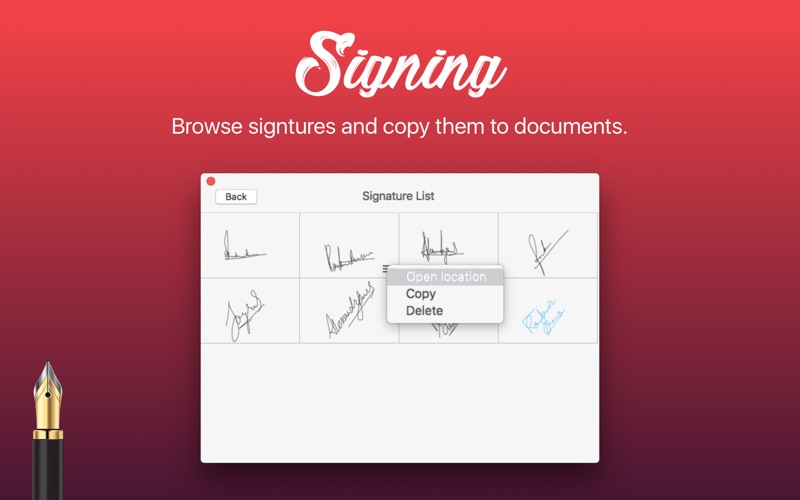
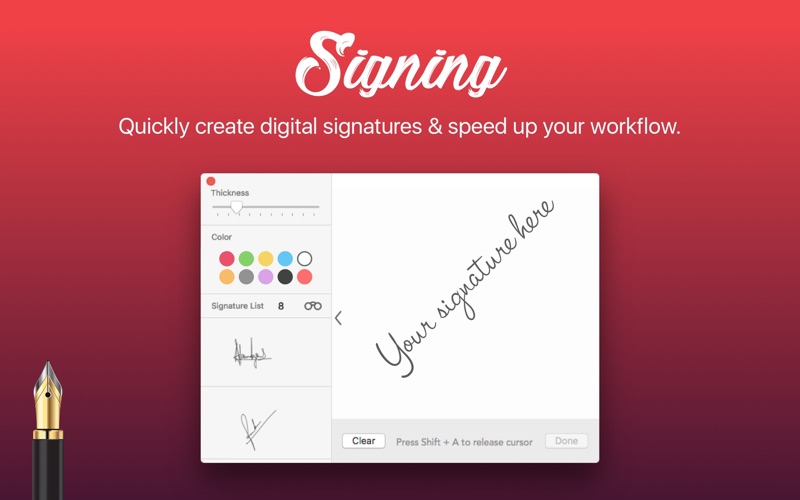
Singing is your app if you need to create digital signatures and paste them on documents in minutes. Speed up your workflow with Signing and sign documents with ease. Creating your signature images with Signing is as simple as drawing and sketching on a piece of paper.

Just by using your finger or a stylus, you can sign your name using the built-in multitouch trackpad, mouse, or Magic Trackpad. You can easily get your digital signatures in PNG image files stored in one place. Copy your signatures from the app and insert or paste on documents in other applications hassle freely.

App highlights:
- Create and store unlimited digital signatures.
- Easy to use minimal app interface.
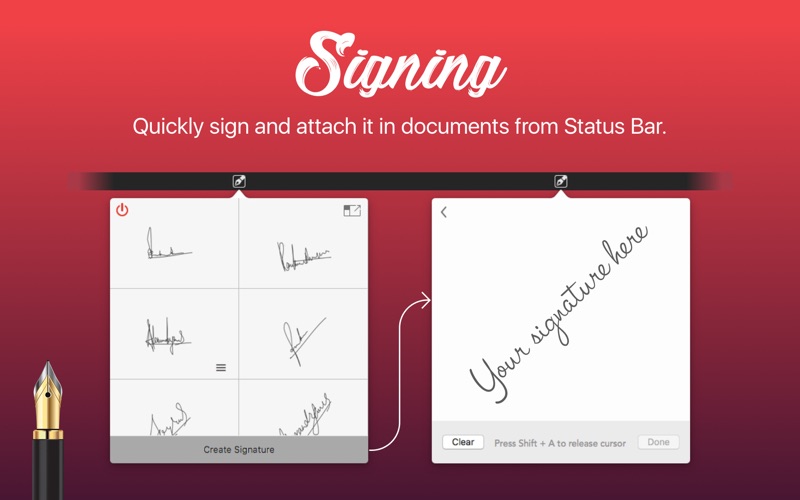
- Open app from Menu bar and create signatures.
- Increase or decrease pen thickness.
- Choose from 10 ink color presets.
- Open all your saved signatures in a grid view.
- Easily copy and paste or insert signatures in documents.
- Increase signature image size up to 200 percent.

HOW TO CREATE SIGNATURE BY USING TRACKPAD:
Please move your cursor over the signature canvas area of the app and click on it to activate Sign Mode. In Sign Mode, the entire Trackpad area works as the signature canvas. Use finger to create your signature. In Sign Mode, you won’t be able to see your regular cursor and do anything outside Signing App. Please press shift+A to release cursor and quit Sign Mode.

So, Download Signing today and never bother whenever you get a digital document that requires your signature.

En voir plus...

Quoi de neuf dans la dernière version ?

Colour updated and much cleaner now.
Improved version.
  • Screenshot #1 pour Signing - Digital Signature
  • Screenshot #2 pour Signing - Digital Signature
  • Screenshot #3 pour Signing - Digital Signature

D'autres applications du développeur

Live Dock Weather
Live Dock Weather
/ macOS
iPicture
iPicture
/ macOS
Camera Mirror
Camera Mirror
/ macOS
Contact Book
Contact Book
/ macOS
Work at Night
Work at Night
/ macOS
Kids Paint
Kids Paint
/ macOS
Voir toutes les apps

Note

(0 note)

Détails sur l'application

Version
3.1
Taille
3 Mo
Version minimum de macOS
10.13
Dernière mise à jour
18/07/2024
Publié par
Sudip Bag

Newsletter App Store

Recevez chaque jour les meilleures promos

Actualité Apple

Image Apple ne signe plus iOS 26.1 : restauration et mise à jour bloquées
Apple ne signe plus iOS 26.1 : restauration et mise à jour bloquées
Image UniGen-1.5 : Apple dévoile une IA qui comprend, génère et modifie des images
UniGen-1.5 : Apple dévoile une IA qui comprend, génère et modifie des images
Image Apple Watch : Apple est autorisé à activer les alertes d’hypertension en Australie
Apple Watch : Apple est autorisé à activer les alertes d’hypertension en Australie
Image Samsung devance Apple avec la première puce gravée en 2 nm (Exynos 2600)
Samsung devance Apple avec la première puce gravée en 2 nm (Exynos 2600)
Partenaires : Actualité iPhone - Culture Geek
©2009-2025 i2CMedia | A propos |