WatermarkPDF Pro
macOS / Productivité
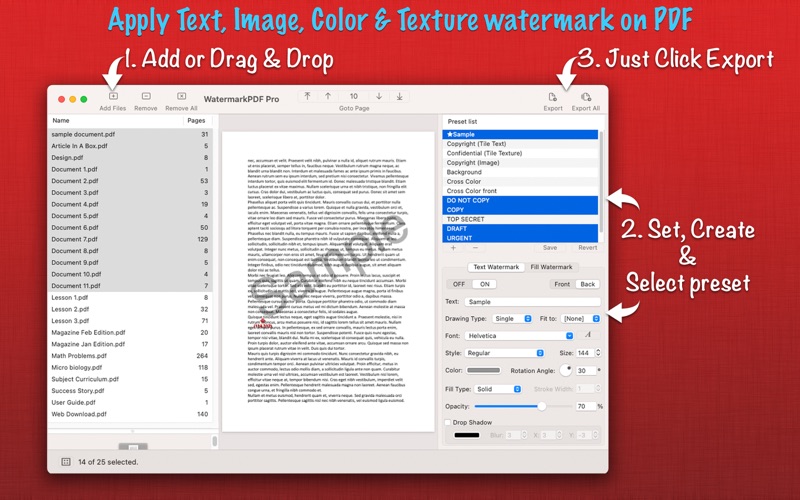
WatermarkPDF Pro is a simple and intuitive application for applying text, image, color and texture watermark on PDF documents in batch fashion. WatermarkPDF Pro provides easy and effective ways to apply watermark with extensive set of options and presets. Personalize your PDF by batch exporting multiple watermark presets on a PDF, each PDF will be watermarked with individual preset options. WatermarkPDF Pro makes your life easy by defining true means of batch exporting PDF files with watermark, batch exports multiple PDF files with multiple watermark presets at once.
FEATURES:
◆ Batch export list of presets on a set of PDF files to generate each PDF with individual watermark.
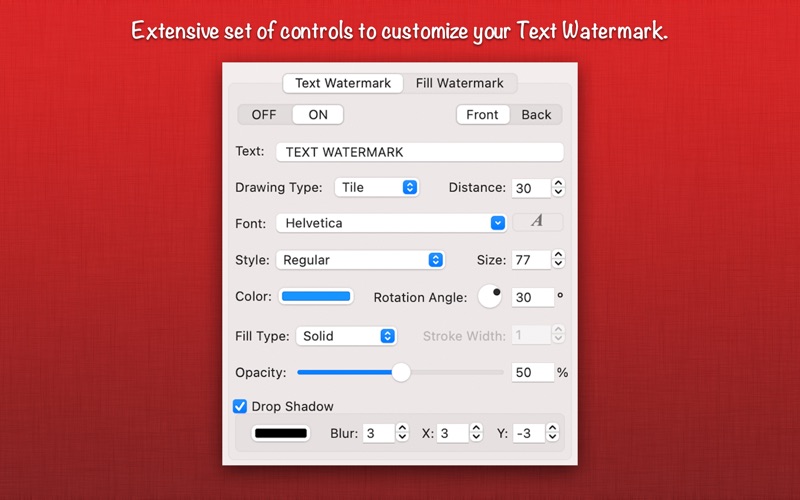
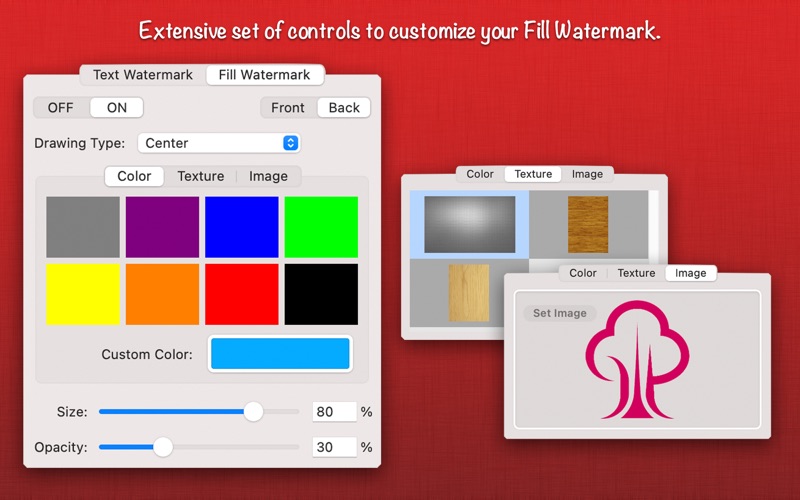
◆ Full set of controls to make fantastic watermark on PDF.
-- Customize your Text Watermark by changing drawing type(Single, Double, Triple and Tile), font, size, color, opacity, angle, fill type and drop shadow. In Addition, option to fit text to width, height and diagonal of the page irrespective of page size and length of watermark text.
-- Customize your Fill Watermark by choosing Color, texture or custom Image and set size, opacity and drawing type(Single, Center, Fit to Page, Stretch to Fill Page, Cross, Tile).
◆ Real time preview of PDF with watermark Any change in control settings reflects in preview.
◆ Unlimited flexibility to put watermark anywhere on the PDF page, just mouse click and drag over PDF page preview to set watermark position. Tracking pointer mark with x-axis and y-axis position helps to put watermark at definite location. The selected watermark tab segment allows you to set position either for Text Watermark or Fill Watermark respectively.
◆ Default presets. Save and preserve your favourite customize watermark settings as preset.
◆ Export option to apply watermark on range of pages like All pages, First page, Last page, First and Last page, Odd pages, Even pages, Portrait pages, Landscape pages and user define page range.
◆ PDF Compression options. Export your PDF file using High, Medium and low compression quality to reduce PDF file size.
◆ Export as encrypted PDF by setting password protection.
◆ Preferences options to customize output PDF file name with preset name. Option to create separate folder for each watermark preset.
◆ Very flexible options to add PDF files for applying watermark. Simply Drag & Drop into PDF list or Right click Open With in Finder or Drop on "WatermarkPDF" application to add PDF files beside direct Add PDF/Folder buttons.
◆ PDF page thumbnail view, Page traversing controls, Right click contextual menu on preview for watermark selection toggle enhances the WatermarkPDF usability.
USABILITY HIGHLIGHT
◆ Create personalized PDF documents by applying watermark of your name, company name or company logo.
◆ Generate multiple personalized PDF documents by applying simple list of watermark presets on a PDF, simultaneously. Its really smart, very easy and lightning fast.
◆ Change background or your PDF documents. Apply Fill Watermark with color, texture or using custom image.
◆ Compress image rich PDF files.
You can refer User Manual from menu "Help -> WatermarkPDF Pro Help" for any assistance Or Contact Support.
Privacy Policy: http://rootrisetech.com/privacy-policy
Terms of Use(EULA): https://www.apple.com/legal/internet-services/itunes/dev/stdeula/
Quoi de neuf dans la dernière version ?
- Bug fixes and UI improvements to streamline with latest macOS.
We are thankful to all users for their valuable feedback :)