• KultureGeek
  • Comparateur de prix
       
iPhoneAddict
 iAddictv5Notre Application iPhone/iPad
  • Accueil Apps
  • Actualité Apple
  • Keynote Apple
  • Firmwares & iTunes
  • Contactez-nous
Accueil » Liste des Apps » Apps Mac » Utilitaires » Any Document Converter
L'application n'est plus disponible sur l'App Store français
1.0 macOS €2,99€ 晖 向 0 0 Any Document Converter is a powerful universal document conversion tool that can support a variety of different types of documents to convert each other, including many popular file formats such as docx, html, epub, markdown, txt, etc. and supports...
Any Document Converter

Any Document Converter

macOS / Utilitaires

2,99€ au lieu de 3,49€
Acheter sur l'App Store

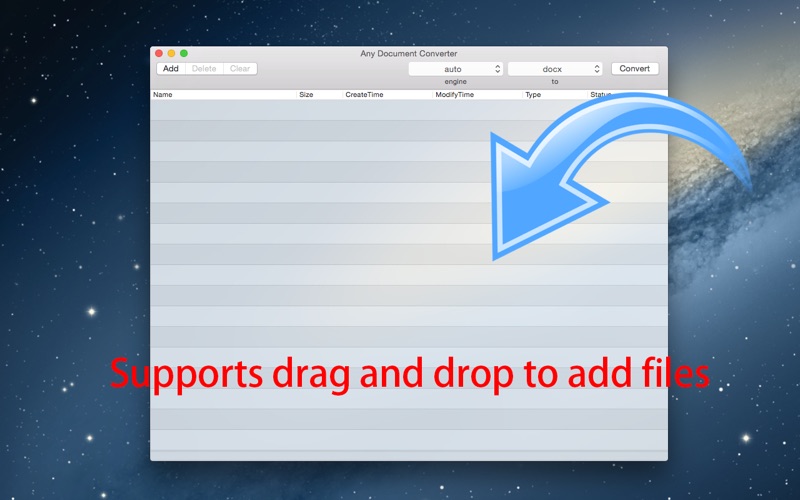
Any Document Converter is a powerful universal document conversion tool that can support a variety of different types of documents to convert each other, including many popular file formats such as docx, html, epub, markdown, txt, etc. and supports various format conversion to PDF.

Input forma: docx, html, epub, latex, markdown, commonmark, docbook, haddock, json*, mediawiki, native, odt, opml, org, rst, t2t, textile, twiki

Output formats: docx, pdf, html, html5, epub, epub3, latex, asciidoc, beamer, commonmark, context, docbook, dokuwiki, dzslides, fb2, haddock, icml, json*, man, markdown, mediawiki, native, odt, opendocument, opml, org, plain, revealjs, rst, rtf, s5, slideous, slidy, tei, texinfo, textile


Main feature:

Supports drag and drop operation. You just need to drag the converted file to the list, and you can drag multiple files at the same time, note that when an illegal document format, it will not be dragged into.

Can convert multiple files at once. It converts documents in the order of the list, and display the progress of conversion and time.

Can simultaneously convert different types of files to another format. You only need to select the input format "auto", it will automatically recognize the format of the input file.

Note: If your document references an external file, such as aa.html reference picture 1.jpg and 2.jpg not included in aa.html, you need to set the output directory to the same directory with aa.html, otherwise it will lead to the export of the document does not contain pictures 1.jpg 2.jpg. When you first convert PDF, it takes a few minutes to load data, please wait for it to finish loading.
En voir plus...

  • Screenshot #1 pour Any Document Converter
  • Screenshot #2 pour Any Document Converter
  • Screenshot #3 pour Any Document Converter

Note

(0 note)

Détails sur l'application

Version
1.0
Taille
94.6 Mo
Version minimum de macOS
10.10
Dernière mise à jour
06/09/2016
Publié par
晖 向

Newsletter App Store

Recevez chaque jour les meilleures promos

Actualité Apple

Image L’iPhone Air avec carte SIM physique existe grâce à une bidouille
L’iPhone Air avec carte SIM physique existe grâce à une bidouille
Image Apple reste l’entreprise la plus admirée au monde en 2026 selon Fortune
Apple reste l’entreprise la plus admirée au monde en 2026 selon Fortune
Image Apple Cash, pour transférer de l’argent, va bientôt coûter plus cher
Apple Cash, pour transférer de l’argent, va bientôt coûter plus cher
Image Apple accusé d’avoir eu un impact négatif sur les frais bancaires au Royaume-Uni
Apple accusé d’avoir eu un impact négatif sur les frais bancaires au Royaume-Uni
Partenaires : Actualité iPhone - Culture Geek
©2009-2026 i2CMedia | A propos |