Hand Mirror
macOS / Utilitaires
"App You Didn't Know You Needed" — App Store
Hand Mirror is a super simple app that lives in your Menu Bar (little cozy top right corner of your Mac) and gives you a one-click access camera check!
‣ Need to jump on a video call? Quick camera check.
‣ Need to quickly check your surroundings? Quick camera check.
‣ Need a view of your camera for when you're streaming or recording your screen? Quick camera check and drag the window around.
‣ Need to check your face because you're gorgeous? Quick camera check.
Want more? Good thing for Hand Mirror Plus:
It's a one-time purchase that will unlock all past, present, and future features added to the app, like:
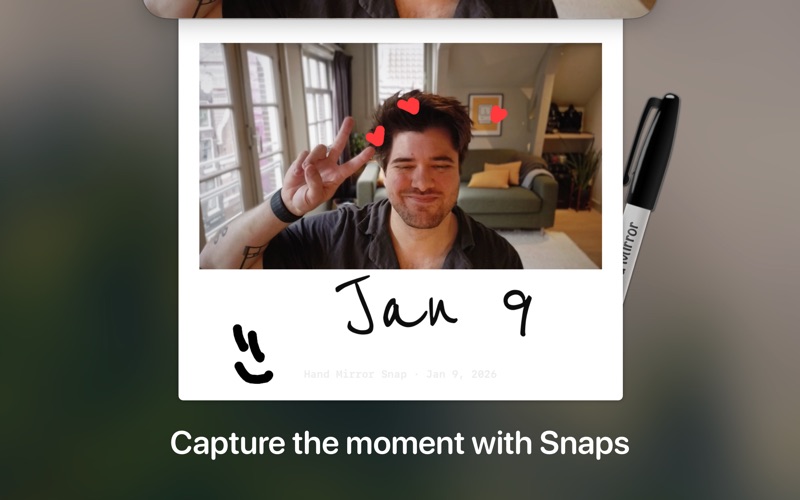
‣ Snaps: Save the moment with a cute Polaroid-style picture, complete with a marker for drawing over it.
‣ Mic Check: You already know you look good, but can people hear you? Check your microphone levels directly from Hand Mirror
‣ Reactions Playground: Custom triggers for all of the new macOS Sonoma Reactions for some fun screenshots
‣ Smart Window: Fully customizable, resizable, positioned window
‣ Window Masks: Zoom, crop, tweak border radius, make your camera view just like you like it
‣ Custom position: Want to trigger the window right below your camera, pick where the window appears
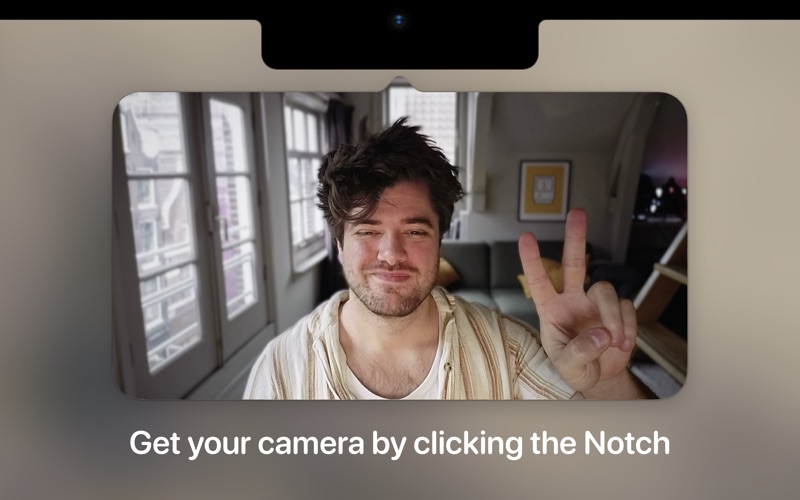
‣ Notch Trigger: If you're on a compatible device, you can click right on the camera housing area to trigger Hand Mirror
‣ Custom App Icons and Menu Bar Icons: Make the Menu Bar icon match your camera and or your taste
(every time a new feature is released with Hand Mirror Plus, the price will go up, so this bundle will never be as cheap as NOW).
_____
Here's what some really nice people said about this little app:
"A-Plus Apps for Students"
‣ App Store
"Your Work-From-Home Toolkit"
‣ App Store
"It’s incredibly useful"
‣ Jay Peters, The Verge
"It's free, it's cute, it's awesome"
‣ Quinn "Snazzy Labs" Nelson
“Hand Mirror is a great little app (…) just download it!”
‣ Brett Burney, on Mac Power Users
"I'm putting this on every device now, it's incredibly handy"
‣ Charlie Chapman, also on Mac Power Users
“One of my favorite apps of all time.”
‣ Sara Soueidan
“It is so good!”
‣ Dieter Bohn
“Every remote worker needs this Mac app - quick check yo'self camera reviews before you jump on that Zoom call!”
‣ James Doman-Pipe
"Mac users, Hand Mirror by Rafa is by far the best way to check your video's look before jumping on a Zoom call. Worth every penny. Which is none. It's free."
‣ Keith Monaghan
“Still crashes on launch!”
‣ Tim Van Damme
_____
This app does not record, collect, or send your data anywhere — for three reasons:
1. There's absolutely no need, it's just a feed of your own web camera.
2. I wouldn't do that, that's just creepy.
3. And most importantly: I don't even have the programming skills to do that. Seriously, but thanks for thinking that I did!
Quoi de neuf dans la dernière version ?
Improvements
• You can once again drag the popover away from the menu bar to keep it around as a floating window.
• A lot of performance improvements
Fixes
• Opening Hand Mirror with the keyboard shortcut while another app was in front could instantly close the window. Not anymore.
• Fixed a hang when opening the camera.
• Switching microphones now sticks reliably — it no longer occasionally reverts to the previous mic.
• Your saved microphone choice is no longer forgotten if it's temporarily unplugged.
• Space and Escape now only work in the camera window — pressing Space in Settings no longer takes a surprise Snap.
• With "Close window when unfocused" enabled, clicking the floating window no longer closes it.
• Fixed a crash when no camera is connected to your Mac.
• A failed Snap no longer counts against your free Snaps.
• The Reactions section in Settings now correctly reflects whether your Mac supports Reactions.
• Fixed several small memory leaks for better long-run stability.