iSmartClock
macOS / Utilitaires
iSmartClock with Full Screen and Mouse Detection is a very special clock for your Mac. It is smart because of its minimalistic and elegant design and because it knows when you need it and when you do not. It never gets in the way.
There are many clock applications out there that are often great to look at but cannot be used on a regular basis because of their CPU/graphic card misuse or because they lack important and practical features. iSmartClock wants to make up for all of that.
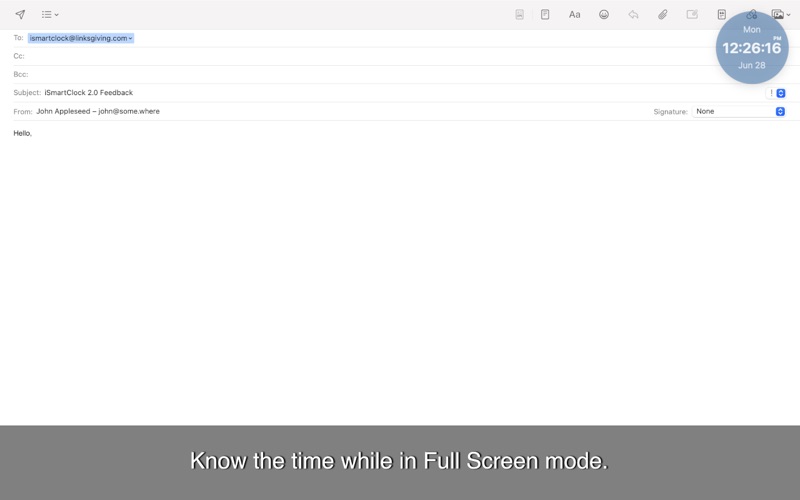
You can keep it showing all the time anywhere on your screen on top of everything. It will not disturb you because you can customize its look and it gently fades away every time you mouse over it. You can also have it appear only when you are working in Full Screen mode in another application (menu bar and system clock are hidden in Full Screen, so you cannot normally know what time it is).
Every time you need it you can use a keyboard shortcut to display the clock for a number of seconds, if it is not showing. A shortcut is also available to activate and deactivate it in a snap.
KEY FEATURES:
- Menu bar application: no icon in your Dock
- Possibility to disable icon in order to save space in your menu bar
- Very low computer resource usage
- Option to automatically start at login
- Full Screen recognition to show the clock if you enter Full Screen mode in another application: at last you can now know the time without moving your mouse to get the menu bar to show up!
- Mouse detection: clock hides itself when you mouse over it or if you drag something on it (can also be temporarily disabled)
- Digital (12h, AM/PM, 24h) and/or analog display
- Additional digital clock in application menu
- Animated seconds 'filling' the circular track: they let you focus on hours and minutes
- Customization of color, opacity, and size of all elements: your imagination is the limit
- Ability to save one combination of values (color, opacity, size, and position) as a Favorite
- Date displayed in more than 30 languages: even if the application is (at the moment) only in English, you can have your clock showing in another language.
- Time Zone support
- Manual clock time set in UTC (GMT) format
- Notifications with customization
- XL Mode with no-sleep option (the clock may get maximized and centered, with the option to prevent the Mac from sleeping)
- Possibility to copy clock image to clipboard to later paste it into documents: create a colorful timestamp, surprise your friends!
- Customizable keyboard shortcuts to activate/deactivate clock, to display it momentarily, and to activate/deactivate UTC offset.
Should you have any questions, please do not hesitate to contact us. We appreciate your valuable feedback.
If you like this application, please do not forget to rate it in the App Store. Thanks.
Quoi de neuf dans la dernière version ?
NEW FEATURES:
- macOS 13 Ventura compatibility
- New menu bar icon when the clock is inactive (one instead of two concentric circles)
- New fade-in animation.
BUGS FIXED:
- Modifier keys are recognized again (macOS Ventura bug)
- Solved an issue where the clock could be accidentally visible under the mouse pointer even without pressing the cmd key
- Small bug fixes.