
• KultureGeek
  • Comparateur de prix
       
iPhoneAddict
 iAddictv5Notre Application iPhone/iPad
  • Accueil Apps
  • Actualité Apple
  • Keynote Apple
  • Firmwares & iTunes
  • Contactez-nous
Accueil » Liste des Apps » Apps Mac » Utilitaires » Numpad
1.2 macOS €0,99€ Marat Saytakov 0 0 Easy to dial a number, and then call using your iPhone. (You have to set up FaceTime on your Mac beforehand.) Enter phone number manually via Mac keyboard or on-screen virtual keyboard. Hold 0 button to enter “+”. Numpad recognizes country...
Numpad

Numpad

macOS / Utilitaires

0,99€ au lieu de 1,19€
Acheter sur l'App Store

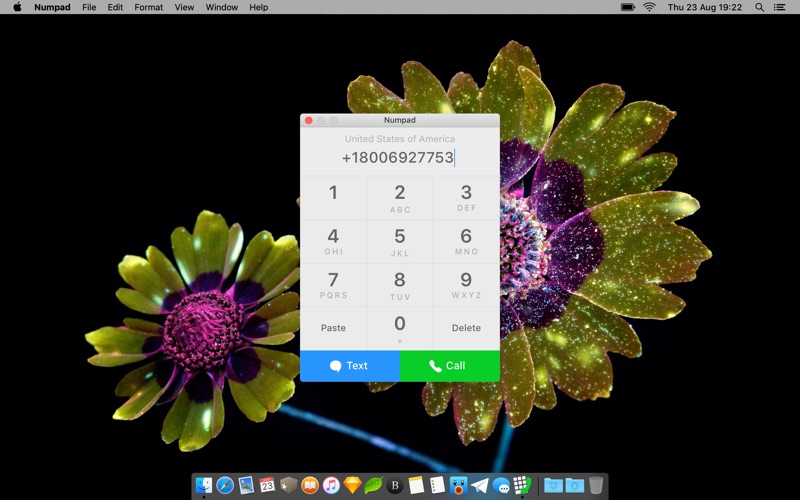
Easy to dial a number, and then call using your iPhone. (You have to set up FaceTime on your Mac beforehand.)

Enter phone number manually via Mac keyboard or on-screen virtual keyboard. Hold 0 button to enter “+”.

Numpad recognizes country calling codes, and shows a country name on top. It even recognizes an identical dialing code for US/Canada, and Russia/Kazakhstan phone numbers.

On launch, the app will try to paste a phone number from the pasteboard. If there is not a phone number there, the app ignore it.

Numpad doesn’t collect any user data, address book contacts, or anything else. It even makes 0 network requests. Everything is offline.

En voir plus...

Quoi de neuf dans la dernière version ?

Welcome to the Dark Mode.

Thanks for your feedback! This version comes with:
• Auto-paste on window has become focused, if the field is empty.

  • Screenshot #1 pour Numpad
  • Screenshot #2 pour Numpad

D'autres applications du développeur

Easy Percent Calculator
/ iOS Universel
Chars
Chars
/ iOS Universel
Москва. Метро. Авторизация вайфай (wifi)
/ iOS Universel

Note

(0 note)

Détails sur l'application

Version
1.2
Taille
4.8 Mo
Version minimum de macOS
10.10
Dernière mise à jour
26/09/2018
Publié par
Marat Saytakov

Newsletter App Store

Recevez chaque jour les meilleures promos

Actualité Apple

Image iPhone 18, 18 Pro et Fold : 12 Go de RAM pour toute la gamme
iPhone 18, 18 Pro et Fold : 12 Go de RAM pour toute la gamme
Image iPhone 18 Pro : écran LTPO+ et Face ID sous l’écran au programme
iPhone 18 Pro : écran LTPO+ et Face ID sous l’écran au programme
Image Xenia, un émulateur de Xbox 360, débute sur Mac
Xenia, un émulateur de Xbox 360, débute sur Mac
Image Lisa : retour sur l’ordinateur qui a révolutionné l’informatique… avant d’être oublié
Lisa : retour sur l’ordinateur qui a révolutionné l’informatique… avant d’être oublié
Partenaires : Actualité iPhone - Culture Geek
©2009-2026 i2CMedia | A propos |