SSH Tunnel Builder
macOS / Utilitaires
Stop typing "ssh -L 5432:db.prod.internal:5432 alice@jump.corp.example.com -i ~/.ssh/id_ed25519" every time you need a tunnel. SSH TunnelBuilder turns those commands into named profiles you click once — no flags to remember, no terminal window to keep open, no shell history to leak.
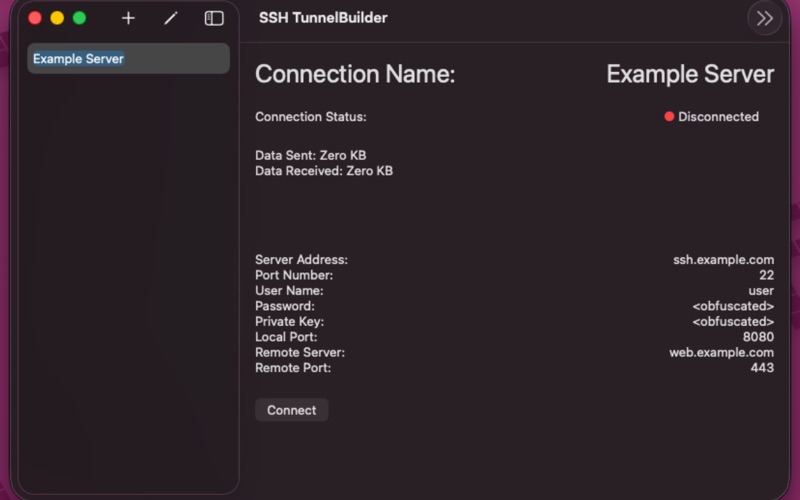
Pick a connection from the sidebar, click Connect, and your local port is ready. Profiles sync between your Macs via your private iCloud database; passwords and keys stay in the Keychain on each device, never in iCloud.
Built on Apple's SwiftNIO and NIOSSH, designed to feel like it belongs on macOS.
OPEN SOURCE
The full source code is published as open source and freely available on GitHub. The cryptography, the key parsing, the host-key trust model — every line that ever sees your credentials — is open for inspection:
https://github.com/Comraich/SSH-TunnelBuilder
KEY FEATURES
• Named connection profiles for every server and tunnel you reach regularly
• Local port forwarding ("ssh -L" style): point a local client at localhost on your chosen port and traffic is forwarded over SSH to your chosen remote host and port
• Password or private-key authentication
• Encrypted private keys supported — passphrase prompts when needed, never stored
• Ed25519 and ECDSA (P-256 / P-384 / P-521) keys, in OpenSSH, PKCS#8, or SEC1 format
• Host-key trust-on-first-use with proper pinning: unknown hosts ask for confirmation; a changed key triggers a clearly-marked warning so you can spot a possible MITM
• Live per-connection status indicator and byte counters (sent/received)
• Menu bar traffic dot, visible only while a tunnel is up
• Encrypted backup and transfer: export connections to a passphrase-encrypted .sshtunnels file, import on another Mac
• Optional Spotlight indexing of connection names — off by default, never indexes hosts, usernames, or credentials
SECURITY BY DESIGN
• Passwords and private keys are stored in the macOS Keychain. Only non-sensitive metadata (names, hostnames, ports) lives in your private iCloud database.
• Private-key passphrases are entered per session and never persisted.
• Host keys are verified against a pin you control. A changed key blocks the connection until you explicitly re-trust it.
• Optional Touch ID / login-password gate for using saved credentials, with a configurable grace window so common workflows don't double-prompt.
• Sandboxed and hardened-runtime signed. No telemetry, no third-party analytics.
SUPPORTED KEY FORMATS
• OpenSSH ("BEGIN OPENSSH PRIVATE KEY") — encrypted or plain
• PKCS#8 ("BEGIN PRIVATE KEY") — encrypted or plain
• SEC1 ("BEGIN EC PRIVATE KEY") — plain
RSA and DSA keys are not supported. The credentials sheet detects them and shows the exact ssh-keygen / openssl command to generate a compatible replacement.
REQUIREMENTS
• macOS 14 (Sonoma) or newer
• An iCloud account if you want profiles to sync across Macs (the app works fully offline if you decline)
SSH TunnelBuilder is not affiliated with the OpenSSH Project.
Quoi de neuf dans la dernière version ?
SSH TunnelBuilder 2.2
The interface has been completely rewritten in SwiftUI and now conforms to Apple's Human Interface Guidelines, so the app looks and feels at home on modern macOS.
Also in this release:
• Password and private-key authentication, with encrypted Ed25519 / ECDSA keys supported (OpenSSH, PKCS#8, SEC1)
• Host-key trust-on-first-use with proper pinning, plus a clearly-marked warning when a pinned key changes
• Live per-connection byte counters and a menu bar traffic indicator while a tunnel is up
• Encrypted `.sshtunnels` export and import for moving connections between Macs or restoring from backup
• Optional Touch ID / password gate for using saved credentials, with a configurable grace window
• Optional Spotlight indexing of connection names (off by default)
Built on Apple's SwiftNIO and NIOSSH. Sandboxed and hardened. No telemetry, no third-party analytics.