AR Needle Guide
iOS Universel / Medecine
This is an augmented reality (AR) software to assist computed tomography (CT) guided procedure.
An AR coordinate system is presented based on the position of laser apertures, allowing the virtual protractor to be displayed at the desired coordinates. In addition, the inclination angle of the puncture needle recognized by the iPhone camera is measured in a non-contact manner and displayed in real time.
§ User Manual
1. Setting coordinate system
Scan the feature points around the CT scanner with your iPhone or iPad to stable spatial anchor.
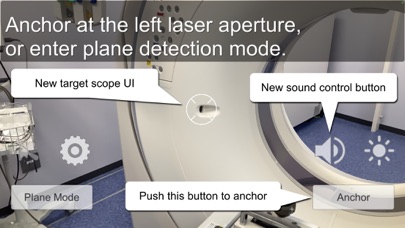
"Anchor" at the left laser aperture of CT. Set laser aperture in the center target scope of the screen and press "Anchor" button to set spatial anchor. Then, anchor at the right laser aperture.
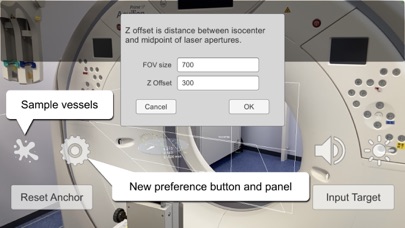
Default Z-offset of scan plane is 300mm headward from the midpoint of the two laser apertures. The coordinate origin is set at the left upper corner of CT field of view (FOV). Size of FOV and Z-offset can be configured with preferences button ("Gear" button).
When the coordinate system deviates from the actual space, press "Reset Anchor" button to reconfigure the coordinate system.
2. Determination of puncture position
A virtual protractor is initially displayed at 1m caudal to the scanning isocenter (z -1000mm).
The virtual protractor can be moved in the CT scan plane (XY-plane) with one finger, and along to the Z-axis direction with two fingers.
Alternatively, coordinates can be entered directly with "Input Target" button.
When the CT gantry is tilted to perform a procedure, the angle of the virtual protractor can be also tilted with three fingers. The Z coordinate of the center of the tilted plane including the center of the virtual protractor is displayed, which can be used to determine the scaning position.
Pinch in and out with two fingers to change the size of the virtual protractor.
3. Puncture needle tracking
For some specific puncture needles, the tilt and roll angles are displayed as they are recognized from the camera.
Tilting was defined according to the tilting of the CT gantry so that rolling would match the angle measured in the CT images.
The following biopsy needles are currently supported.
• TEMNO Evolution (Merit Medical)
• STARCUT (TSK Laboratory, back side only)
• BARD MISSION (BD)
• Quick-Core (Cook Medical)
• “KAKENHI” sticker (purple color)
Turn on LED torch of iPhone to improve the accuracy of needle tracking.
Quoi de neuf dans la dernière version ?
Updated to use AR Foundation 5 and XR Interaction Toolkit.