Klare smile
iOS Universel / Medecine
Klare smile is a brand name for the dental treatment simulaion software it provides diagnosis and treatment simulation services ,as well the custom-made devices worldwide .
Function List :
1 )Userlogin
Klare smile app is an exclusive software designed to serve the doctors who provide Klare smile therapy to their patients .Meanwhile ,non-Klare smile doctors or guests are welcome to install the app to get some ideas about Klare smile therapy and app functions.
Klare smile will set up a password protected account for each Klare smile doctor .And will notify doctors the account login information by email and telephone call .
Once opened this app ,there will be a case list interface .And some demo data sets will be listed .Everyone ,even non-Klare smile doctors ,can load and review these demo data sets without login .
For Klare smile doctors ,can tap " doctorlogin "button to login .After login ,their own clinical cases will be listed on the case list interface .
2 )Load a case data
single case with some case information shown . Tap "Load"button to load the data .If it is the first time to load this data ,the data will be down loaded from the server and the data will be saved on the device .Typical downloading time for each case is 10 to 20 sec ,depending on the connection speed .
3 )Delete a case data
To delete a case from the device ,touch and push the case's row toward the left .A "delete" button will appear .Tap it to delete the case data .
4 )Rotate3D dental model
Touch anywhere on the display window and drag to different directions .
5 )Zoom-in and zoom-out a 3D dental model Touch the display with two fingers .Move the fingers away from each other to zoom-in ;Move the fingers closer to zoom-out .
6 )Standardviews
Tap icons shown as heads and a dental arch on top of the display set the 3D model to standard observation angles ( LeftView ,Front View ,Right View and Occlusal View )
7 )Single dental arch or Both dental arches display
Tap the icon shown as dental arch configurations on top of the display window to select views of both maxilla and mandibular , maxilla only ,or mandibular only
8 )Play a simulation of teeth movement automatically
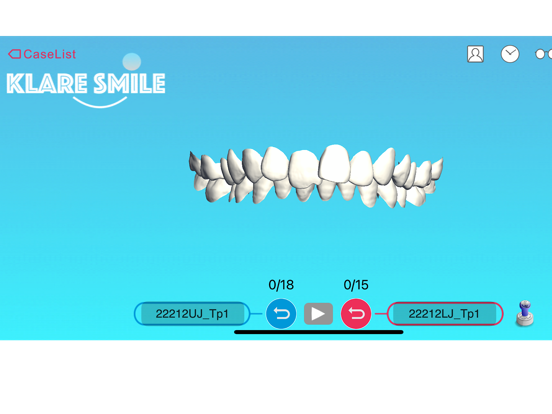
Tap the play icon to start an animation of teeth movements .The teeth move continually from initial positions to a simulated treatment target . The numbers of steps for the simulated treatment process for both maxilla and mandibular are shown .
9 )Playa simulation of teeth movement manually There are two "PlaySimulation "wheels.The left one controls the maxilla ,and the right one controls mandibular .
Rotate a " PlaySimulation "wheel clockwise to move the treatment simulation from initial positions towards the simulated treatment target step by step .Rotate "PlaySimulation "wheel counter-clockwise to move the teeth back
Taping the centre part of the wheel will toggle the teeth positions between initial state and the simulated target state .
10 )Displaythe case pictures
Tap the picture icon on upper right corner of the window .The case photo and X-ray window pops up .Tap the thumbnails to display the full size photo .Some of the cases may not include patient pictures.
11 )Display treatment charts
Tap the treatment chart icon on upper right corner of the window .The treatment charts window pops up .Tap the thumbnails to display towards the initial positions .the full size charts .Some of the cases may not include treatment charts
12 )Setting
Tap the setting icon on upper right corner of the display window .can control some
animation display options.
Quoi de neuf dans la dernière version ?
1.update the app name
2.improve the speed of ipr picture load
3.fix crashes on old versions of IOS
4.Capable of third-party API connect to app